
Digital Workspaces: Your Complete Guide to the Modern Work Environment

Summary:
- A digital workspace is a secure, work-from-anywhere environment that delivers applications, data, and desktops to users on any device or network.
- Digital workspaces can enable hybrid work, strengthen security with Zero Trust, simplify IT management, and improve the digital employee experience (DEX).
- The HP Workforce Experience Platform (WXP) delivers secure, high-performance access to virtual desktops and applications through its digital workspace platform capabilities powered by HP Anyware.
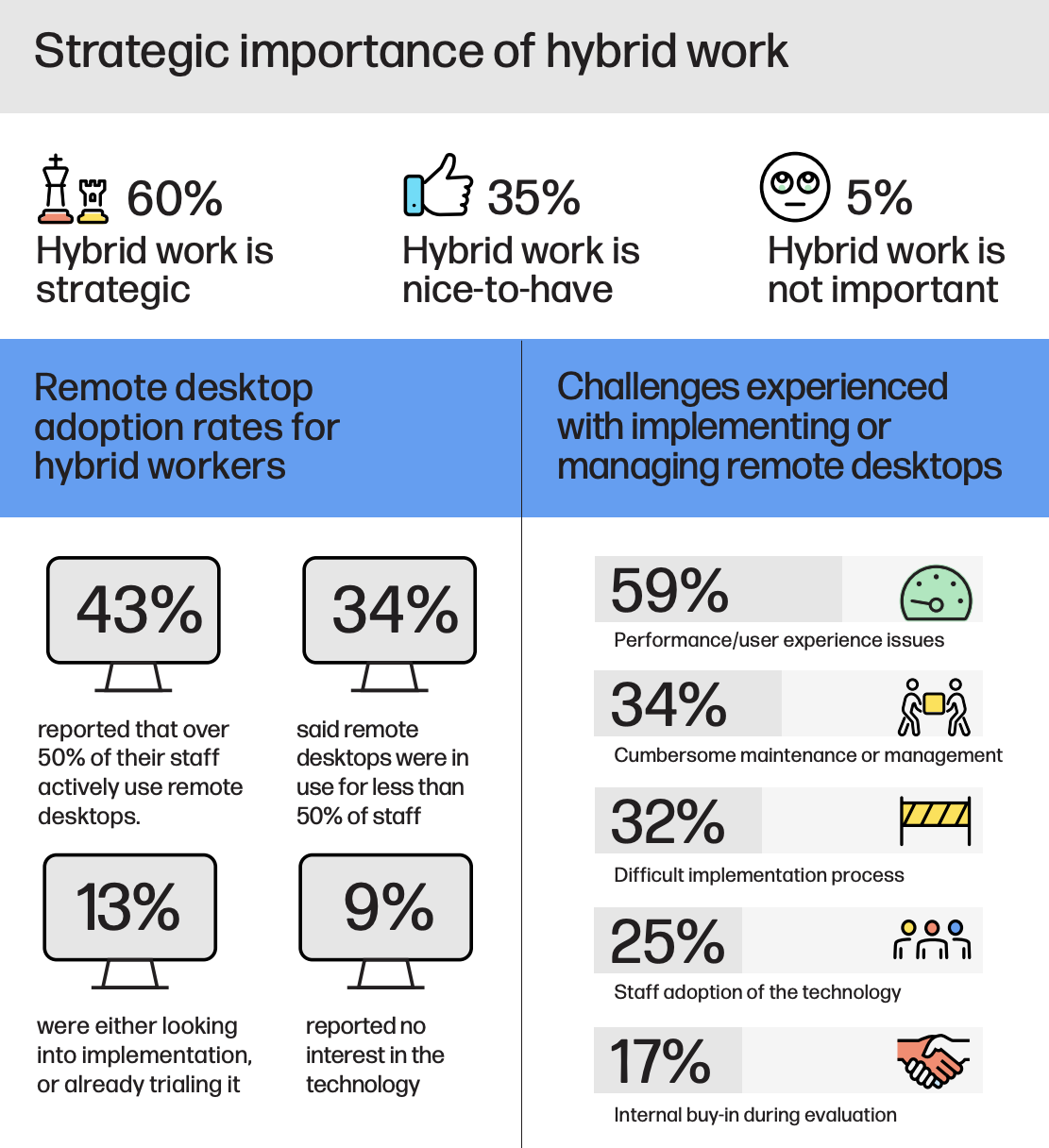
The rise of hybrid work has transformed how and where business gets done. According to HP research, 60% of businesses now consider hybrid work a strategic priority, while only 5% say it’s not important. Despite the shift, many organizations face challenges with performance and user experience issues, maintenance, and implementation difficulties. Meanwhile, 43% say that over half their workforce actively uses remote desktops, and 13% are currently exploring or testing the technology.
Source: HP Anyware
Today’s employees expect to work from anywhere—whether from a home office, a corporate site, or while traveling—and they need consistent, secure access to tools and data regardless of location. A high-quality digital workspace can support this expectation, providing a secure, integrated environment that delivers desktops, applications, and data to any device without sacrificing performance, manageability, or control.
Modern digital workspace platforms help businesses overcome pain points by offering secure, high-performance access to virtual desktops and apps, whether deployed on-premises, in the cloud, or in hybrid environments. With support for nearly any host or endpoint—including PC, Mac, tablet, or thin client—organizations can empower employees to work productively from anywhere with a network connection.
What Is a Digital Workspace?
A digital workspace is a secure, integrated technology environment that allows employees to access company applications, data, and desktops from anywhere with a network connection.
A digital workspace is a comprehensive environment that brings together virtual desktop infrastructure (VDI), on-premises data centers, cloud platforms, edge resources, physical and virtual workstations, business applications, collaboration tools, and centralized IT management systems—all governed by secure access policies.
Because it’s virtual by design, a digital workspace can be securely deployed across a wide range of infrastructures and accessed from any location with network connectivity.
This flexibility enables employees to work productively from anywhere. With the right credentials and a secure host connection, they can access all the tools, data, and applications they need, regardless of device or location.
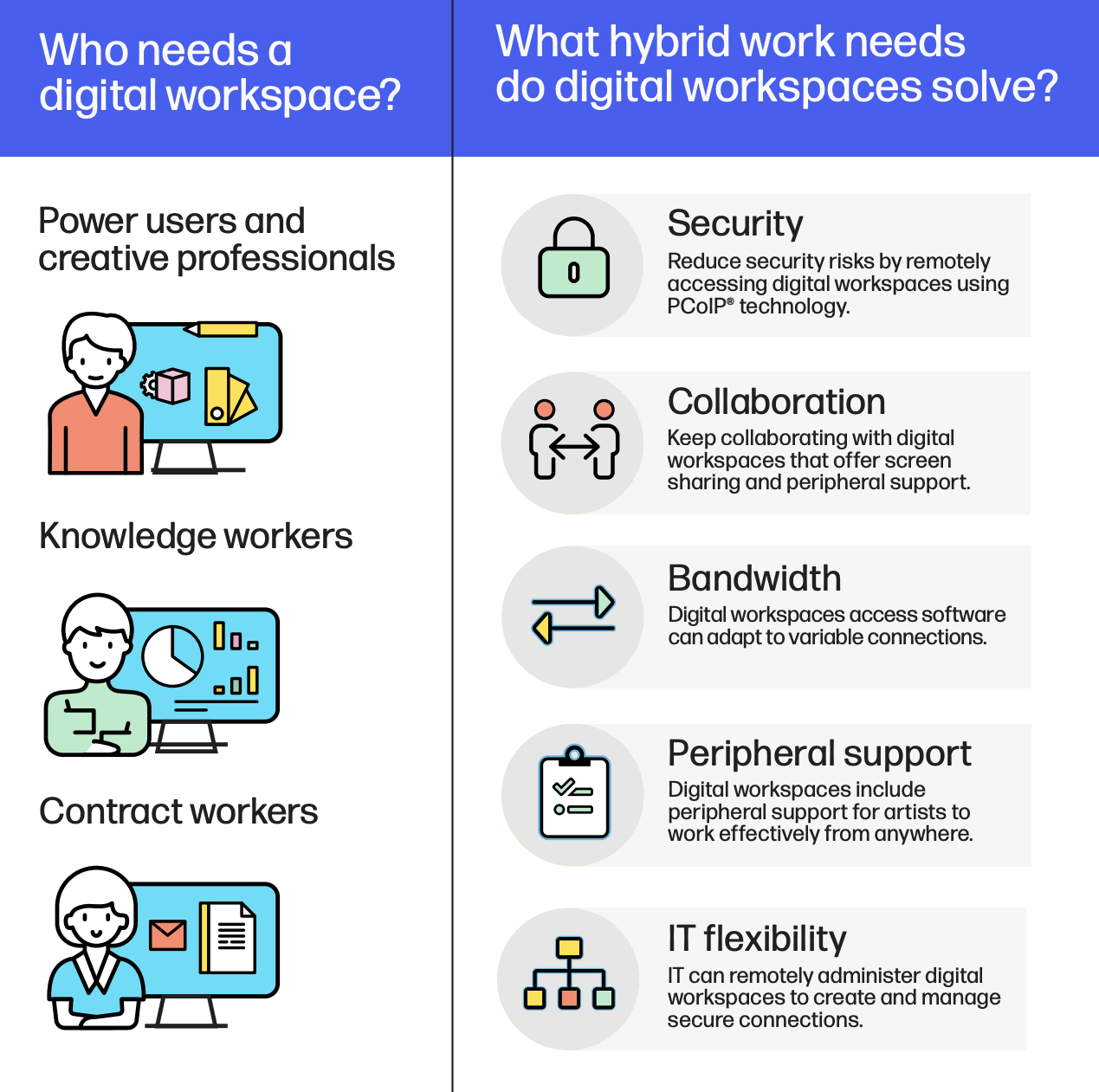
Who needs a digital workspace?
Digital workspaces benefit a wide range of roles across industries, especially in hybrid and distributed environments. The following user groups stand to benefit most:
- Power users and creative professionals who need high-performance, pixel-accurate environments for design, media, or engineering tasks.
- Education, finance, government, and other types of knowledge workers who require fast, secure access to data and collaboration tools.
- Contract workers who need temporary, secure access to company systems from their own devices, without compromising enterprise data.
These user groups highlight the diverse needs digital workspaces are built to support.
What hybrid work needs do digital workspaces solve?
Hybrid work creates challenges in connectivity, security, and collaboration. Digital workspaces are designed to address these issues in various ways. What follows are some examples of how Digital Workspaces by HP Anyware address them.
- Security: Digital workspaces reduce risk by providing secure remote access. For example, PCoIP® (PC-over-IP) technology is a proprietary HP Anyware remote display protocol that transmits only encrypted pixels to endpoints. It ensures no data leaves the secure host environment.
- Collaboration: Digital workspaces support real-time teamwork by enabling screen sharing and integrating webcams, audio, and interactive peripherals for seamless remote interaction.
- Peripheral support: Creative professionals, power users, knowledge workers, and contract workers require a variety of endpoint and peripheral support. For example, HP Anyware supports Wacom pens and tablets, webcams, 4K multi-monitors, as well as Quadro, GTX cards, and AMD GPUs, depending on the type of OS in use.
- Bandwidth optimization: Workers need consistent bandwidth to maintain visual accuracy and productivity, but it’s not always available. HP Anyware uses adaptive streaming to deliver high performance over variable networks, including mobile. It preserves color accuracy and image quality even at low bandwidths.
- IT management: IT teams can configure, monitor, and control access remotely, streamlining operations without sacrificing control.
Digital workspaces vs Digital workplaces: What’s the difference?
While often used interchangeably, “digital workspaces” and “digital workplaces” are distinct concepts, and understanding the difference is critical for IT decision-makers.
A digital workplace refers to the full ecosystem of tools, systems, services, and digital workplace infrastructure that support digital operations. This includes everything from collaboration platforms and facilities to employee experience programs and business apps.
A digital workspace is a focused subset of the digital workplace. It delivers a secure, virtual environment personalized to each user, offering access to the apps, data, and desktops they need, across cloud, on-prem, or hybrid environments. Digital workspaces work on virtually any device, from desktops and laptops to tablets and thin clients, enabling productive work from anywhere.
In short, digital workplaces define the strategy. Digital workspaces power the experience.
4 Key Benefits of High-Performance Digital Workspaces
While many digital workspace solutions exist, not all are created equal. Implementing high-performance digital workspace infrastructure solutions can deliver major advantages across your organization. From enhanced user experience to greater IT efficiency and infrastructure agility, modern platforms prioritize responsiveness, scalability, and security to help organizations create better work experiences, regardless of location.
-
Infrastructure flexibility
High-performance digital workspaces support a wide range of deployment models—including on-prem data centers, cloud environments, and edge infrastructure. Unlike more rigid solutions, they work seamlessly across virtual desktop infrastructure (VDI), physical workstations, and mobile endpoints. This flexibility empowers businesses to adopt BYOD (bring your own device) policies while reducing hardware costs and improving agility.
-
Improved productivity
Hybrid work is now a strategic priority for many companies, but productivity often suffers with lower-performing digital workspaces that struggle under bandwidth constraints. High-performance solutions use adaptive streaming and display optimization to reduce latency and pixelation, even on variable network connections. The result is a smoother, more responsive user experience that keeps employees focused and productive, no matter where they’re working.
-
Enhanced collaboration
Not all digital workspaces handle collaboration equally. High-performance platforms allow employees to share applications, screens, and sessions in real time across locations, with the speed and peripheral support required for fluid teamwork. Whether it’s a quick review with a colleague or a shared project with an external partner in a collaborative digital workspace, a modern digital workspace platform removes the friction in teamwork.
-
Stronger security posture
Remote access can introduce risk, but high-performance digital workspaces are designed with built-in security. They offer robust, built-in protection with multi-factor authentication, session monitoring, and centralized access control. By streaming encrypted pixels—not raw data—to the endpoint, these solutions ensure sensitive information stays within the secure host environment, reducing the risk of data leakage and minimizing the attack surface.
With a strong digital workspace foundation, companies can support modern work while maintaining security, performance, and operational efficiency.
Challenges to Overcome in Digital Workspace Implementation
While digital workspaces offer clear benefits, successful adoption requires overcoming several common obstacles, including:
- Performance issues: Users may experience latency, pixelation, or slow load times, especially over inconsistent network connections.
- Complex implementation: Initial setup can be resource-intensive, requiring alignment across IT, HR, and operations to define policies, provisioning, and security.
- User resistance: Employees may be hesitant to adopt new workflows or access methods, particularly if training and communication are lacking.
- Device and OS compatibility: Ensuring seamless performance across a wide mix of operating systems and devices can strain IT resources.
- Security concerns: Without proper configuration, remote access can increase the risk of data exposure, especially in bring-your-own-device (BYOD) scenarios.
Management overhead: IT teams may face challenges in monitoring and maintaining access policies, user sessions, and software updates at scale. - Collaboration gaps: If collaboration tools are not integrated effectively, teams may struggle to work together in real time.
Overcoming these challenges requires a carefully planned implementation strategy, flexible infrastructure, and digital workspace software built for secure, high-performance access.
Digital Workspace Use Cases
Digital workspaces directly address the operational, security, and flexibility demands of hybrid work environments. Here are several key use cases:
| Use Case | Description |
|---|---|
| Disaster recovery | Ensures employees can securely access their work environment from anywhere during disruptions. |
| Cost efficiency and workforce resilience | Lowers operational costs and supports employee safety by enabling remote work. |
| OS-agnostic access | Delivers a seamless experience across Windows, macOS, Linux, and other operating systems. |
| Secure training environments | Allows users to join remote training sessions from any device with just an internet connection. |
| Physical to virtual workstations | Gives users remote access to high-performance desktops, removing the need for a fixed physical location. |
| Public cloud infrastructure | Enables fast, cost-effective deployment at scale using public cloud platforms, while maintaining secure access. |
These use cases show how digital workspaces meet the evolving needs of modern organizations and enable secure, resilient hybrid work.
How to Deploy Successful Digital Workspaces
Digital workspaces are highly adaptable and can be deployed across a variety of infrastructures to meet different business needs. What follows are examples of how they’re deployed through the Digital Workspaces solution by HP Anyware.
- Standalone or virtualized workstations: Digital workspaces can be installed on individual physical or virtual machines, whether hosted on-premises or in the cloud.
- Cloud, multicloud, and hybrid cloud: Organizations can deploy digital workspaces using public, private, or hybrid clouds, enabling scalability while applying strong security protocols.
- On-prem data centers: For businesses requiring more control over infrastructure, digital workspaces can be hosted within company-managed data centers or server groups.
- Mobile network access: Employees can securely connect to digital workspaces over high-speed 4G or 5G networks using smartphones, tablets, or portable hotspots—ideal for remote and on-the-go work scenarios.
How do businesses make access to digital workspaces secure?
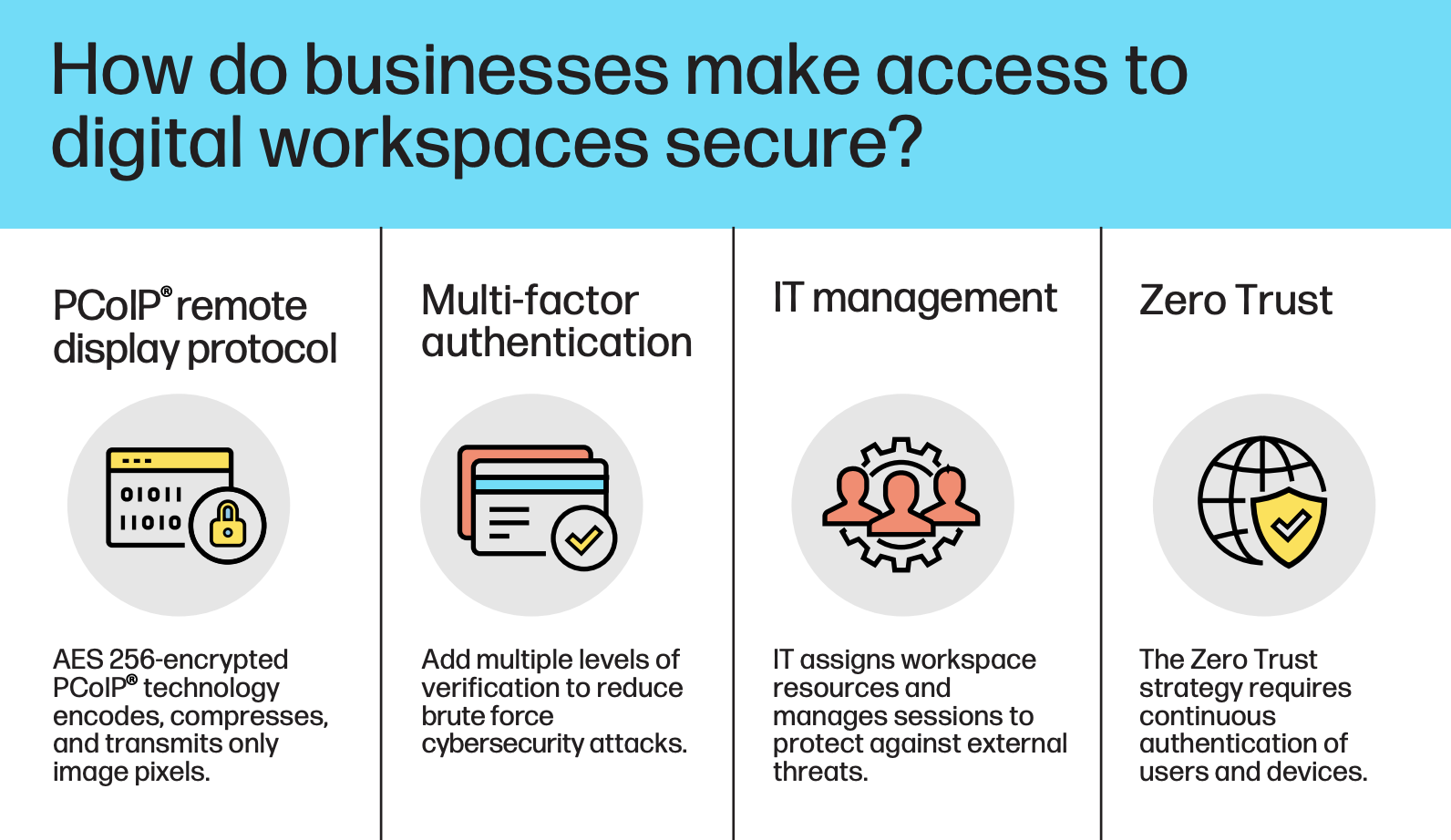
Some of the best ways to ensure only the right people access their digital workspaces are for businesses to use secure remote display protocols, multi-factor authentication, centralized IT management, and Zero Trust policies that continuously verify users and devices. These layers work together to protect sensitive data while maintaining a seamless user experience across devices and locations. Here’s how:
- Remote display protocol: Secure display technologies stream only pixel data to the endpoint, keeping business information contained within the host environment. For example, HP Anyware uses AES 256-encrypted PCoIP® to ensure that no raw data is transferred to the user’s device, significantly reducing the risk of data exposure.
- Multi-factor authentication: Adding layers of identity verification helps prevent unauthorized access, even if login credentials are compromised.
- IT management: Admins can assign digital workspace resources, monitor usage, and terminate idle sessions through robust digital workspace management tools to reduce exposure to threats.
- Zero Trust: Access is continuously validated for both users and devices, following the principle of “never trust, always verify.”
Together, these measures create a secure, resilient access framework that supports flexible work without compromising control. With these security foundations in place, the next step is implementing digital workspace best practices to ensure long-term success.
4 best practices for deploying digital workspaces
A successful digital workspace deployment depends on careful planning, cross-functional alignment, and continuous optimization. These best practices help ensure a smooth rollout for businesses.
- Work closely with IT to align your digital workspace rollout with business continuity and hybrid work plans. Involve IT early to define how access, security, and infrastructure will support flexibility and long-term goals.
- Set clear budgets, timelines, and security policies. To track the effectiveness of your deployment, include key performance indicators (KPIs) like login success rates, system uptime, and support requests.
- Make the digital experience easy and secure for employees. Focus on fast, reliable access, support for all major device types, and simple login processes that don’t compromise on security.
- Review and improve regularly. Use data and user feedback to monitor performance, fix issues, and fine-tune your digital workspace over time.
With a strong foundation in place, it’s critical to monitor key metrics that reflect the impact and efficiency of your digital workspace strategy.
Digital workspaces KPIs
Source: HP Anyware
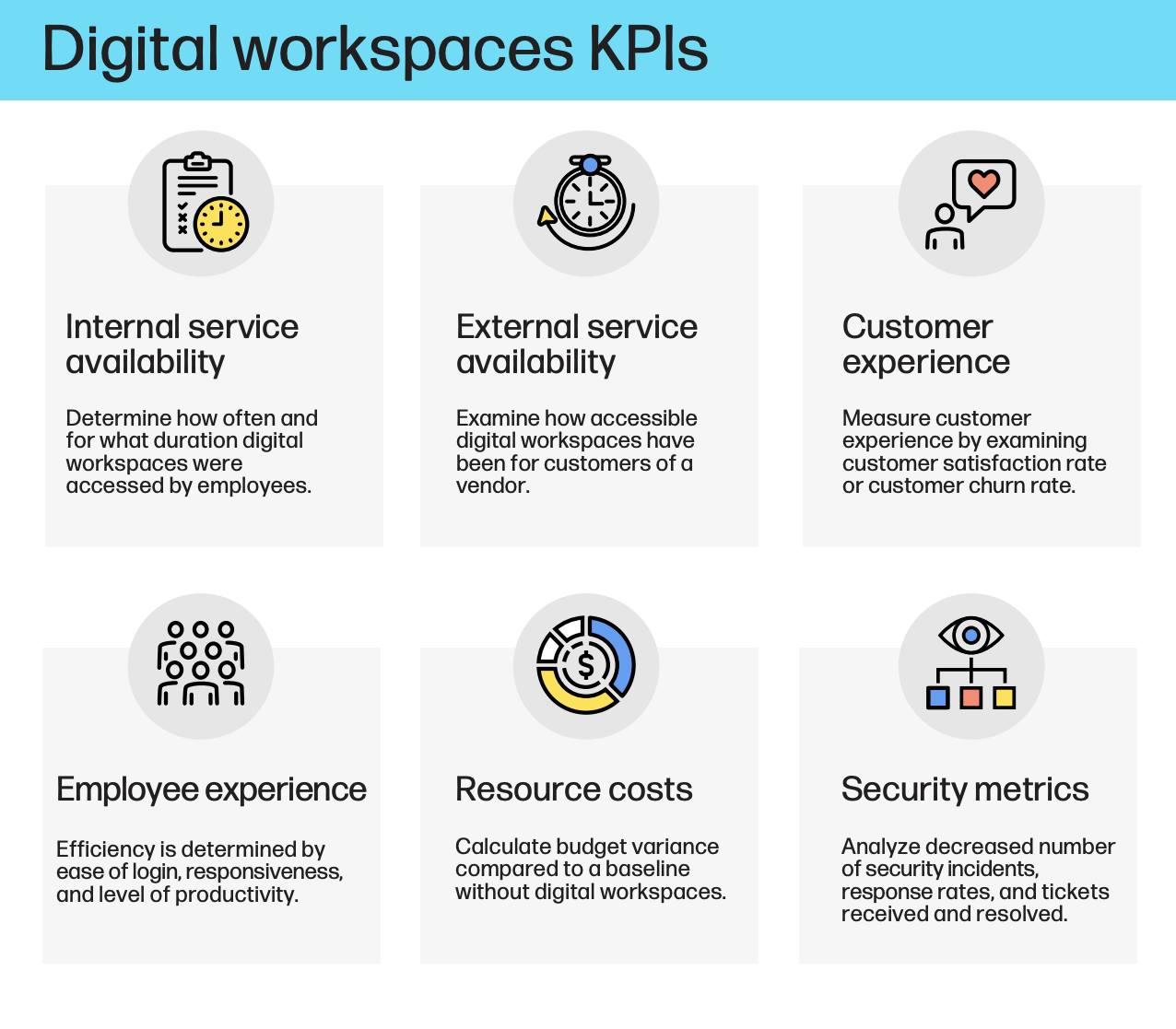
To evaluate success and optimize deployment, here are some key performance indicators (KPIs) to monitor:
- Internal service availability: Track how often employees access digital workspaces and for how long.
- External service availability: Assess uptime and accessibility for third-party users or partners.
- Customer experience: Measure satisfaction and retention when digital workspaces support customer-facing roles.
- Employee experience: Evaluate responsiveness, login efficiency, and impact on productivity.
- Resource costs: Compare costs before and after workspace implementation to assess ROI.
- Security metrics: Monitor incident frequency, response times, and resolution rates.
These metrics provide the insight needed to refine your deployment and guide future investment decisions.
Virtual Workspace Technologies Powering Remote Productivity
Modern virtual workspace technologies are the backbone of remote and hybrid productivity. Delivering a seamless, secure digital workspace experience relies on a well-integrated stack of core technologies designed to support remote and hybrid workforces. These include:
- Remote display protocols (like HP Anyware’s PCoIP®) that can stream encrypted pixels instead of raw data, ensuring high-performance access with enterprise-grade security.
- Cloud-hosted VDI that enables scalable delivery of desktops and applications from public, private, or hybrid cloud environments.
- Endpoint management solutions that allow IT to configure, monitor, and secure devices across diverse operating systems and networks.
- Collaboration features, including screen sharing, webcam, and audio support, and USB peripheral compatibility, to keep teams productive from anywhere.
These technologies work together to deliver a consistent user experience across devices and network conditions, making them essential for any organization optimizing for secure, location-agnostic productivity.
How AI and analytics are shaping the digital workplace
AI and analytics are transforming the digital workplace by enabling smarter, faster decision-making and more personalized experiences. AI helps automate repetitive IT tasks, monitor user behavior, and optimize workspace performance in real time. Analytics tools provide visibility into application usage, employee engagement, and system health, allowing IT teams to proactively improve digital experiences. As organizations adopt AI-powered digital workspace platforms, they can reduce downtime, enhance security, and tailor environments to meet evolving workforce needs.
The Future of Digital Workspaces: What’s Next
Digital workspaces and virtual desktop solutions offer a secure, scalable way to support a global workforce by ensuring uptime and controlled access for both employees and contractors.
The future of digital workspaces lies in greater integration, automation, and intelligence. Expect platforms to become more adaptive, using AI to personalize user experiences and anticipate performance issues before they arise. As Zero Trust security models become standard, digital workspaces will incorporate continuous authentication and advanced threat detection. Hybrid cloud and distributed digital workplace infrastructure will also expand deployment options, offering greater flexibility. Ultimately, the digital workspace will evolve into a unified, intelligent hub for secure work across any device, location, or network.
Here at HP, we offer a powerful Digital Workspace solution through the HP Workforce Experience Platform (WXP). Our platform delivers secure, high-performance access to virtual desktops and applications across any infrastructure, helping organizations support hybrid work, enhance IT control, and deliver a seamless user experience from anywhere. Whether you’re transitioning to the cloud, modernizing endpoint access, or building a Zero Trust strategy, HP provides the tools to future-proof your workforce.
Explore our Digital Workspace solution
FAQ
What is a digital workspace?
A digital workspace is a secure, work-from-anywhere environment that provides users with access to company data, applications, and desktops across any device or network. It enables flexible, productive, and secure hybrid work.
What is an example of a digital workspace?
An example of a digital workspace is a company using a platform like HP Anyware to give employees secure, remote access to virtual desktops, applications, and data, enabling them to work productively from any device or location.
What is the meaning of digital workplace?
A digital workplace refers to the complete set of digital tools, platforms, and services that support modern work. It includes communication apps, file sharing, collaboration tools, and infrastructure that power the employee experience.
What is a digital work platform?
A digital work platform is a unified environment that integrates essential work tools—such as virtual desktops, SaaS apps, communication software, and workflow automation—into a seamless user experience accessible from anywhere.
What is meant by digital workforce?
A digital workforce refers to employees who use digital tools and platforms to perform their jobs. It can also include automation technologies like AI or bots that work alongside humans to improve efficiency.
What is a digital workplace strategy?
A digital workplace strategy is a plan to align people, processes, and technology to support modern work. It focuses on enhancing productivity, collaboration, security, and employee experience across physical and virtual environments.
HP Workforce Experience Platform is a comprehensive and modular digital employee experience solution that enables organizations to optimize IT for every employee’s needs.
If you want to learn more about the HP Workforce Experience Platform, we would love to speak to you! Simply fill out the form below, and a team member will be in touch.
From the blog
The latest industry news, interviews, technologies, and resources.





Frequently asked questions
Here's everything you need to know about WXP.
- What is the HP Workforce Experience Platform (WXP)?
- How does WXP work?
- Can WXP be customized to fit specific business needs?
- How is WXP modular?
- Is WXP compatible with different vendors and operating systems?
- How does WXP integrate with other IT tools to provide a more comprehensive solution?
- What is a Workforce Experience score?
- How is AI used within WXP?
- How can I buy WXP and find out about new releases?
