
Invisible IT: Recovering From IT’s Ticket Addiction
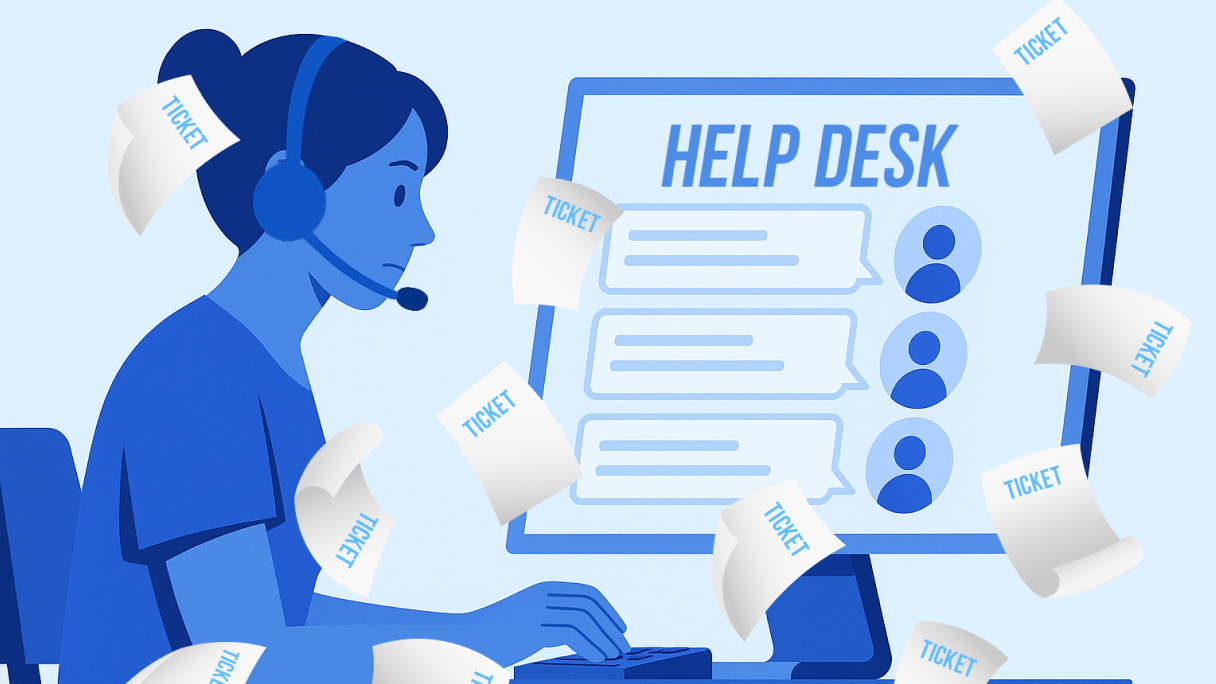
Overrun help desks and endless tickets drain IT teams while employees struggle with daily disruptions. Here’s how businesses can take a novel approach to reducing incidents and improving the employee experience.
This article was first published on LinkedIn.
Incentives are the invisible hand that steers behavior and outcomes. For example, workers stay late for bonuses, and students study harder when scholarships are on the line. But what happens when incentives actually make things worse and encourage the wrong behaviors instead?
It’s a question more IT leaders should be asking.
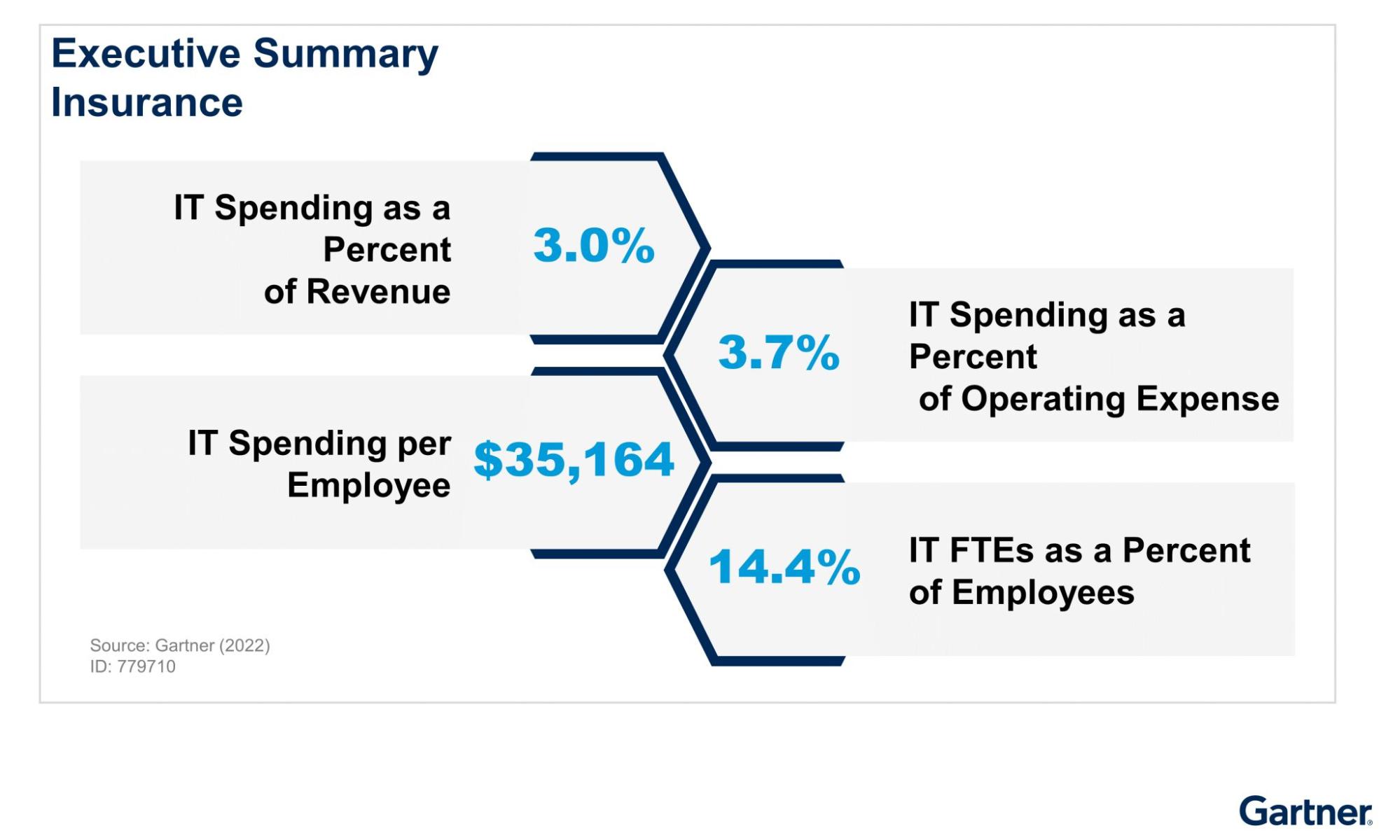
With IT spending per employee already topping $35,000 and total worldwide IT investment projected to reach over $5 trillion by 2025, ensuring budget is spent strategically has never been more important.
Source: LinkedIn
However, as HP’s Faisal Masud outlines, the reliance on IT service management (ITSM) for logging, triaging, and resolving IT issues has created a kind of “addiction” where success is measured not by whether employee experience improves but by how many tickets get closed or how quickly they move through the system. Unfortunately, reducing tickets doesn’t address the root causes and often frustrates employees because it fails to improve day-to-day work. It’s a poor measure that creates a hamster wheel of recurring problems that becomes increasingly more expensive for organizations to maintain.
Losing the Forest Through the Trees
“Unfortunately for businesses, SLAs are still around – they’re like zombies. Companies realized for many years that SLAs don’t work. They are not just ineffective; they constrain companies from getting to their goals for services.”
– Peter Bendor-Samuel, Founder and Executive Chairman of Everest Group
In most companies, the IT function has traditionally been treated as a cost center: provide the devices, keep the printers running, maintain the network, rinse and repeat. Every year, leadership gives a directive to slash costs, and like clockwork, IT leaders either reduce headcount or cut spend or both. With limited levers to pull, budgets are spread thin across people, hardware, software, and services, leaving only a fraction for the employee experience.
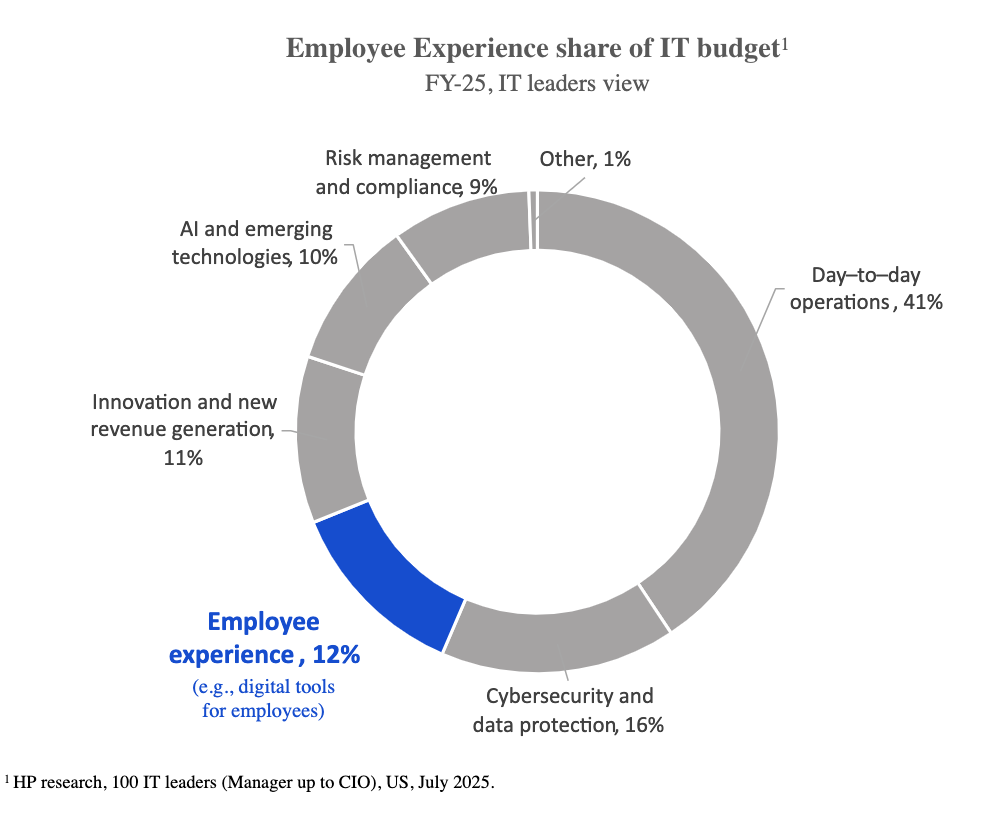
Although ITSM is the framework most organizations use to manage IT services, it was never designed to optimize the digital employee experience (DEX). ITSM platforms are now known for overflowing ticket queues, which trap organizations in reactive mode and drive up costs.
With less than half of employees contacting IT when they encounter a problem, ticket systems overlook a wide range of unresolved issues. This gap matters for retention as 74% of employees say they lack the tools, technology, or workspace to succeed.
Furthermore, focusing on ticket-based metrics creates a perverse incentive. Service level agreements (SLAs) and experience level agreements (XLAs) are supposed to hold IT accountable, but teams focus on meeting SLAs by closing tickets quickly, rather than addressing underlying issues. The goal shifts from improving the employee experience to avoiding penalties and hitting compliance targets.
Ultimately, it’s the end users who suffer. IT may technically hit its SLA targets, yet employees still can’t get through a workday without disruptions. Not only does this compromise service quality, but IDC research finds that a sizable portion of organizations can’t reach SLA goals more than 85% of the time.
What If You Could Prevent Tickets Entirely?
Many organizations don’t realize that IT issues give off early warning signs long before they become disruptive. The trick is to catch these in real time using device analytics data collected at scale. When powerful device data from endpoints feed back signals like battery degradation, thermal spikes, or unstable drivers, patterns emerge that let IT act before a crash or ticket ever happens.
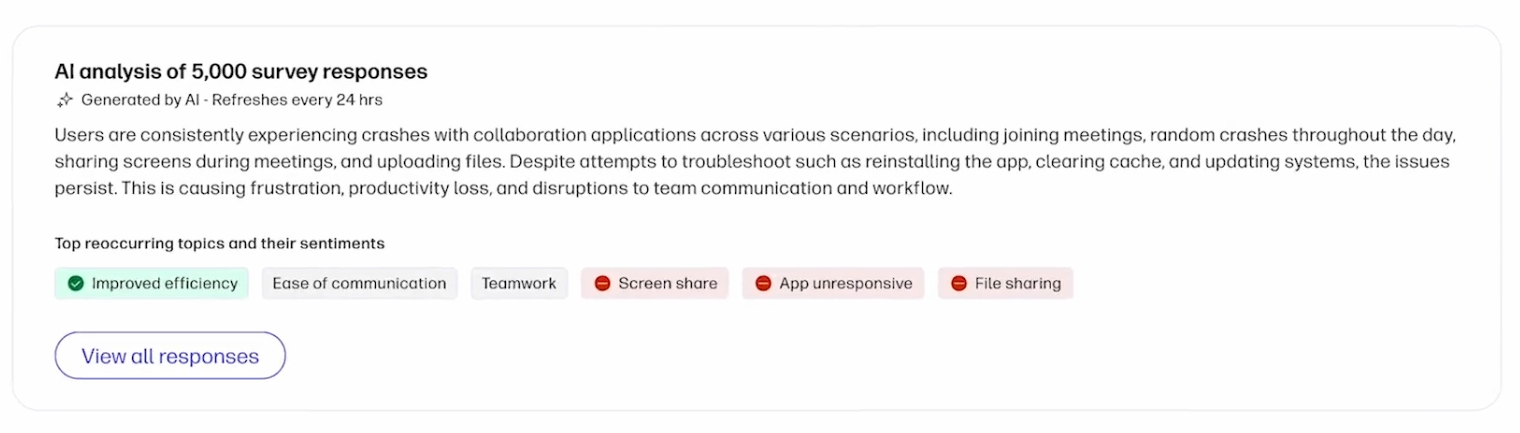
The Pulses module in the HP Workforce Experience Platform (WXP) lets you schedule short surveys, gather employee feedback, and use AI to understand their experience with the technology solutions provided to them.
What are some real-world use cases?
- Identify applications and workloads that are straining CPU and memory utilization.
- Optimize collaboration experience by tracking meeting quality, room usage, and UC performance.
- Surface friction points through employee engagement surveys to ensure technology meets employee needs.
- Reveal vulnerabilities with status reports and alerts on encryption, antivirus, firewall, and critical updates.
- Free up resources for strategic initiatives by using AI and automation to optimize performance, refresh cycles, and ROI.
Together, these use cases move teams from reacting to problems to preventing them, finally shifting the IT function from firefighting to truly fireproofing the employee experience.
The Best DEX Is Invisible
At HP, we offer a comprehensive, integrated approach to managing the entire workforce experience. As I wrote previously, enterprises need powerful software, the ability to expand beyond PCs, and a complete set of managed services to optimize the employee experience. The HP Workforce Experience Platform (WXP) is a device- and OS-agnostic DEX solution that works behind the scenes to power it all, eliminating disruptions before employees notice them.
By connecting directly to firmware and device analytics, WXP captures signals from the source, such as thermal fluctuations, driver instability, power irregularities, usage trends, and more. This data helps prevent issues, reduces time to resolution when incidents do happen, and ensures employees have the right technology for their role by aligning devices to usage patterns.
WXP also strengthens security by continuously validating device posture—checking firewalls, antivirus, disk encryption, and secure boot. Security features enable IT to remotely locate, lock, and wipe a device if it is lost or stolen. HP Sure Start validates every PC at boot, while HP Sure Click isolates risky files to block phishing and ransomware.
The result is secure, invisible IT and a workforce that rarely encounters disruption.
Here at HP, IT oversees more than 80,000 PCs, 1,700 video rooms, and 1,000 printers worldwide for our organization. Using WXP internally, we’ve reduced support desk load by about 23%, with 97% of issues now identified proactively before employees even notice them. In print, 80% of notifications are resolved remotely. However, while fewer tickets save time and money, WXP also measures how changes impact employees directly, so improvements can be tied to sentiment, engagement, fulfillment, and satisfaction.
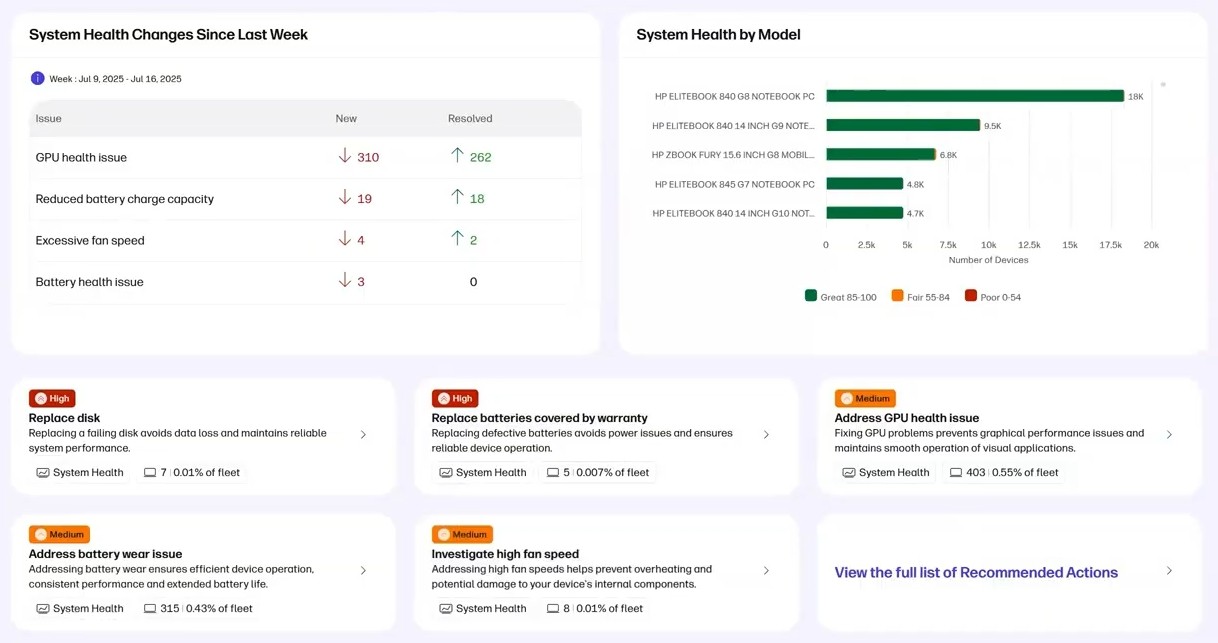
The System Health report in WXP provides visibility into the overall health of your organization’s devices by evaluating hardware-related indicators, such as battery and component statuses.
Conclusion
The future will show IT is a strategic business partner delivering meaningful, measurable outcomes that employees experience daily. ITSM ticketing may have started with good intentions, but it’s become a tool of compliance rather than a catalyst for change.
The real opportunity lies in moving beyond “ticketing addiction” and focusing instead on strategic IT, fewer disruptions, and a deeper understanding of what employees truly need to thrive.
That’s the paradigm shift HP is driving. With WXP, we’re delivering an invisible, intelligent platform that keeps work flowing and employees focused—because the best DEX is when problems never surface in the first place.
HP Workforce Experience Platform is a comprehensive and modular digital employee experience solution that enables organizations to optimize IT for every employee’s needs.
If you want to learn more about the HP Workforce Experience Platform, we would love to speak to you! Simply fill out the form below, and a team member will be in touch.
From the blog
The latest industry news, interviews, technologies, and resources.




Frequently asked questions
Here's everything you need to know about WXP.
- What is the HP Workforce Experience Platform (WXP)?
- How does WXP work?
- Can WXP be customized to fit specific business needs?
- How is WXP modular?
- Is WXP compatible with different vendors and operating systems?
- How does WXP integrate with other IT tools to provide a more comprehensive solution?
- What is a Workforce Experience score?
- How is AI used within WXP?
- How can I buy WXP and find out about new releases?
