
Enterprise IT’s Ticketing Addiction: Trapped in a Reactive Cycle
A growing dependency on IT Service Management (ITSM) drains company resources and leaves real problems unresolved. With the rise of innovative new tech, can IT teams finally eliminate the addiction to costly ticketing support?
This article was first published on LinkedIn.
When it comes to the U.S. healthcare system, perhaps the most uncomfortable truth about the for-profit model is that the sick and dying are good for business. With patients requiring ongoing treatments and costly medications, the system’s financial incentives often prioritize managing conditions over preventing them altogether.
In the business world, a similar pattern shows up in enterprise IT. The more problems teams face, the more money gets poured into tools and services. Vendors thrive when IT departments manage and close a never-ending stream of tickets, not when problems are actually solved. It’s a conflict of interest that rewards volume over outcomes.
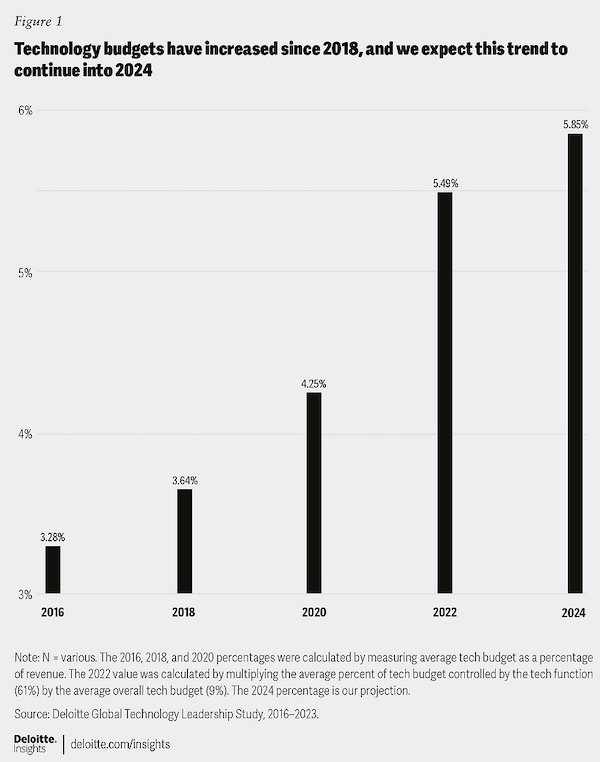
But this dependency is getting wildly expensive. Tech support costs companies nearly $5K per employee each year. Meanwhile, Gartner forecasts that spending on IT services will soar 9% YOY to reach $1.7 trillion in 2025. A Deloitte survey of CIOs and CTOs also found that tech spending by organizations grew from 3.28% of revenue in 2016 to a projected 5.85% by 2024—a gain of 78% in less than a decade.
Many IT teams default to ticketing systems, but that reactive mindset only hides the real problems. Issues stay unresolved, doomed to fuel a vicious cycle of repeat incidents and frustrated employees.
Are we solving anything?
One of the main culprits is IT service management (ITSM). Few frameworks have done more to help design, build, deliver, operate, and control IT services than ITSM. Platforms like ServiceNow, Atlassian, BMC, and Avanti help automate tasks, streamline workflows, and simplify service delivery.
However, ITSM platforms have also become synonymous with incident queues, endless tickets, cluttered dashboards, and meeting SLAs. Sure, many powerful capabilities are on offer, but most customers chronically overspend on features they never use. Gartner reports that 8 out of 10 IT organizations overpay for ITSM by nearly 50%.
The bottom line is that companies spend increasingly more money on fixing issues they never resolve. So the question to ask is:
What exactly are they paying for?
Why IT Teams Are Set Up to Fail
In ITSM, incident management (IcM) is inherently reactive. By the time something’s logged, the damage is already done.
From there, it’s a race to meet SLAs: categorize, triage, prioritize, escalate, repeat. Every handoff is about speed, not root cause. The worst part is that these disruptions get treated like business as usual, no questions asked, and just more tickets in the queue.
Then there are the metrics. For example, mean time to resolve (MTTR) is widely considered a “crucial indicator” or “the top key performance indicator (KPI)” for incident response.
Yet the metric itself is inherently flawed. MTTR (and all of its variations, MTTD, MTTA, MTBF, etc) focuses on the time it takes to complete an action and doesn’t account for whether the underlying issue was understood or fixed at the root.
In other words, you can hit a great MTTR while patching the same problem over and over. Conversely, permanently fixing a root cause might result in a high MTTR, but the issue never returns.
Is problem management the answer? In theory, yes. Information technology infrastructure library (ITIL) lays out an approach that uses root cause analysis, postmortems, and the configuration management database (CMDB) to map every dependency and track down the source of issues. In practice, it’s still reactive. Teams rush to close action items without addressing systemic flaws.
It’s no wonder the most common IT issues today are practically identical to those of 10 years ago. The key difference is that IT teams have offloaded responsibility to expensive ticketing systems, which now handle most IT issues.
SLAs, XLAs, and Firefighting vs. Fireproofing
Enterprises now chase experience-level agreements (XLAs). Unlike SLAs, which measure how fast IT patches things up, XLAs promise to track how employees really feel about their tech.
Gartner says the best XLAs tie technical delivery to business KPIs, link service revenue to performance, and pinpoint the real pain points behind employee frustration. They lean on digital experience monitoring, analytics, and process mapping to capture the entire journey, not just ticket stats. They’re designed to move IT beyond the “hygiene factor” of keeping systems on and toward making them work better for people.
Yet XLAs aren’t magic. They’re complex, subjective, and often lack standardization, making it hard to compare or benchmark results. Improvements can also appear inflated if they start from a low baseline. Without a proactive design, they risk becoming just another reactive metric.
Focus on the inputs—not the outputs
During my time at Staples, we were maniacal about drilling down to every source of friction in order to get products to customers fast. In 2013, next-day delivery was unheard of, but we hit a 98% next-day fulfillment rate. Being reactive isn’t an option in e-commerce. Any slight hiccup can trigger cart abandonment and lost sales.
Building resilient and efficient IT operations is a lot like driving continuous improvement in logistics, supply chains, or warehouse processes. Whether you’re a Six Sigma black belt, follow Lean principles, or align with the theory of constraints, the goal remains the same: remove friction, eliminate bottlenecks, and improve workflows.
Leaning on ITSM as a ticketing platform is not a panacea. IT admins have grown dependent on systems that respond fast but don’t actually solve anything. If your process just moves tickets quicker, you’re still stuck downstream. That’s not strategic IT—it’s firefighting.
Applying process-based management principles means detecting anomalies, investigating root causes, eliminating repetitive issues, and addressing the most significant constraints slowing down resolution. It’s a proactive—and even predictive—approach that continuously improves the process behind the problems and streamlines workflows across teams. Here’s where automation and agentic workflows can really shine, taking the strain off IT teams and letting AI handle the heavy lifting.
At HP, we sit closer to the action than any ITSM vendor ever could. Instead of scraping the surface, we’re plugged directly into the firmware, hardware, and daily user workflows. That gives us telemetry no one else has: thermal data, driver behavior, power fluctuations, and even usage patterns across printers, PCs, collaboration tools, digital workspaces, and accessories.
The result is smarter triage and faster remediation before anyone’s productivity gets disrupted.
It’s Time to Rethink IT
ITSM was never designed to carry the full weight of root cause resolution, let alone drive employee experience. And yet, that’s what IT departments ask of it.
What organizations truly need is smarter, more efficient IT. That starts with moving upstream from addictive ticketing systems and getting closer to the source.
With clarity and a more holistic view across the full stack—hardware, software, and the complete employee experience—organizations gain visibility into where friction starts and how to eliminate it before it impacts people and productivity. With deeper telemetry, IT teams can finally detect, diagnose, and resolve problems before they ever disrupt employees.
Because the real goal isn’t faster ticket resolution.
It’s ending the need for tickets altogether.
HP Workforce Experience Platform is a comprehensive and modular digital employee experience solution that enables organizations to optimize IT for every employee’s needs.
Subscribe for future product release updates and the HP Workforce Experience Blog to learn how to optimize your IT capabilities today.
If you want to learn more about the HP Workforce Experience Platform, we would love to speak to you! Simply fill out the form below, and a team member will be in touch.
From the blog
The latest industry news, interviews, technologies, and resources.







Frequently asked questions
Here's everything you need to know about WXP.
- What is the HP Workforce Experience Platform (WXP)?
- How does WXP work?
- Can WXP be customized to fit specific business needs?
- How is WXP modular?
- Is WXP compatible with different vendors and operating systems?
- How does WXP integrate with other IT tools to provide a more comprehensive solution?
- What is a Workforce Experience score?
- How is AI used within WXP?
- How can I buy WXP and find out about new releases?
