
Rethinking Space for the Modern Workforce
From standing-room-only to empty conference rooms, getting space utilization right in the era of “Hybrid Work” and RTO is a challenge for businesses… and there is no one-size-fits-all solution.
This article was first published on LinkedIn.
Walk into any corporate office today, and you’re just as likely to see a packed huddle room with people crammed elbow-to-elbow as you are to find a massive boardroom occupied by one person on a video call.
Hybrid work is compounding the challenges. According to Moody’s, US office building vacancy rates continue to break record highs, reaching 20.4% nationally in Q1 2025.
This growing mismatch of supply and demand points to a more profound shift in workplace behavior. How employees use office space has fundamentally changed, and traditional rules of thumb—like maintaining a ratio of one conference room for every 10 employees—no longer hold up.
Companies Are at a Crossroads
Whether organizations enforce return-to-office mandates or embrace more flexible models, many still work with real estate footprints designed for a different era. Just a few years ago, in-person meetings were the default, and space planning relied on calendar bookings in Outlook or Exchange or followed simple formulas—like X employees times Y square feet equals Z rooms.
However, bookings don’t confirm whether anyone attended the meeting, how they used the space, or if they engaged with the in-room technology. Traditional approaches no longer work, and space usage now varies significantly across departments, teams, and regions.
Some businesses have too much space
Today, large conference rooms often sit empty or they’re occupied by one person on a virtual meeting. At HP, we analyzed 18 months’ worth of collaboration data and found that nearly half of all conference rooms sat empty 90% of the time. Of the rooms in use, only one person occupied them 40% of the time.
The data suggests that employees actively want to recreate their home work experience at the office. They want privacy, quiet, and a familiar digital collaboration setup.
Some businesses don’t have enough
On the other end of the spectrum, RTO mandates can create chaos across businesses. At WPP’s World Trade Center offices in New York, RTO overcrowding forced employees to work in kitchens, hallways, and printer rooms. Despite having enough total seats, poor distribution led to a temporary rollback of in-office requirements from four to two days per week while the company looked for more office space. According to one employee:
“There’s very, very low morale, and beyond that, there’s a sense that leadership doesn’t care about us.”
These stories highlight the importance of workspace design that supports how people work today. To avoid frustrated employees, disengagement, poor productivity, and higher attrition, organizations can leverage data to rethink room types, layouts, and booking behavior to suit the needs of the modern workforce.
Rethinking Office Space for a Better Employee Experience
“Many organizations are using pre-COVID office space for a post-pandemic workforce. Until they repurpose or rightsize old offices to support new work styles, they’ll continue to struggle with low office utilization.”
– Susan Wasmund, CBRE Global Occupancy Management Lead
To optimize physical office and meeting spaces, organizations have two paths; most need a mix of both.
The first is to update the physical footprint. Over the last three years, companies have reduced square footage per person by 22% and increased collaboration space by 44%, showing a clear shift toward layouts that reflect how people work in a hybrid model. That often means replacing oversized boardrooms with mid-sized, tech-enabled rooms for flexibility and hybrid collaboration. According to CBRE, some key considerations include:
- Office-space composition: What is the ideal amount of individual vs collaboration space, density, size, and amenities?
- Workplace design: How has design evolved to accommodate new ways of working, and does the perception of office usage match the reality?
- Employee experience: How can office spaces incorporate employee personas to attract and retain talent?
- Portfolio optimization: How much space does an office need to support utilization targets?
- Co-working: How important is flexibility for occupiers?
The second path is to be intentional with meeting culture. Even with the right spaces in place, usage often lags. Office utilization rates are just 31% globally, well below pre-pandemic levels of 64%. Rethinking booking behavior and meeting culture is key. That means discouraging one-on-ones in 16-person rooms, encouraging proper space selection, and using data to spot patterns, such as who’s booking, who’s showing up, and how people use in-room tech. Below, CBRE illustrates the new demand for space for organizations.
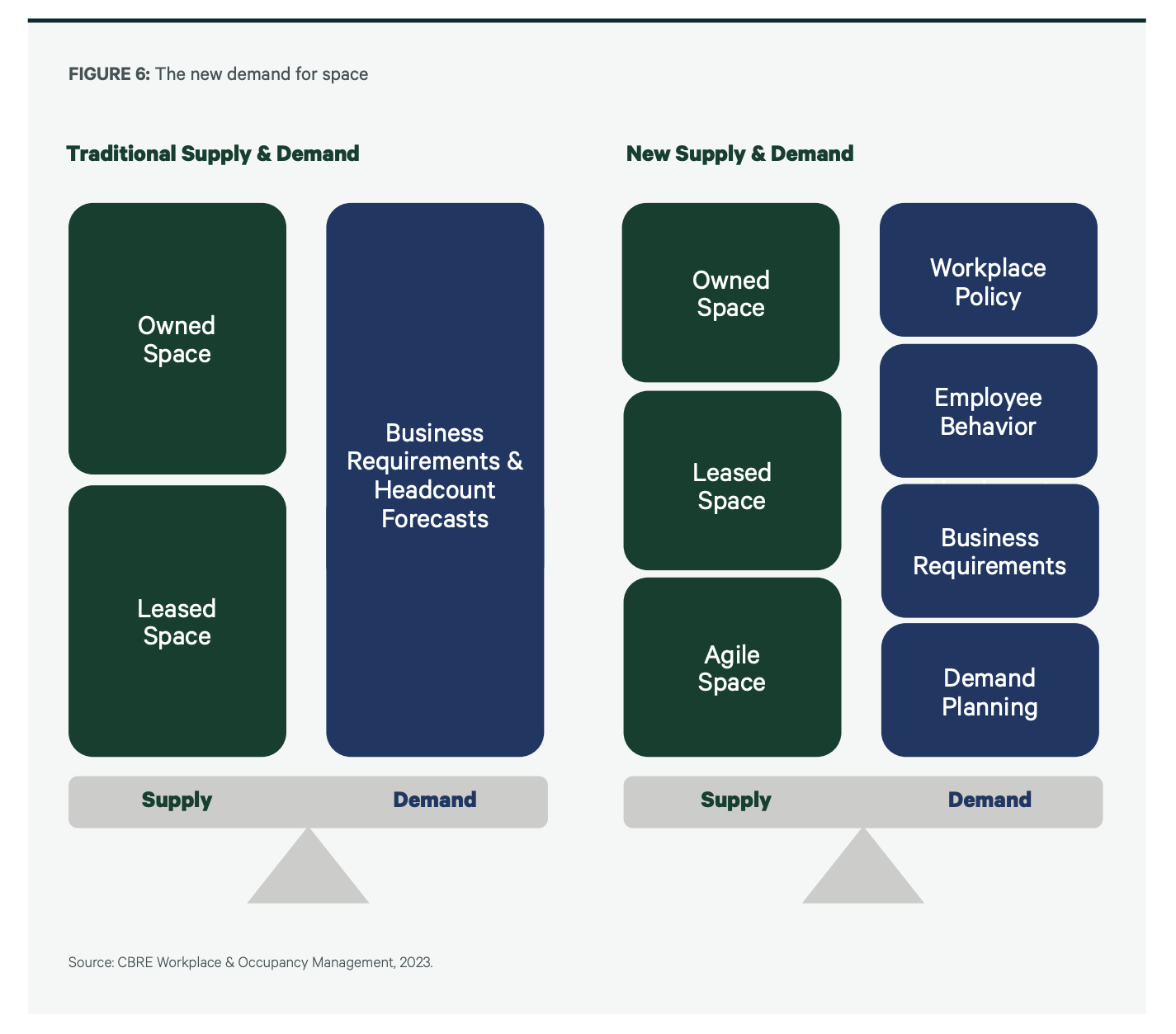
Source: CBRE
Space Insights Can Enhance the Employee Experience
With the HP Workforce Experience Platform (WXP), we make collaboration experience management easy by giving organizations a clear picture of how they use their meeting rooms. With Space Insights, our platform provides a single pane of glass into meeting space utilization so businesses can identify inefficiencies, understand trends, and make the right technology choices.
Our platform pulls in three key types of data.
- First is occupancy and people count, often sourced from sensors embedded in modern room hardware. These data points reveal how many people were physically present and for how long.
- Second is technology usage, which shows whether employees used in-room systems like microphones, speakers, and video equipment or defaulted to Zoom or Teams on their laptops.
- Third is calendar data from tools like Outlook or Google Workspace, which offers insight into scheduled meetings.
Combining all three data sources can give organizations a clearer, more accurate view of space usage, something legacy systems and calendar data alone can’t provide. Whether reworking a single floor or an entire real estate portfolio, teams gain the visibility needed to align space with real employee behavior. That makes Space Insights different from traditional planning or surface-level analytics. It’s holistic, contextual, and built for hybrid.
Conclusion
The traditional office was never designed with today’s dynamic work patterns in mind. Modern workflows demand a fundamental space rethink, with fewer static layouts and more flexible, human-centered environments that support creativity, collaboration, and the employee experience.
Many organizations remain locked into outdated workplace models. To meet the workforce’s expectations and attract and retain top talent, companies must design environments that reflect how people work. That means embracing new ways of working, integrating modern technology, and creating purposeful, engaging, and connected spaces.
If you want to learn more about simplifying collaboration experience management, we’d love to speak with you! Simply fill out the form below to schedule a demo.
HP Workforce Experience Platform is a comprehensive and modular digital employee experience solution that enables organizations to optimize IT for every employee’s needs.
If you want to learn more about the HP Workforce Experience Platform, we would love to speak to you! Simply fill out the form below, and a team member will be in touch.
From the blog
The latest industry news, interviews, technologies, and resources.




Frequently asked questions
Here's everything you need to know about WXP.
- What is the HP Workforce Experience Platform (WXP)?
- How does WXP work?
- Can WXP be customized to fit specific business needs?
- How is WXP modular?
- Is WXP compatible with different vendors and operating systems?
- How does WXP integrate with other IT tools to provide a more comprehensive solution?
- What is a Workforce Experience score?
- How is AI used within WXP?
- How can I buy WXP and find out about new releases?
