
How Smarter Meetings Can Reverse Digital Fatigue
With access to technology, space, and user insights, companies can turn collaboration from a productivity killer into a competitive edge.
This article was first published on LinkedIn.
With all the sophistication and promise of modern technology, you’d think that most employees today would be tap dancing to work. But in recent years, remote and hybrid work models have exacerbated the phenomenon known as digital fatigue, where patterns of extensive technology use can lead to mental exhaustion, and virtual meetings are shown to play a key role.
Unfortunately, research has found that meetings are a top barrier to productivity. Up to one-third of all meetings are likely unnecessary, and 68% of employees lack uninterrupted focus time during the day. The business impact is staggering, with lost productivity and engagement costing organizations hundreds of billions of dollars.
To turn the tide, businesses need to take a hard look at how their teams collaborate and take steps to improve the digital employee experience (DEX). That means optimizing technology, streamlining processes, and creating a workplace where employees can thrive.
Poor Meeting Experiences Lead to Digital Fatigue
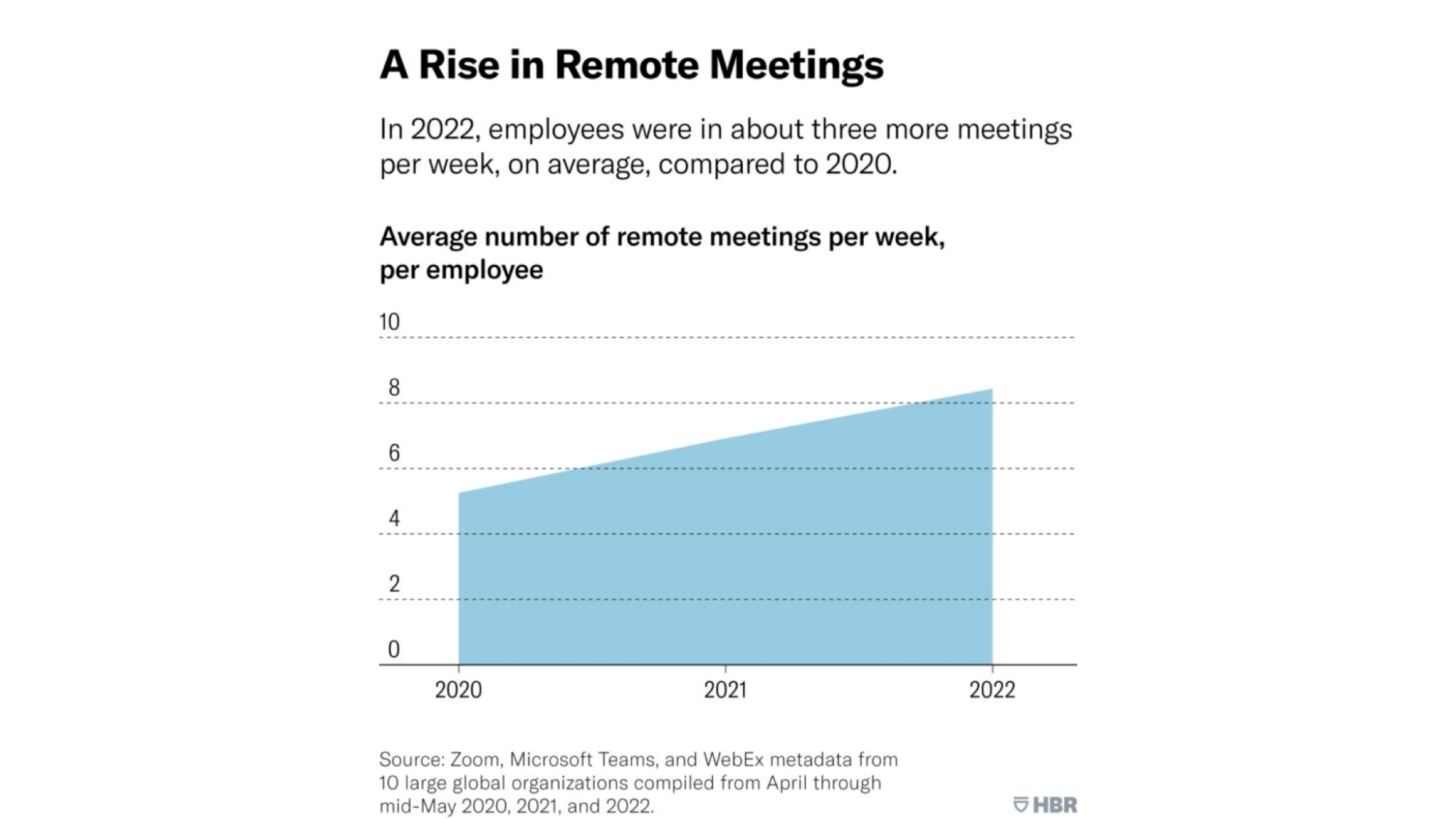
Our brains are built for high-fidelity communication, which includes eye contact, body language, and nuance. Yet employees sit through 10 or more virtual meetings a week in low-resolution grids while processing compressed audio and video. The mismatch creates cognitive strain and, over time, increases stress.
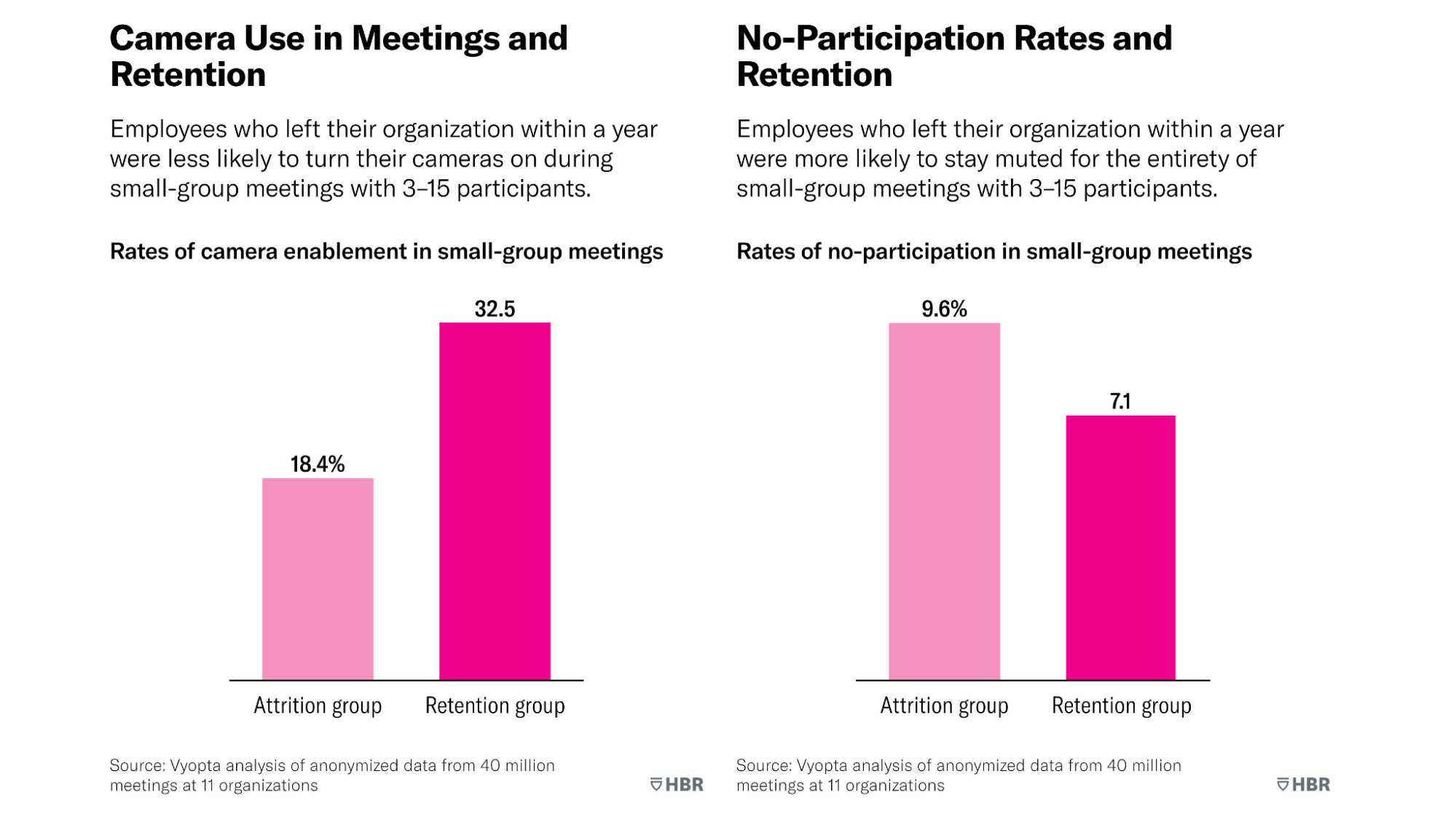
Digital fatigue and disengagement show up in meeting behavior trends. Not only are participants enabling their cameras less, but they’re also staying on mute more often without participating. These trends are associated with higher attrition in organizations.
Technical issues are complex and hard to solve without visibility
Technical issues also kill productivity and engagement. We’ve all felt the stress of trying to understand choppy audio in an important meeting. However, one of the biggest challenges is figuring out where problems are. The main obstacle is visibility when you’re supporting global teams and navigating a complex unified communications (UC) environment. Packet loss and software bugs are real, but you’re still operating in the dark if you can’t identify issues at scale and trace them back to their root causes.
The good news is that collaboration experience management software can help improve meeting quality. Collecting telemetry data on video, audio, device performance, and user behavior can give IT and operations teams clear, actionable insights to improve experiences. Beyond technical challenges, spotting signs like fewer 1:1s, lower engagement, or more siloed teams allows organizations to step in early and turn things around before they lead to burnout or attrition.
3 Tips for Smarter, More Efficient Meetings
Meetings have become a sore spot for organizations, but there are proven ways to get more from team collaboration.
1. Be intentional about your meeting culture
If there’s one foundational strategy, it’s being intentional about your meeting culture. Hybrid work isn’t going away, and the way we meet today doesn’t follow the same rules as in-person collaboration. What works face-to-face doesn’t always translate digitally. That’s why setting clear expectations, defining what meetings are for, and training people to run them well pays off in a big way. Researchers found that implementing “meeting-free” days can also be beneficial.
2. Empower meeting hosts
Another key strategy is focusing on your meeting hosts. Our data shows that just 10% of employees are responsible for 50% of all meetings. That small group has an outsized influence on collaboration culture. If they run focused, effective meetings, those habits spread. If they don’t, the inefficiencies spread too.
That’s why identifying and training your top meeting hosts is important. Their behavior sets the tone, especially when they show up prepared and keep meetings tight. Every meeting should be necessary and purposeful so participants derive real value from attending. Running a great meeting is a skill; like any skill, it can be taught. Investing in upskilling hosts can pay dividends for your workforce.
3. Tap into the hybrid work analytics goldmine
Data is another critical piece. Before the pandemic, most meetings were in person and left behind zero data to analyze. Collaboration is now virtual, with every meeting generating nearly 400 data points that cover video and audio quality, device performance, camera usage, talk time, and more. With collaboration management software, we’re sitting on a goldmine of telemetry, yet most organizations haven’t scratched the surface of what’s possible.
Beyond fixing technical issues, forward-thinking companies are finding ways to make meetings more efficient, address digital fatigue, and deliver better collaboration experiences. Those leveraging this untapped goldmine can potentially turn collaboration into a competitive advantage.
Conclusion
Meeting quality has become one of the most critical challenges facing modern enterprises. Every day, millions of employees join meetings across devices and platforms without realizing how much friction exists beneath the surface. From poor audio and packet loss to choppy video and network issues, frustrating meeting experiences can add to digital fatigue and steadily drain productivity.
With the HP Workforce Experience Platform (WXP), we simplify collaboration experience management to improve virtual and in-person meetings for employees. Whether you use Zoom, Microsoft Teams, Google Meet, Poly, Cisco Webex, or all of the above, our UC analytics and room insights help customers monitor and analyze everything from video calls to meetings to collaboration platforms and get real-time insights into performance, technical issues, and technology and workspace usage.
With a single pane of glass, IT and UC teams can finally understand what’s working, what’s not, and where to improve. By giving teams the data they need, organizations can make collaboration more productive and less draining, ultimately improving the employee experience.
HP Workforce Experience Platform is a comprehensive and modular digital employee experience solution that enables organizations to optimize IT for every employee’s needs.
If you want to learn more about the HP Workforce Experience Platform, we would love to speak to you! Simply fill out the form below, and a team member will be in touch.
From the blog
The latest industry news, interviews, technologies, and resources.




Frequently asked questions
Here's everything you need to know about WXP.
- What is the HP Workforce Experience Platform (WXP)?
- How does WXP work?
- Can WXP be customized to fit specific business needs?
- How is WXP modular?
- Is WXP compatible with different vendors and operating systems?
- How does WXP integrate with other IT tools to provide a more comprehensive solution?
- What is a Workforce Experience score?
- How is AI used within WXP?
- How can I buy WXP and find out about new releases?
