
What Is Digital Collaboration? Definition, Benefits, Tools, and Best Practices
Summary:
- Digital collaboration uses technology to enable real-time teamwork across locations, devices, and time zones. It enhances productivity, communication, and accessibility for hybrid and remote teams.
- Collaboration experience monitoring provides visibility and control, ensuring that tools and spaces work as expected.
- WXP Collaboration is a digital collaboration experience monitoring solution that provides near real-time visibility into meeting quality, endpoint performance, and space utilization to enhance the employee experience.
If the hybrid era has made one thing clear, it’s that collaboration must evolve to meet the needs of today’s distributed workforce. Digital collaboration enables seamless teamwork across time zones, platforms, and devices, supporting everything from project execution to virtual meetings. Whether employees are in the office, working from home, or on the go, they need tools and environments that work together without friction.
Demand for seamless digital collaboration remains high. Even with the increase in return-to-office (RTO) mandates, organizations continue to grow their hybrid workforces. According to research by Robert Half, 37% of all jobs in Q1 2025 were either hybrid or fully remote, down 1% from last quarter but still up 19% from two years ago.
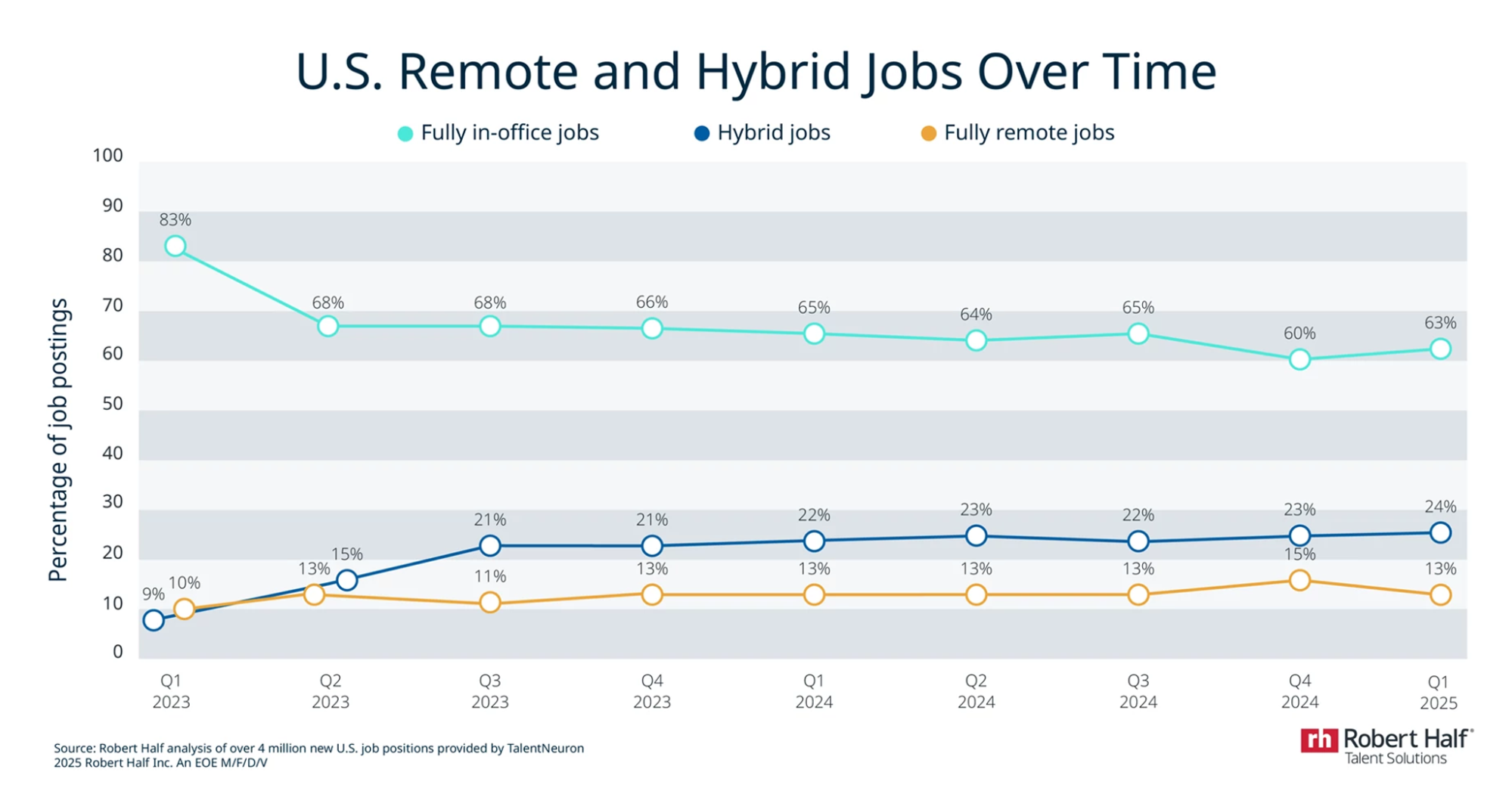
Source: Robert Half
As organizations rethink how work gets done, the ability to collaborate digitally is becoming critical. In this guide, we’ll take a deep dive into everything you need to know about digital collaboration, including what it is, its benefits, common challenges, and best practices to enhance the digital employee experience (DEX).
What Is Digital Collaboration?
Digital collaboration is the use of digital tools, apps, and systems that let people work together from anywhere, in real time or asynchronously. It replaces traditional face-to-face methods with digital channels, such as shared documents, messaging platforms, and video calls, to keep teams aligned and productive regardless of where they are.
From messaging platforms like Slack or Microsoft Teams to video conferencing like Zoom and Google Meet to document sharing and co-editing with tools like Google Docs and Microsoft 365, modern organizations now use a variety of tools to work and collaborate. According to Gartner, nearly 80% of workers were using collaboration tools in 2021, up from just over half in 2019, driven by the rise of hybrid and remote work. As in-person meetings continue to decline and virtual meetings rise, digital collaboration is quickly becoming the foundation of how modern teams operate.
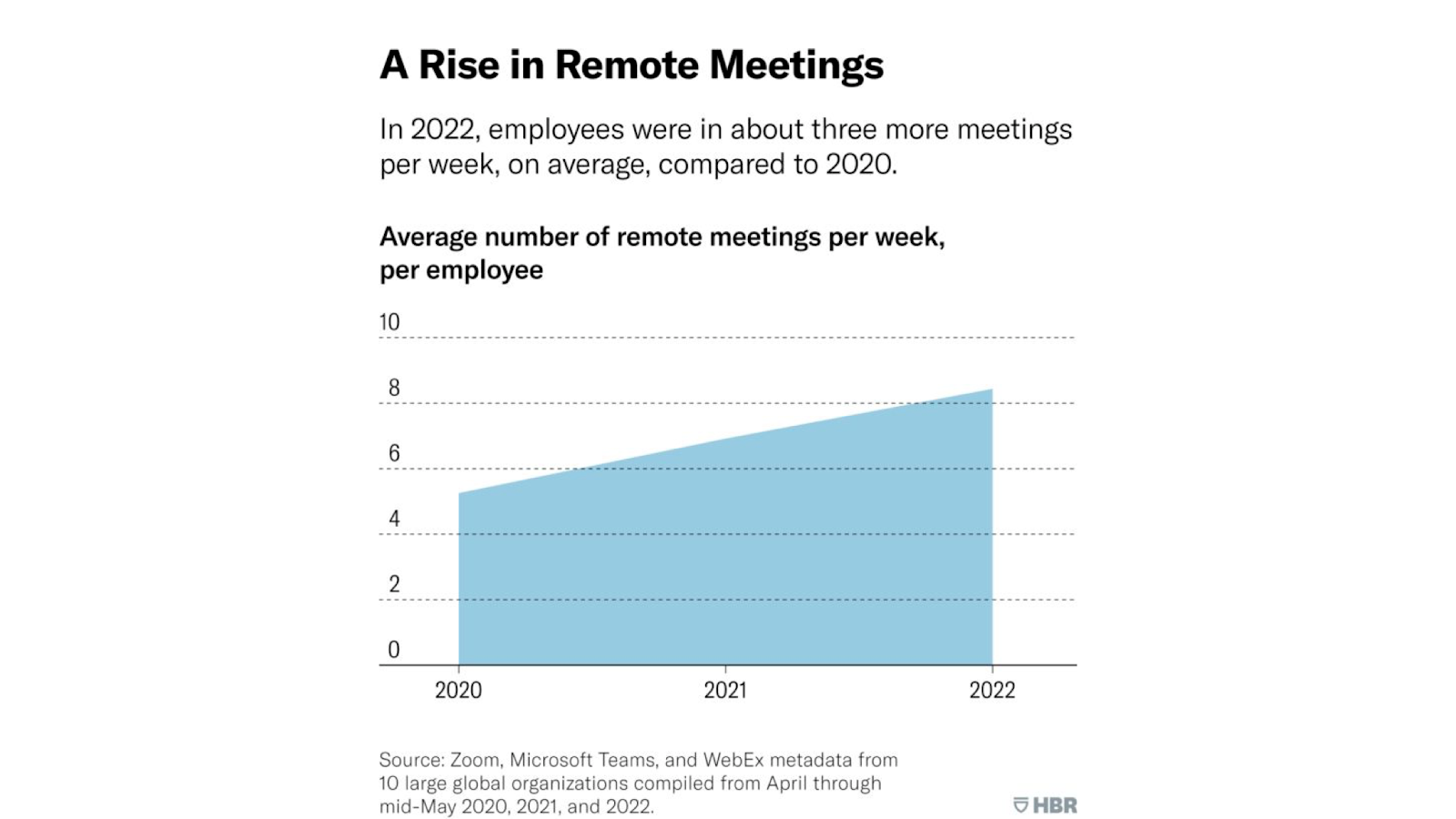
Source: HBR
What is Unified Communications and Collaboration (UC&C)?
Unified Communications and Collaboration (UC&C) is a single system that brings all communication tools together to help people connect and work more easily. It combines voice calls, video meetings, instant messaging, presence, email, file sharing, and collaboration apps in one place, so employees don’t have to switch between separate tools. UC&C makes communication smoother across devices and locations, reduces delays, and supports hybrid work. Teams can meet, share information, and solve problems in real time with a consistent and reliable experience.
Traditional Collaboration vs. Digital Collaboration
Traditional collaboration methods
Traditional collaboration relies heavily on physical presence, scheduled meetings, and manual workflows. It often involves:
- In-person meetings in conference rooms
- Whiteboards and printed materials
- Email threads for communication and approvals
- File sharing via USB drives or shared network folders
- Project updates through verbal or written reports
Geography, time zones, and rigid schedules often constrain traditional collaboration. Its manual nature also lacks scalability, traceability, and integration with other business systems.
Digital collaboration methods
Digital collaboration uses digital technologies and real-time tools to streamline communication and coordination without requiring everyone to be in the same place. It often includes:
- Real-time messaging platforms like Slack or Microsoft Teams
- Video conferencing through Zoom, Google Meet, or Webex
- Cloud document sharing and co-editing with tools like Google Docs and Microsoft 365
- Asynchronous collaboration using task management platforms like Asana, Trello, or Quire
- Integrated workflows across customer relationship management (CRM), enterprise resource management (ERP), and content management systems (CMS)
These methods support distributed teams, flexible schedules, and data-driven decision-making. Here’s a breakdown of the differences between the two.
| Aspect | Traditional Collaboration | Digital Collaboration |
|---|---|---|
| Location Dependence | Office-based, physical presence required | Location-agnostic; supports remote/hybrid work |
| Communication Speed | Delayed (emails, scheduled meetings) | Instant (chat, video, notifications) |
| Documentation | Paper documents, local files | Cloud-based, version-controlled documents |
| Meeting Format | In-person, limited by scheduling | Virtual and asynchronous options |
| Workflow Visibility | Manual tracking, limited transparency | Real-time dashboards and progress tracking |
| Tool Integration | Siloed tools, minimal system integration | API-connected, integrated platforms |
| Scalability | Harder to scale across teams or geographies | Easily scalable across global teams and time zones |
| Accessibility | Limited to office hours and internal infrastructure | 24/7 access from any device with an internet connection |
| Cost Efficiency | High travel, printing, and facility costs | Reduced overhead through digital infrastructure |
| Collaboration Style | Sequential and time-dependent | Simultaneous, real-time, and asynchronous collaboration |
Common roles that depend on digital collaboration
Many modern jobs rely on digital tools to work across locations and time zones. Some typical roles include:
- Remote project managers
- Software developers
- Marketing teams
- Customer support teams
- Consultants and freelancers
6 Key Benefits of Digital Collaboration
What makes digital collaboration so critical to the modern workplace? It helps organizations accomplish tasks and optimize teamwork without the drawbacks of location constraints, scheduling delays, or siloed communication. Here are some of the key benefits:
-
Increased productivity
Real-time messaging enhances productivity by centralizing communication and automating workflows. Deloitte uses Slack to connect systems like Tableau, streamline approvals, and accelerate decision-making across teams.
-
Better accessibility and flexibility
Video conferencing allows collaboration from anywhere, supporting remote-first work models. During the pandemic, Zoom saw a surge from 10 million to over 300 million daily meeting participants, removing location barriers for global teams.
-
Greater transparency
Cloud-based collaboration tools increase transparency through shared visibility and version control. For example, the City of Jacksonville implemented Power BI and Azure to build a suite of “transparency dashboards”—real-time data platforms that allow the tracking of service requests, animal care, public works, emergency response, budgeting, and community programs, saving 600+ hours in core processes.
-
Real-time collaboration
Asynchronous editing minimizes delays and mistakes by allowing multiple users to write and edit documents instantly. McClatchy, a digital-first media organization, adopted Google Workspace and cut article writing time by over 65% through real-time collaboration in Docs and Sheets.
-
Seamless cross-team communication
Unified communication platforms bust silos by bringing messaging, calls, and apps into one hub. Enterprises use UCaaS tools like Microsoft Teams and Slack to connect sales, product, and support teams in real time. The market is set to reach over 131 million global users by 2028.
-
Easier performance tracking and reporting
Integrated platforms deliver performance insights with real-time dashboards and metrics. Leveraging its sister company American Airlines’ partnership with Samsung, Envoy Air integrated Samsung’s digital signage solutions and content management system (CMS) to elevate internal communications and brand visibility. The company now delivers a more engaging employee experience.
Digital Collaboration Tools and Platforms
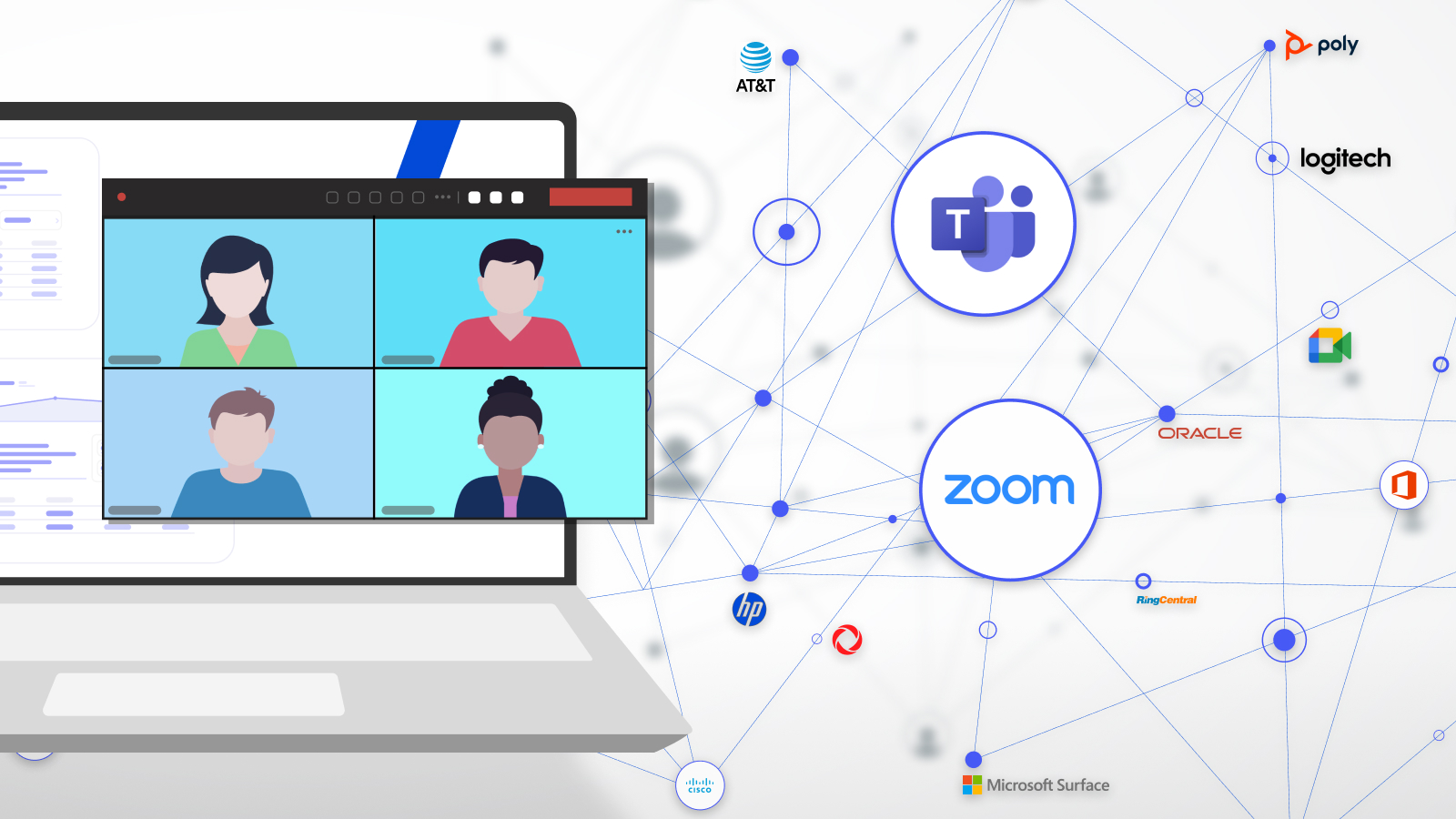
The right mix of collaborative tools is essential and can help teams plan, communicate, create, and manage content more effectively. Here are some of the most common:
Project management tools
Trello, Asana, and Monday.com help teams organize tasks, set deadlines, assign responsibilities, and track progress.
Communication platforms
Slack, Zoom, and Microsoft Teams enable instant messaging, video calls, and screen sharing to support real-time interaction.
Document collaboration tools
Google Workspace and Microsoft 365 allow multiple users to co-edit documents, spreadsheets, and presentations simultaneously.
Content management systems (CMS)
These platforms centralize digital assets, apply version control, and manage access permissions to ensure secure, organized content workflows.
Why Digital Collaboration Fails: Common Pitfalls to Avoid
Even with the right tools, digital collaboration can break down due to people, processes, or poor alignment. Some of the most common challenges to watch for include:
- Lack of clear communication: When expectations aren’t clearly defined or reinforced, remote and hybrid teams can fall out of sync, causing delays and rework.
- Over-reliance on tools without strategy: Too many platforms, disconnected workflows, and overlapping apps create confusion and reduce collaboration efficiency.
- Poor user adoption and training: If teams aren’t properly onboarded or don’t understand how to use the tools, collaboration slows down, and engagement suffers.
- Security and privacy concerns: Weak access controls and a lack of training can put sensitive information at risk, especially in BYOD and remote setups.
- Time zone and scheduling conflicts: Global teams need asynchronous communication options, or collaboration stalls waiting for overlapping work hours.
- Lack of accountability and visibility: Without clear task ownership or progress tracking, it’s hard to know who’s responsible and keep projects moving.
- Resistance to change: Longtime users of legacy tools may be hesitant to adopt new platforms, slowing down digital transformation.
- Technical issues and connectivity problems: Video lag, app crashes, and unreliable internet access can erode trust in collaboration tools and stall productivity.
To address these challenges proactively, organizations can turn to digital collaboration experience monitoring software to gain visibility into usage, engagement, and performance, and take action before problems impact productivity.
Best Practices for Effective Digital Collaboration
Effective digital collaboration requires intentional strategy, clear processes, and continuous visibility. These best practices help ensure collaboration supports both productivity and business goals.
Build a culture of open communication
Foster transparency with regular check-ins, shared feedback channels, and open forums that keep everyone aligned.
Choose tools aligned with business goals
Select collaboration platforms based on team structure, workflows, and long-term strategic priorities—not just feature lists.
Streamline and integrate collaboration tools
Avoid tool overload by consolidating platforms and connecting them with systems like CRM, ERP, or directory services.
Provide onboarding and support
Equip employees with clear training, help documentation, and responsive support to ensure they can use tools effectively.
Define roles and collaboration protocols
Establish clear responsibilities and workflows for meetings, file sharing, decision-making, and approvals.
Encourage feedback and iteration
Gather team feedback to identify friction points and adjust collaboration processes over time.
Prioritize security and compliance
Ensure your platforms are secured with encryption, role-based access, and usage policies that align with governance needs.
Track collaboration metrics and KPIs
Monitor engagement, adoption, and performance to evaluate the effectiveness of collaboration efforts.
Align IT and business outcomes
Link collaboration performance to larger objectives like retention, satisfaction, and operational efficiency.
To implement these best practices, organizations may benefit from purpose-built tools. For example, WXP Collaboration is a leading digital collaboration experience monitoring solution that offers technology insights, space usage insights, and near real-time analytics across hybrid environments. It’s a powerful technology that provides contextual intelligence, unified visibility, and actionable alerts for business collaboration applications, devices, and infrastructure.
Why Visibility Is Critical to Collaboration Success
Digital collaboration tools are essential in today’s workplace, but visibility is key. Poor meeting quality, underused spaces, and disengaged teams often go unnoticed until productivity suffers.
That’s why visibility is foundational to collaboration success. IT and business leaders can measure, manage, and continuously improve how people connect, communicate, and create across platforms and work environments.
As a core capability in the HP Workforce Experience Platform (WXP), WXP Collaboration delivers collaboration experience monitoring and analytics across unified communications (UC) environments. It provides technology, space, and user insights to optimize collaboration and help organizations improve meeting quality, reduce friction, optimize investments, and increase ROI.
Want to better monitor and analyze the collaboration experience across your digital workplace? Request a demo today!
FAQ
What is the meaning of digital collaboration?
Digital collaboration means working together on projects using digital tools. It allows teams to exchange ideas, assign tasks, and solve problems without being in the same location.
What are the four types of collaboration?
The four main types of collaboration are:
- Internal collaboration – within a single organization
- External collaboration – between different organizations
- Team collaboration – among members of the same team
- Cross-departmental collaboration – across multiple departments
What are the three common components of digital collaboration?
The three key components are:
- Project management tools like Asana are used to organize and track tasks
- Communication platforms like Slack and Zoom are for real-time interaction
- Document collaboration tools like Google Workspace for co-editing files
Organizations also use content management systems (CMS) to centralize assets, manage permissions, and apply version control across projects.
What do you mean by electronic collaboration?
Electronic collaboration (e-collaboration) refers to using computer systems and software to help individuals and organizations work together to achieve shared goals.
HP Workforce Experience Platform is a comprehensive digital employee experience solution that enables organizations to optimize IT for every employee’s needs.
Discover how it can transform your IT operations from a cost center to a business accelerator. Simply fill out the form below, and our team will be in touch soon.
From the blog
The latest industry news, interviews, technologies, and resources.






Frequently asked questions
Here's everything you need to know about WXP.
- What is the HP Workforce Experience Platform (WXP)?
- How does WXP work?
- Can WXP be customized to fit specific business needs?
- How is WXP modular?
- Is WXP compatible with different vendors and operating systems?
- How does WXP integrate with other IT tools to provide a more comprehensive solution?
- What is a Workforce Experience score?
- How is AI used within WXP?
- How can I buy WXP and find out about new releases?
