
Only 20% of Workers Happy, But Change Possible with DEX

HP recently released the 2025 Work Relationship Index (WRI) and, despite only 20% of knowledge workers saying they have a healthy relationship with work (down 8% from last year), there are many opportunities for organizations to reverse this downward trend.
Eighty-five percent of the factors measured for the WRI that influence work satisfaction are within an organization’s control to change. Technology and collaboration are included in these factors and also identified as two of six key enablers that facilitate professional fulfillment.
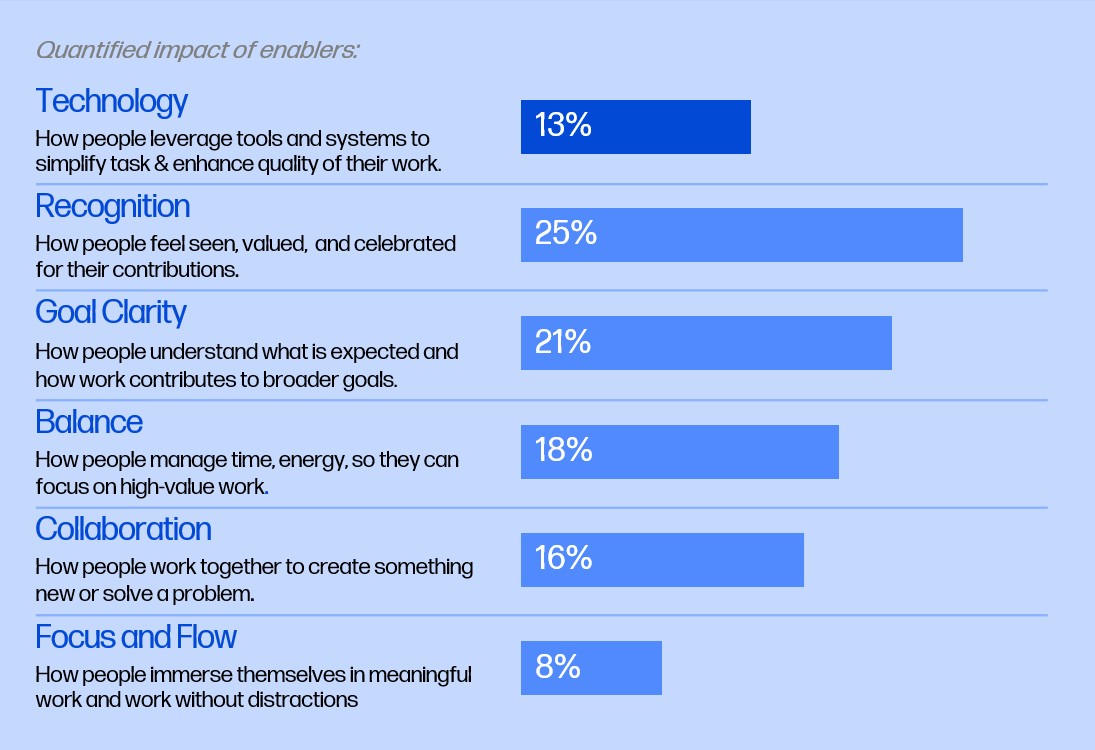
The 2025 Work Relationship Index identified six enablers that facilitate professional fulfillment.
Combined, technology and collaboration create 29% of the impact on enabling professional fulfillment. Since collaboration includes unified communication as a service (UCaaS) solutions, meeting room systems, and other technology that brings teammates together, this means the IT department has the opportunity to play a leading role in improving employees’ relationship with work.
The Work Satisfaction Solution Called DEX
One of the key takeaways of the 2025 WRI is to “utilize DEX solutions.” With new platforms emerging that help organizations improve the digital employee experience (DEX), each type of worker can experience a healthier relationship with work.
With DEX, IT teams benefit from having a comprehensive solution for enabling proactive IT while employees benefit from more performant devices and less help desk interactions. (Keep in mind: 58% of employees would rather live with unresolved technical issues than contact the service desk.)
How DEX Supports Workforce Technology
DEX helps IT departments ensure that technology provided to employees functions properly, which is directly tied to employee happiness. According to the 2025 WRI, a healthy relationship with work increases five-fold for knowledge workers when they believe their company is investing in technology and tools that support their experience.
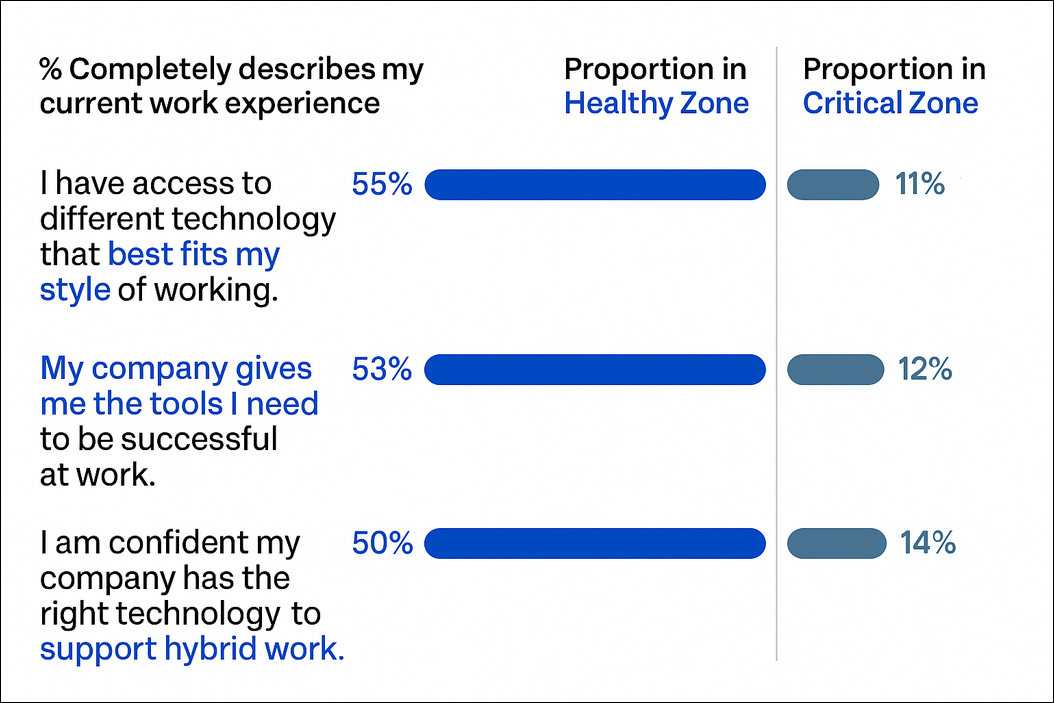
When desk-based workers are given the right tools and technology, the likelihood of them being in the Healthy Zone for work satisfaction increases five-fold.
Fifty-three percent of knowledge workers say they have the tools they need to be successful and only half feel confident that their company has the right technology to support hybrid work. At the same time, demand for better tools is clear: workers’ top requests include upgraded, more efficient hardware such as faster, more performant computers.
DEX platforms allow IT to track device performance and automatically remediate issues. For example, the HP Workforce Experience Platform (WXP) can monitor the performance of multi-vendor device fleets across various operating systems and, when needed, apply remediations to affected applications and machines.
How DEX Supports Workforce Collaboration
Only 14% of knowledge workers say their work environment makes it easy to transition between work locations. With DEX software, IT teams can ensure employees have reliable access to communication and collaboration tools across locations—office, home, and hybrid.
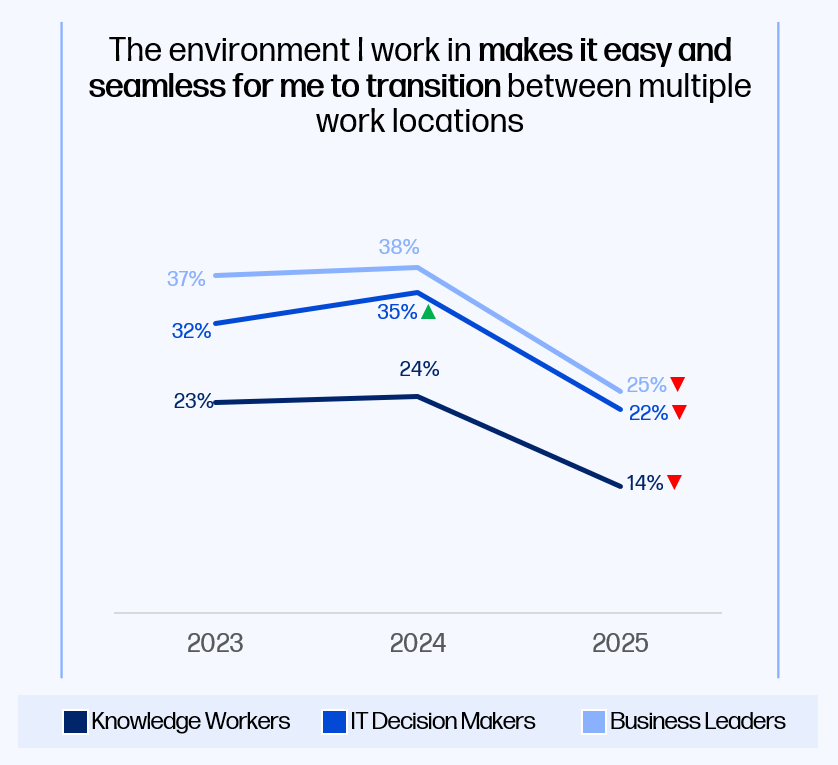
Compared to 2023, workers find it significantly harder to transition between office, remote, and hybrid work.
As hybrid work patterns continue to shift, there is a growing need for technology that supports work in office and remote environments. For example, while there was less of a need for conference room equipment to function properly when the majority of knowledge workers were based at home, more people are back in the office and back to experiencing issues with conference room mics, speakers, video, and presentation software.
Modern DEX solutions are beginning to solve these issues with collaboration monitoring built in. In addition to monitoring the performance of individually assigned hardware, a solution like WXP monitors the performance of UCaaS software, meeting apps, and meeting room hardware. For conference rooms specifically, WXP gives IT and operations teams data about which technology is used during meetings. With these insights, they can investigate trends signaling poor collaboration, such as conference rooms with video capabilities that are only utilizing audio.
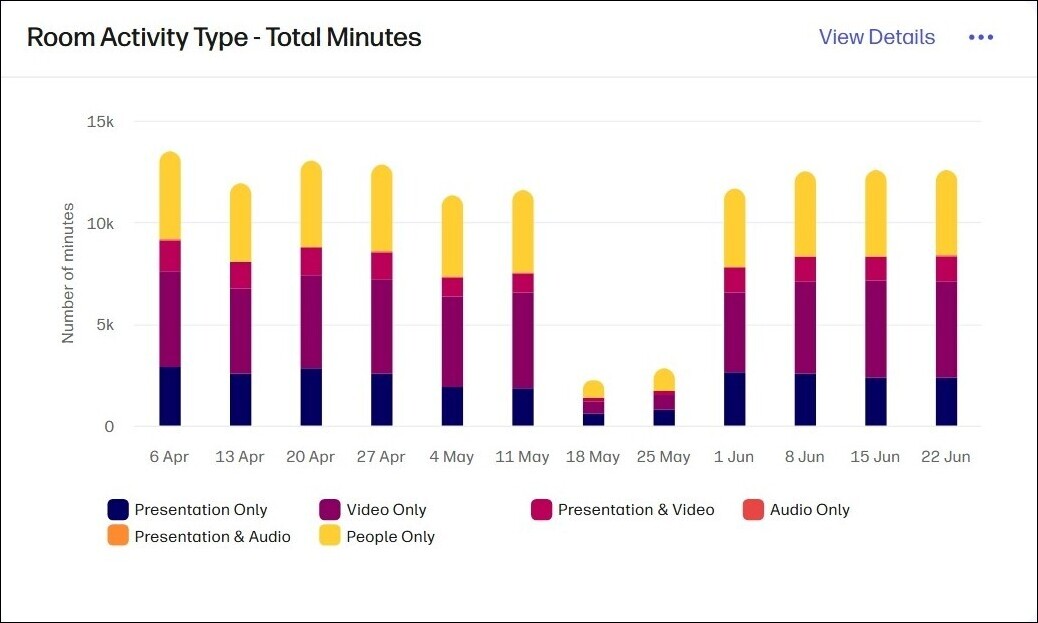
The “Room Activity Type” report in the Collaboration Spaces dashboard of WXP shows how conference room technology is used during meetings.
Key Takeaways for Improving Work Satisfaction with DEX
By following the steps outlined below, IT teams can translate insights from the 2025 Work Relationship Index into meaningful change.
- Focus on proactive device support. Use DEX data to identify and resolve issues before they reach employees. This proactive approach to IT reduces downtime and improves the perception of IT from help desk to workforce enabler.
- Strengthen hybrid collaboration. Monitor UCaaS platforms and meeting room hardware as part of a unified collaboration strategy to prevent disruptions across office and remote work environments.
- Align IT strategy with wellbeing. Tie DEX initiatives directly to improvements in worker satisfaction, using tools like WXP Pulses to send simple surveys to employees about their experience with IT and the technology provided to them.
For more insights about increasing worker happiness, download the full report for the 2025 Work Relationship Index.
From the blog
The latest industry news, interviews, technologies, and resources.








Frequently asked questions
Here's everything you need to know about WXP.
- What is the HP Workforce Experience Platform (WXP)?
- How does WXP work?
- Can WXP be customized to fit specific business needs?
- How is WXP modular?
- Is WXP compatible with different vendors and operating systems?
- How does WXP integrate with other IT tools to provide a more comprehensive solution?
- What is a Workforce Experience score?
- How is AI used within WXP?
- How can I buy WXP and find out about new releases?
