
HP on HP: How We Used WXP to Accelerate the Windows 11 Migration

With less than a year to go before support for Windows 10 lapsed, the HP team still had nearly two-thirds of its fleet of more than 80,000 devices to be upgraded. But they also had the WXP Windows 11 Readiness Assessment tool.
With support for Windows 10 coming to an end, HP’s IT team faced a massive upgrade effort: migrating over 80,000 devices to Windows 11 across a global fleet. Upgrading a fleet that large might sound like a daunting task, but for HP’s IT team, it was also a chance to put our own tools to the test. As part of the HP-on-HP program, which involves using the HP Workforce Experience Platform (WXP) to manage the HP fleet and provide feedback to our product teams, they used WXP’s Windows 11 Readiness Assessment tool to get ahead of the October 2025 deadline and streamline their Windows 11 migration.
We recently sat down with the team to learn more about their process and what tips they might have for WXP customers as they assess how to complete their own enterprise migrations. Read on to learn how the WXP Windows 11 Readiness Assessment tool helped them:
- Assess the scope of the Windows 11 migration project across HP’s fleet
- Proactively identify issues blocking Windows 11 upgrades for intervention
- Prioritize devices for replacement or remediation actions in advance of the upgrade
- Communicate with employees regarding specific obstacles to compliance
- Monitor and report the status of the upgrade across the entire fleet with confidence
The Wake-up Call: A Deadline Looms
As in most large corporate IT environments, software upgrades in HP roll out over time, as new devices enter the fleet with the OS preinstalled. “We started rolling out Windows 11 a few years ago when we reimaged a device or if someone received a new device shipping from the factory,” explained Wesley Haney, PC management engineer and service engineer for HP. “So, we’ve had Windows 11 in our environment for years.”
But with support for Windows 10 set to expire in October 2025, the team set out in late 2024 to determine the status of the upgrade across the HP fleet. At that point, of the more than 80,000 devices across the company, only about one-third had been upgraded. And it wasn’t just a matter of getting remaining Windows 10 users into compliance—the team determined that they wanted all devices on the same version of Windows 11, 24H2, to streamline IT support and ensure everyone has the best experience as the company prepares to roll out AI PCs. This meant that even some users who were already using Windows 11 would require an additional update.
The platform provides a dashboard showing how many devices have been updated, how many updates are still outstanding, and even the potential issues behind the status of each device.
New Year’s Resolution: Facing Down the Challenge
The project officially kicked off in the new year. “The first thing we did was check the Windows 11 Readiness report,” said Wesley. “We literally started with that to see where we were at, because we needed to know what hardware was compatible. We were budgeting based on which devices will get replaced. That’s our first attack—we know that they can’t take Windows 11, we’re going to replace them with a new device.”
WXP and its Windows 11 Readiness Assessment Tool were central to the project all the way through, performing Windows 11 compatibility checks, providing live data, performance risk flags, and device insights the team could use to prioritize time and budget. The platform provides a dashboard showing how many devices have been updated, how many updates are still outstanding, and even the potential issues behind the status of each device.
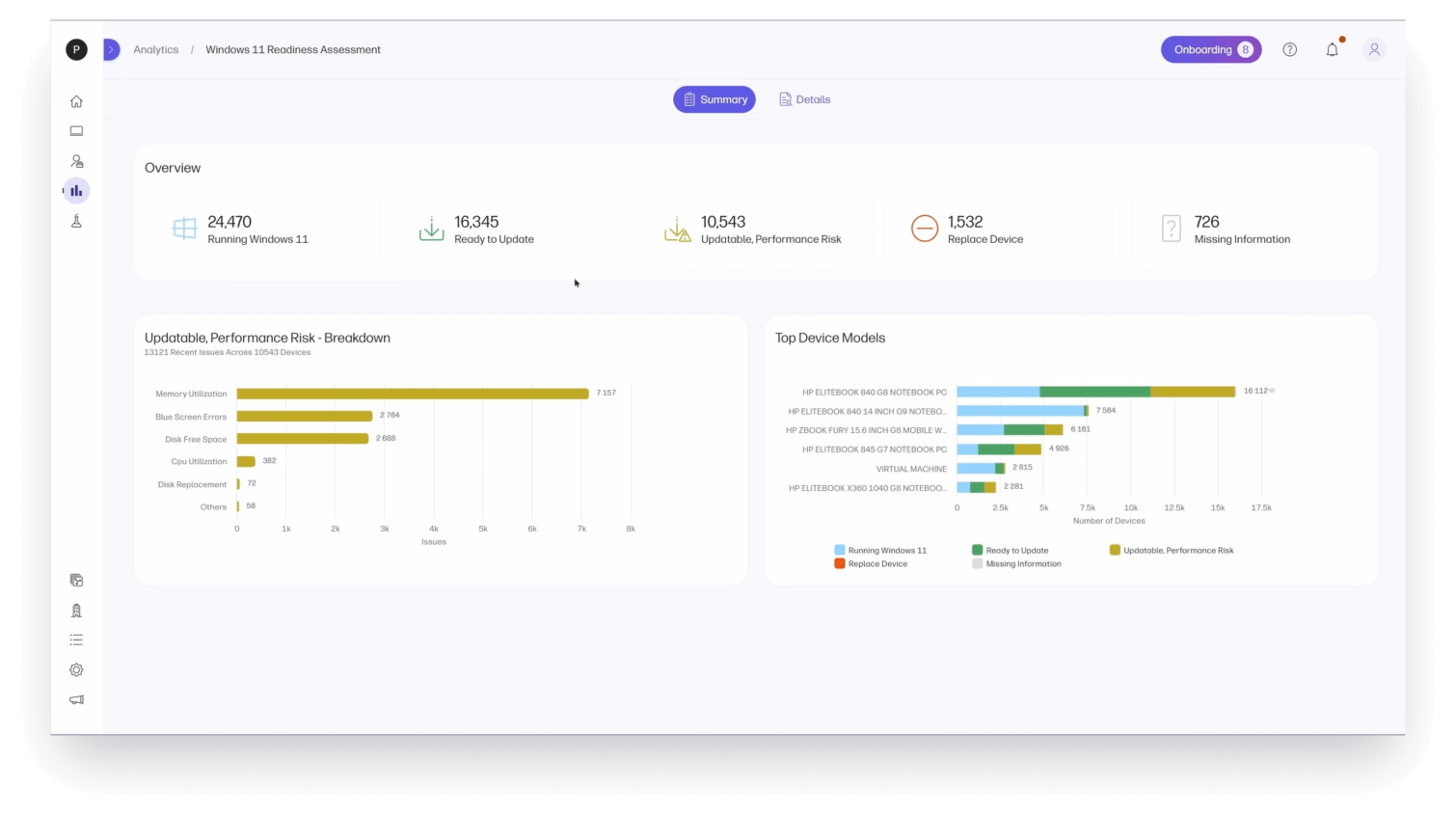
The Windows 11 Readiness tool in WXP provides a snapshot of the current state of the device fleet – how many have been upgraded, how many are ready to upgrade, and how many need further attention or replacement. (Representative dashboard, sample data used.)
“So obviously one of the big advantages here,” said Wesley, “is that there’s live data, a dashboard you can come to each time you need an update. And then you know the device names and have actionable data to use.”
Wesley has been with HP for several years—this was not his first upgrade cycle. He noted that previous upgrades required far more manual work—checking compatibility requirements, compiling inventory, comparing specifications, and building custom reports in SQL to hand off to management.
“We started months ahead of where we would have been,” he said. “If I had normally started this project, I would likely have had to start it last January so I could get to where we were this January.”
With WXP data at hand to assist them in setting priorities, the team launched a tiered rollout. Devices were categorized by compatibility, performance risk, and user type.
“Performance is a big issue—we want to ensure that we’re not shutting down the machines with the upgrade,” said Wesley. “The first tier of devices had to be replaced, the ones that just aren’t compatible. But then for the next tier, we’d go through the different details like the age of the device, the amount of memory, the amount of RAM, even the battery, just seeing what it’s doing in terms of the capacity and its charge, and everything else.
“But it all kind of goes back to the performance. Once we decided we were going to replace the thousands of devices that weren’t compatible, then we started going through the rest of the list. That feature was really helpful.”
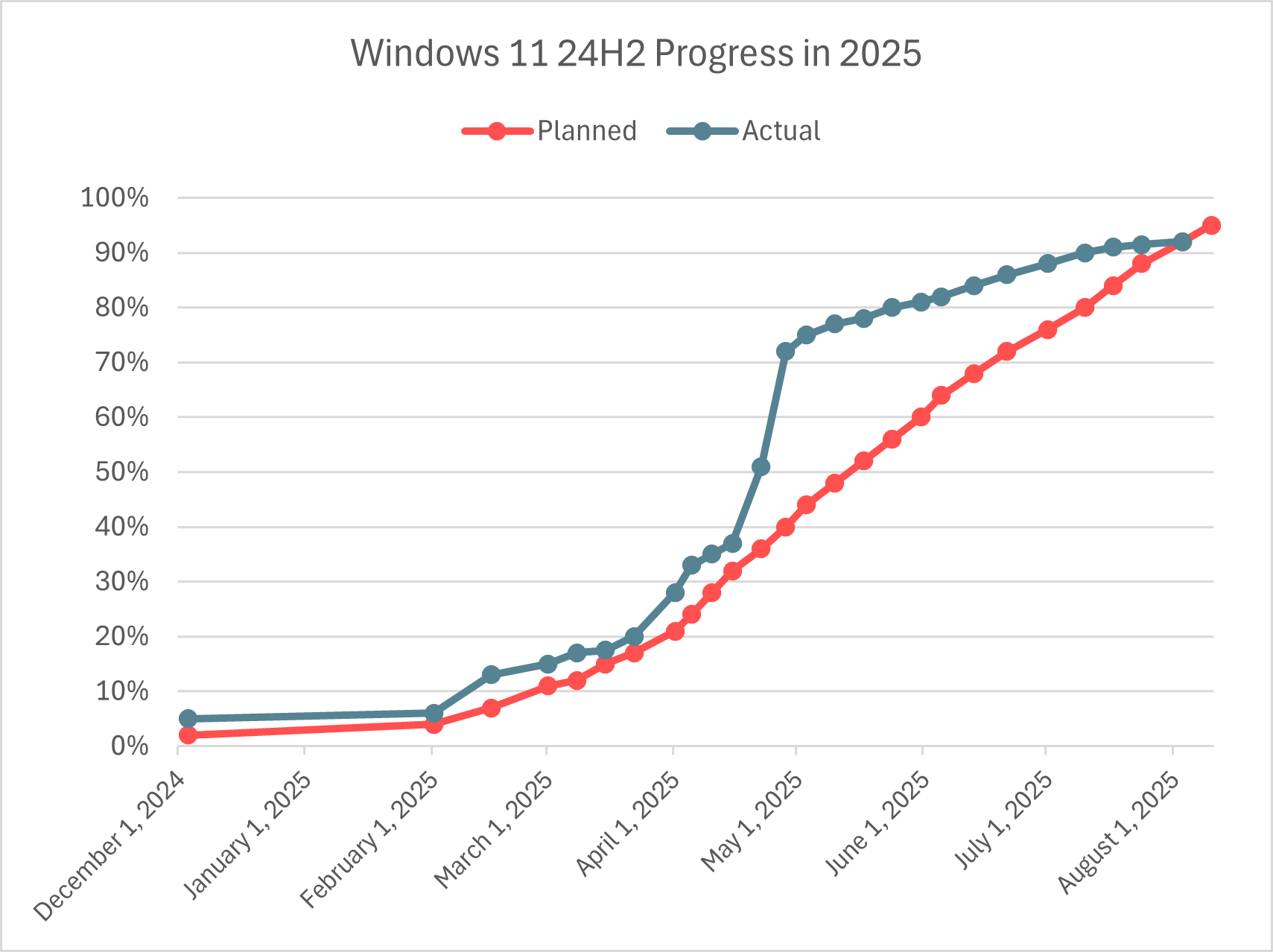
By April, they could see that the number of compliant devices had more than doubled to about 60,000, and it was time for the team to dig deeper into what was behind the holdouts.
The Human Element: Communication That Works
With more information from WXP about not only which devices still needed to be updated, but clues as to why they might be lagging, the team was able to address specific challenges in their communications with employees who hadn’t upgraded their devices yet. For example, the team was able to dig into the data and proactively identify which devices did not have the disk space required for the update.
“We were able to very quickly pull a list of everybody in the company who has a problem because of disk space,” said Ryun Bradfield, the software engineer responsible for WXP’s deployment within the HP-on-HP program. “We actually targeted these people with emails—instructions on how to free up more disk space before they did the Windows 11 upgrade.”
A big surprise for the team was the reach of the platform’s communication channel compared to their emails—while their email open rate was only about 20%, the response rate on the pulse was 73% within the first two days.
Ryun pointed out that without WXP, this particular workflow wouldn’t have been possible.
“People would have tried and then it would have come back and either failed or told them they didn’t have enough disk space,” said Ryun. “Now you’ve got a big percentage of people that will say, ‘OK, well, I’m just going to ignore it then, I don’t have time to deal with this.’ And you get some that actually go into Tech Cafe and say, ‘I have this problem.’”
This was not a small problem, as Wesley points out. “I think we had 5,000 devices that didn’t have disk space,” he said. “It was a known metric when we started the project.”
After months of email reminders and notices through other communication channels, the team determined they needed a different approach to get the final set of devices across the line—a targeted pulse survey, sent directly from WXP to users who were still lagging behind, asking about what was holding them back.
“And then at the bottom of the survey, what really helped is we could just put in ‘Hey, do you need more help?’” said Ryun. “Yes or no? Yes. OK, here’s a list of the people who actually want help. So now I can hand this to support and proactively say ‘Go help these people.’”
A big surprise for the team was the reach of the platform’s communication channel compared to their emails—while their email open rate was only about 20%, the response rate on the pulse was 73% within the first two days.
And yet, even their own team wasn’t immune—Ryun, who was responsible for multiple devices, admitted he’d been ignoring the emails too.
“The funny story I have is, you know, I actually have a few machines on here and I had not been paying attention to my email,” he confessed. “And I got pinged by my manager today and I’m like, did I get busted?”
Ryun isn’t alone. The team is currently following up specifically with other employees who may have multiple devices and have only upgraded their primary one.
“People are getting emails about their primary, but they forget that they have the other device in a closet somewhere or in a maybe a lab room that they don’t go into every day,” said Wesley. “Or maybe it’s just sitting at the office and always on and they work from home. They’re online, but when I send them an email, they check it while they’re on their primary machine, so they look and say, ‘Oh, I need to upgrade, but this says I’m upgraded already,’ and then they ignore it like it’s a false positive or false negative.
“So now what we need to do is send that user a message to all their devices saying ‘Hey, don’t forget you have secondary devices, go upgrade those too.’ And that’s one of the nice things about the pulses, is I can send it out by person, which is going to pop up on whatever device they’re at. But I can also send it out by their serial number, so I can have it pop up on the secondary device and not on the primary device saying, ‘Hey, this PC needs to be upgraded.’”
At the time of writing in late July 2025, there are about 6,000 devices remaining to upgrade, some of which are on Windows 10, and the rest on earlier versions of Windows 11.
Lessons From the Front Lines
A key part of the mission of HP-on-HP is to gather learnings that will help both our product teams in building and testing the platform, and our customers and partners as they deploy and use the platform in their own organizations. For IT teams managing large-scale enterprise fleet software upgrades, whether to Windows 11 or future iterations, the HP team offers this advice:
1. Start early
With the data available in WXP, the team says they could have started the process of planning and communicating earlier, particularly where devices needed to be replaced. “I feel like we probably should have started that communication journey a lot earlier,” said Wesley. “We knew they didn’t have disk space, we could have been working on cleaning up people’s drive space a lot earlier, we could have been working on some of the memory utilization, saying hey, you don’t have enough RAM, and adding them to that PC replacement list.”
2. Use live data to drive decisions
WXP enables continuous monitoring of update status—the team is able to regularly check not only how many upgrades are still outstanding, but even what particular issues are blocking those upgrades. One surprising finding was that even some devices that, based on the model alone, would have been expected to upgrade smoothly, were facing some obstacles. If they were only recorded on a standard inventory listing, the issues might have been missed, causing frustration for users when the upgrade failed. Instead, WXP identified those blockers in advance, allowing the team to intervene.
3. Don’t underestimate the power of targeted messaging
Proactively addressing not only the outstanding task (the upgrade), but also the underlying cause (like disk space), empowers employees to complete their upgrades with less frustration or know when they need to ask for more help before their work is disrupted by an upgrade failure. And direct communication from within WXP gave employees an easy way to ask for further help without having to send a separate email or submit a separate helpdesk ticket—providing a far better user experience.
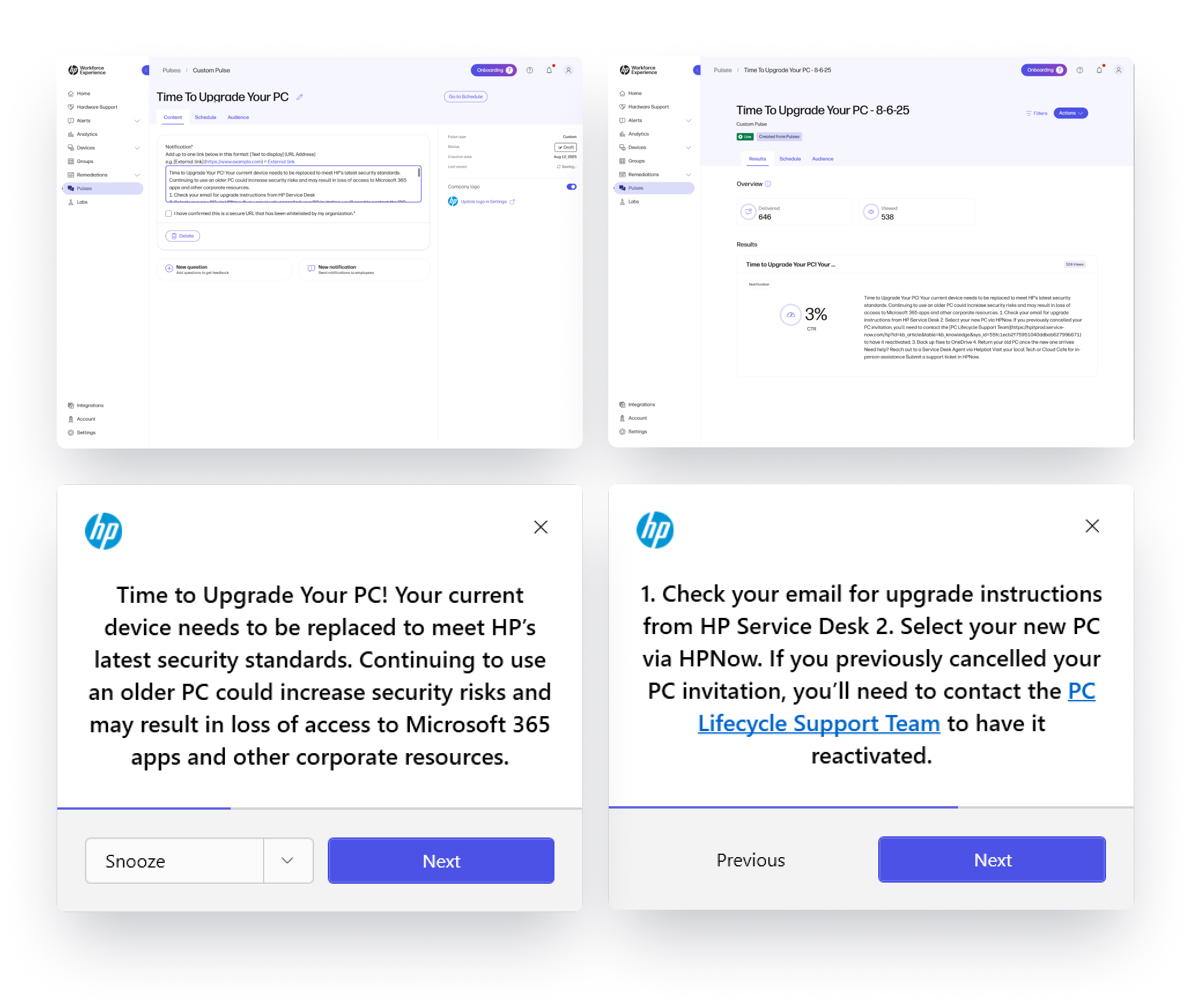
Targeted pulses can be created directly within WXP and pushed to users’ desktops, avoiding crowded inboxes.
The Impact: Visibility, Confidence, and Control
With WXP, HP’s IT team could establish a clear baseline for the Windows 11 upgrade project, easily monitor progress over time, confidently report progress to executives, target support where needed, and avoid service disruptions for employees.
Kathryn Autin, HP-on-HP program manager, summed up the value this way: “I think what it also does is it gives us a very clean, reliable picture of our fleet that we can confidently share upward to our CIO or even the CEO to say, ‘This is what our environment looks like, these are our problem areas, this is how far we are in being completely compliant.’”
The team put WXP data to the test, and it stood up, again and again. “It proved itself when we had to dig deep and go to those individuals with those machines—what we saw in the report was what was actually happening on the machine,” said Kathryn. “It made it much easier for us to control our upgrade to Windows 11 because we have information available through WXP.”
Rumor has it (as yet unconfirmed by the HP-on-HP team) that a scorecard has been generated and it may or may not be the subject of some competition at the executive level about which team can hit full compliance first.
This is the payoff: a tool that not only works but empowers leadership with reliable, timely insights to support any company initiative—or even a little friendly interdepartmental rivalry.
Facing Your Own IT Challenge?
Want to learn how WXP can help your team accelerate compliance and reduce upgrade risks? Or perhaps your IT team is ready to take on other strategic initiatives to accelerate business growth and needs better visibility into the performance of your fleet and the digital experience of your workforce. Contact your HP sales representative or partner, or reach out directly using the form below.
Additional Resources
From the blog
The latest industry news, interviews, technologies, and resources.





Frequently asked questions
Here's everything you need to know about WXP.
- What is the HP Workforce Experience Platform (WXP)?
- How does WXP work?
- Can WXP be customized to fit specific business needs?
- How is WXP modular?
- Is WXP compatible with different vendors and operating systems?
- How does WXP integrate with other IT tools to provide a more comprehensive solution?
- What is a Workforce Experience score?
- How is AI used within WXP?
- How can I buy WXP and find out about new releases?
