
Unified Communications as a Service (UCaaS) continues to redefine the way organizations collaborate by combining voice, video, and chat into one seamless experience. To maximize the benefits, IT teams must focus on selecting the right UCaaS providers, maintaining their systems for resilience, and continuously monitoring performance and engagement with analytics. In this article, industry experts share practical ways to improve UCaaS solutions, from choosing best-fit tools and preventing downtime to analyzing data for actionable insights that enhance the digital employee experience.
Expert Tips for Choosing UCaaS Solutions
Building the best UCaaS solution involves more than considering basic tools for meetings and calls. Business stakeholders and IT decision makers must align technology with employee preferences, business objectives, and long-term organizational value. By understanding how employees use different platforms and evaluating the strengths of shortlisted UCaaS companies, IT leaders can make informed decisions that drive stronger collaboration.
Understand employee preferences for UCaaS services
Based on a LinkedIn survey of over 20,000 people, around 39% of people use Microsoft Teams the most as a UCaaS service, followed by 33% using Zoom the most and the remainder using either Webex (21%) or GSuite (7%) the most. However, many respondents noted that they use a combination of these UCaaS services, plus other services like Slack, depending on the use case. This highlights the importance of flexibility in UCaaS platforms and how user preferences vary by context.
“Many [people] use one collaboration application with their work team, other collaboration applications when communicating with customers, and then another application for personal use with family and friends. In other cases, people use one tool for video conferencing alone and then another for messaging. Also, people pick applications based on ease-of-use for mobility. An instructional designer shared that while she prefers Microsoft Teams on her desktop, she ultimately relies on Slack because it is easier to download and use on her mobile device than Microsoft Teams.”
Dominique Ramirez, Digital Marketing Manager for HP Vyopta
Source: What I Learned From 20,000+ People on LinkedIn About Video Collaboration Preferences (LinkedIn)
Action step: Measure employee sentiment toward UCaaS software already installed on devices within your organization. Surveys like Sentiment Pulses in WXP help you collect feedback from employees about their satisfaction with current UCaaS platforms. Expand surveys to include UCaaS services not yet deployed to identify tools that employees find most intuitive or productive for different work scenarios.
Understand the value of shortlisted UCaaS services
By 2030, more than 75% of companies will use UCaaS for their calling, meeting, and messaging needs, according to a prediction by Metrigy President and Principal Analyst Irwin Lazar. As UCaaS adoption surges, businesses must go beyond feature comparison to evaluate long-term reliability, integrations, and data visibility that strengthen unified communications and collaboration.
“In the fast-paced world of Unified Communications (UC), we often grapple with the challenge of simplifying complex scenarios involving cutting-edge hardware, diverse platforms, advanced features, and the rapidly evolving influence of AI. As professionals deeply embedded in the tech world, it’s easy to get caught up in the intricacies of our solutions. However, the true challenge lies in bringing these complexities down to a level where non-technical stakeholders can easily grasp the value of what we offer.”
Uwe Ansmann, Senior System Engineering Manager for HP Poly
Source: Bridging the Gap: Simplifying Complexity for Customer Success (LinkedIn)
Action step: Work with UCaaS companies that clearly explain the business value and ROI of the collaboration solution you’re evaluating. Prioritize UCaaS providers that offer transparent roadmaps, robust analytics dashboards, and integration support for tools like Zoom analytics and Microsoft Teams analytics to make performance data actionable.
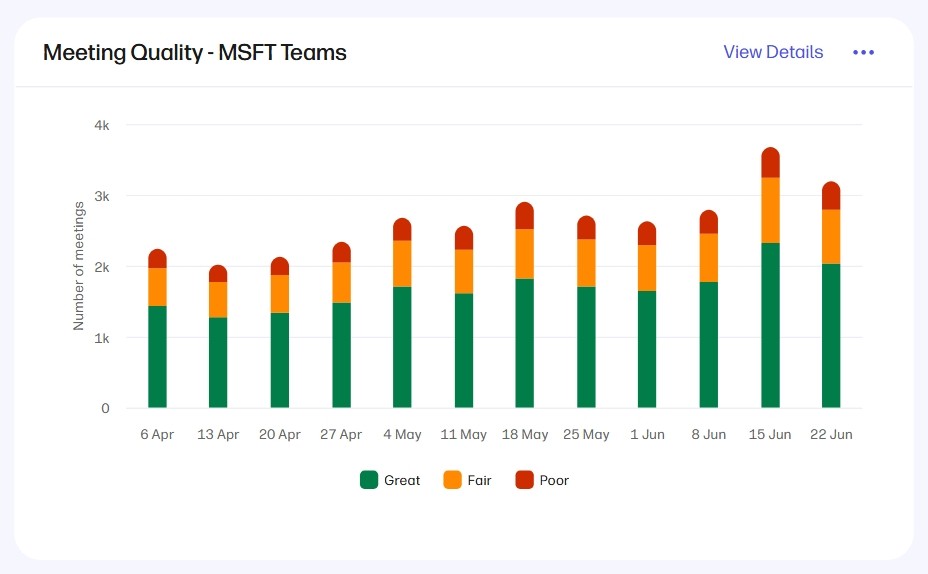
After integrating a UCaaS platform into your overall solution, you can monitor UCaaS performance and meeting quality with the collaboration experience with Vyopta integration in the HP Workforce Experience Platform (WXP).
Expert Tips for Maintaining UCaaS Solutions
Even the best UCaaS platforms require ongoing maintenance and proactive strategies to minimize downtime and optimize performance. From developing contingency plans to avoiding version sprawl, IT teams can use practical tactics to sustain system reliability and maintain a consistent unified communications and collaboration experience.
Create a contingency plan for UCaaS platform outages
According to a 2024 survey of 300 IT decision makers covered by Computer Weekly, 97% of enterprises have experienced major UCaaS-related outages. With unified communications and collaboration at the heart of daily operations, any disruption can quickly affect business continuity. For this reason, it’s important to have a multi-platform UCaaS solution, supported by a policy that makes it easy for users to access collaboration alternatives during outages.
“With UCaaS platforms at the core of daily operations, every minute counts. Yet on April 15, 2025, Microsoft Teams confirmed a major issue that prevented users from sharing or viewing files, disrupting collaboration across organizations. The issue was traced to a recent backend update, forcing Microsoft to halt the rollout, revert the change, and get users to restart. The very next day, Zoom faced its own disruption. At the peak of the incident, users reported over 59,000 outages.”
Alfredo Ramirez, CEO of Vyopta, a wholly-owned subsidiary of HP
Source: A Contingency Playbook for Microsoft Teams and Zoom Outages (WXP Blog)
Action step: As part of your unified communications and collaboration strategy, develop a documented plan for alternative communication tools and workflows in case your primary UCaaS platforms experience downtime. Map out fallback tools such as Slack, Google Chat, or email distribution lists to maintain productivity during outages.
Prevent version sprawl for superior UCaaS experiences
Over 50% of employees say their workplace technology is moderately or completely outdated, according to the Workplace Resources Report by ZenBusiness. This aging technology often contributes to version inconsistencies across UCaaS services and, when different users are running different versions of the same software, the quality of collaboration can take a hit.
“One of the most powerful things you can do to improve the overall employee experience is to eliminate version sprawl. The more disparate versions of applications and OS versions a given IT team is supporting, the harder it is to troubleshoot a device or maintain a great employee experience.”
Nathan Kofahl, Director of Software Product Management for Endpoint Management Tools and Services @ HP
Action step: Use digital employee experience (DEX) software to monitor, manage, and update UCaaS services installed on every employee device. Automated patching, version control, and endpoint monitoring tools can ensure consistent performance and security across all devices connected to UCaaS platforms.
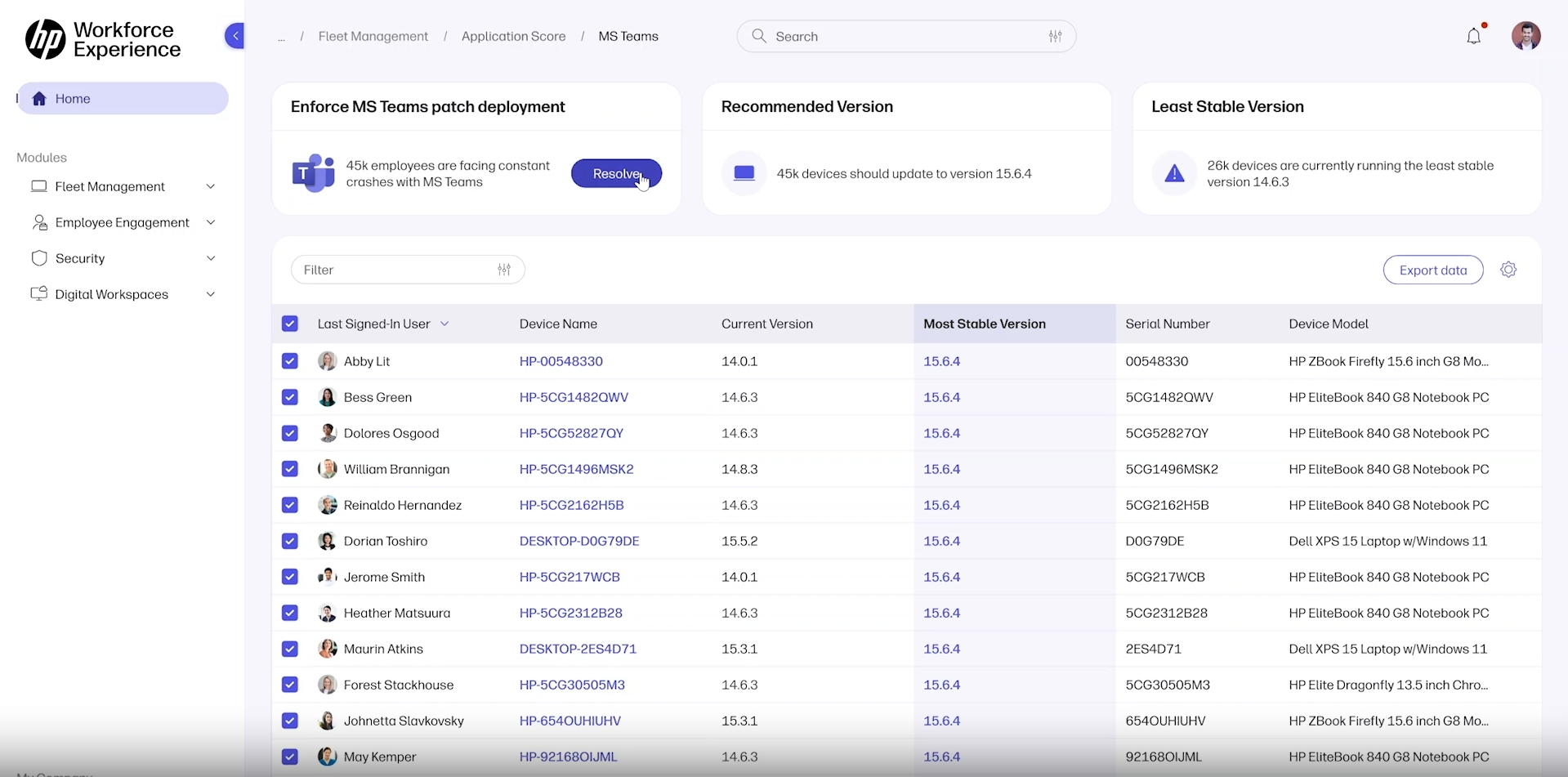
The Fleet Management / Application Score feature in the HP Workforce Experience Platform (WXP) can identify version sprawl and deploy a patch across multiple devices with a single click. Here, an update for Microsoft Teams is being deployed to various device models.
Expert Tips for Monitoring UCaaS Solutions
Monitoring UCaaS solutions does not mean monitoring the conversations teammates are having across platforms, just like monitoring employee productivity doesn’t mean monitoring the work activity teammates conduct across devices. Instead, the goal of UCaaS monitoring is grounded in proactive IT and workplace optimization. Leaders across information technology, human resources, and workplace operations can collect UCaaS analytics and device telemetry in an effort to improve collaboration experiences and the broader employee experience.
Access UCaaS analytics to understand collaboration trends
According to Microsoft documentation, a Microsoft Teams analytics dashboard is available for reporting on how the application is used. With the right metrics, organizations can identify usage patterns, troubleshoot performance bottlenecks, and strengthen adoption strategies.
“Improving collaboration outcomes starts with data, and modern systems and collaboration applications offer more discrete data than ever. For example, Microsoft 365 and Google Workspace provide a work hub that supports individual and collaborative teamwork while making available important metadata. Meanwhile, Zoom, Microsoft, Google, Cisco, HP, and Logitech create intelligent workspaces that anticipate employee needs and make available important telemetry from personal systems and UC group meeting systems, infrastructure, and applications.”
Alfredo Ramirez, Senior System Engineering Manager for HP Poly
Source: The Core Technologies Driving the Future of Digital Collaboration Experience (WXP Blog)
Action step: Collect data from UCaaS software and analyze it with a collaboration experience management platform to translate raw usage data into performance improvements. Integrate Zoom analytics and Microsoft Teams analytics dashboards to gain a unified view of collaboration health across UCaaS providers
Collect telemetry to improve meeting culture
Employees who stay muted or turn their cameras off leave companies sooner than employees who participate with their cameras on during virtual meetings, according to a Vyopta study of 40 million meetings featured in Harvard Business Review. Monitoring engagement indicators can help organizations identify early warning signs of disengagement or burnout.
“Collaboration experience management software can help improve meeting quality. Collecting telemetry data on video, audio, device performance, and user behavior can give IT and operations teams clear, actionable insights to improve experiences. Beyond technical challenges, spotting signs like fewer 1:1s, lower engagement, or more siloed teams allows organizations to step in early and turn things around before they lead to burnout or attrition.”
Mike Tolliver, Product Management Director @ HP | Vyopta
Source: How Smarter Meetings Can Reverse Digital Fatigue (WXP Blog)
Action step: Collect telemetry from meeting room devices and use the data to identify trends representative of poor meeting experiences among employees. Correlate meeting participation with sentiment surveys and UCaaS monitoring dashboards to uncover actionable steps that improve engagement.
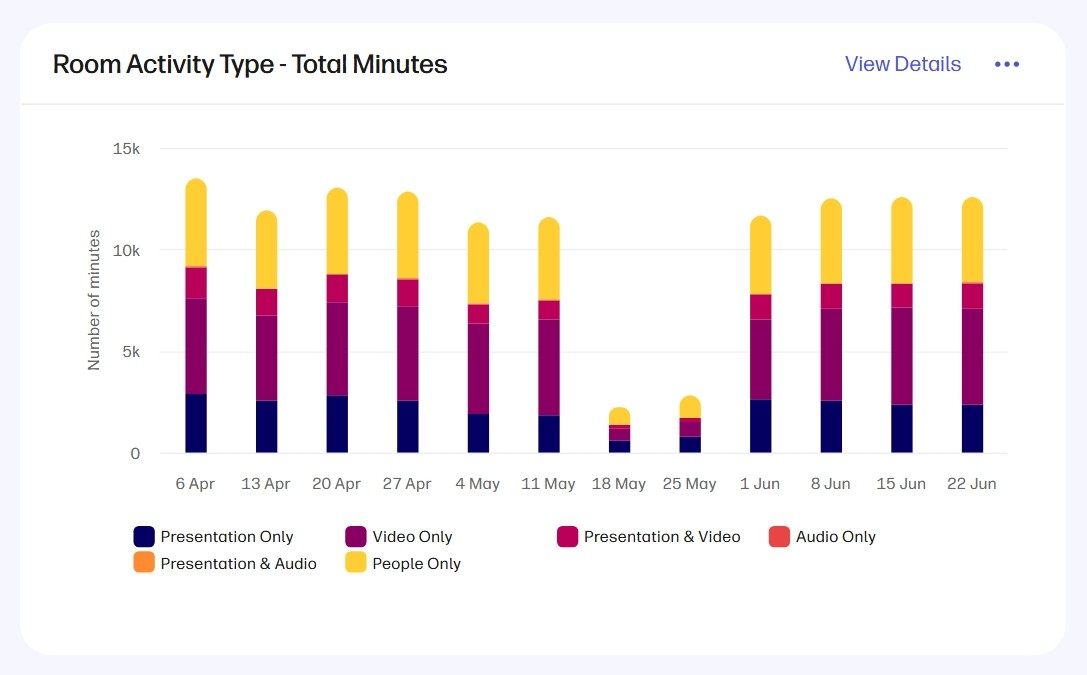
The “Room Activity Type” report in the Collaboration Spaces dashboard of the Analytics section of WXP shows you how UCaaS services are used during meetings. Note: This feature is included with the Collaboration Experience with Vyopta integration.
Key Takeaways for Improving UCaaS Solutions
- Understand employee preferences to identify which UCaaS services best fit different workstyles, devices, and collaboration needs. Regular feedback helps IT teams tailor deployments that improve adoption and satisfaction.
- Work with transparent UCaaS providers that clearly articulate solution value, roadmap stability, and analytics capabilities, ensuring technology decisions align with long-term business outcomes.
- Develop contingency plans for outages to maintain communication continuity when primary UCaaS platforms fail. Define alternative workflows and tools for voice, video, and messaging before disruptions occur.
- Eliminate version sprawl by standardizing UCaaS platforms and enforcing consistent updates across endpoints. A unified technology baseline simplifies troubleshooting and elevates the overall employee experience.
- Leverage analytics and telemetry from UCaaS monitoring tools to detect performance issues early, understand engagement trends, and continuously refine your unified communications and collaboration strategy.
