Most IT budgeting still runs on a model built for a different era: one annual planning cycle, a spreadsheet anchored to last year’s actuals, and a year-end reconciliation to explain overages. That model was already straining under decentralized SaaS purchasing. With AI infrastructure costs arriving mid-quarter and cloud bills fluctuating week to week, it fails in real time.
This guide covers the shift from reactive cost-cutting to proactive cost management. You’ll build an accurate cost picture across cloud workloads, SaaS licenses, and the physical device fleet, then see how data-driven refresh decisions, automated remediation, and FinOps-style cost attribution turn that picture into a planning advantage you can act on before the next budget cycle.
How IT budgeting has changed
Worldwide IT spending keeps growing, driven by generative AI infrastructure investment, device replacement cycles, and software price increases. That growth adds pressure to budgeting models that rely heavily on fixed annual assumptions. When spend is rising, and its composition keeps shifting, a plan built in October can become stale by February.
Four challenges in particular make it difficult to tackle IT cost reduction:
- Annual budgets use last year’s actuals to project next year’s spend, then lock those numbers until the following planning cycle.
- Decentralized SaaS purchasing adds another challenge, spreading buying decisions across teams and making centralized visibility harder.
- Hybrid and public cloud environments can introduce variable consumption-based costs that are harder to forecast than fixed infrastructure commitments.
- AI infrastructure spend adds another layer, arriving as both a capital cost (GPU-accelerated hardware) and an operational one, such as consumption-based inference charges measured in tokens, requests, or compute resources.
The teams handling this well have moved to rolling forecasts, or continuous projections updated against actuals on a monthly or weekly cadence that run alongside an annual budget that sets overall guardrails. The FinOps Foundation’s State of FinOps research tracks this shift and notes that FinOps practices are expanding beyond public cloud to cover endpoints, SaaS, and device lifecycle costs, territory most IT budgeting frameworks still leave underserved. That’s an area where organizations can improve cost visibility and identify waste.
Full fleet visibility as a foundation for IT cost reduction
IT budget forecasting that leads to cost reduction depends on a complete, current inventory of every asset in your environment. Without it, refresh estimates and support cost projections are built on assumptions rather than data.
Most IT environments have real inventory deltas: devices enrolled in one management tool but not another, SaaS licenses provisioned outside the procurement process, or cloud workloads spun up by engineering teams that never made it into the asset register. Any budgeting or forecasting exercise that starts from an incomplete picture will produce inaccurate forecasts.
The data foundation for accurate cost modeling is unified telemetry across all endpoints, regardless of manufacturer or operating system. CPU load, memory pressure, battery health, and network behavior from every device in the fleet feed two distinct forecasting needs simultaneously. Devices with sustained high memory utilization may warrant investigation because persistent performance issues can contribute to user-facing problems and support activity. These signals can also inform refresh planning by helping IT identify devices with persistent performance or hardware-health issues.
Without that telemetry, refresh planning defaults to calendar-based assumptions, and support cost forecasting relies on last year’s ticket volume. Neither reflects the fleet’s actual condition, and both lead to either over-investing in hardware that still has usable life or under-investing until failure-driven replacements spike the budget mid-year. Full fleet visibility closes that forecasting delta before it becomes a line-item surprise.
Improve IT budgeting with data-driven hardware refreshes
A data-driven hardware refresh replaces fixed replacement schedules with device-level signals (hardware health, performance scores, utilization trends, battery capacity, and warranty status) so IT teams prioritize replacements where they produce the clearest return rather than cycling through the fleet on a calendar.
The standard “replace every three years” policy is a rule of thumb built for a world where IT teams had no visibility into actual device condition. It produces two predictable failure modes: 1) premature replacements of devices that are performing well, and 2) delayed replacements of devices already degrading productivity and generating disproportionate support volume.
A data-driven refresh approach replaces the calendar with actual device signals, including hardware health, performance scores, CPU and memory utilization trends, battery capacity, age relative to warranty expiration, and combined issue analysis (such as thermal problems correlated with system crashes, or memory shortages paired with high utilization). These signals let IT prioritize replacements where they produce the clearest return, cycling through the fleet based on condition rather than a fixed schedule.
WXP’s Smart Refresh module is built around this decision framework. The platform assesses each device and places it into one of three categories: Replace Now, Replace Soon, or No Replacement Needed. This is based on real telemetry and makes the factors behind each recommendation transparent. Hardware failure risk, productivity impact, hardware deterioration, aging, and degradation signals all contribute to the urgency model. IT admins can see which devices are flagged, review the estimated investment, and explore recommended replacement models from the catalog.
Smart Refresh offers three predefined strategies, each calibrated to a different organizational priority.
- Experience First (HP’s recommended default) prioritizes employee experience, device reliability, and productivity over cost minimization.
- Performance Driven focuses on device performance while managing costs, with CPU and memory health carrying the most weight.
- Cost Saving avoids replacing devices that still perform adequately, targeting only those where continued operation produces measurable productivity or support cost drag.
IT administrators can also build and save custom strategies, combining device health and hardware criteria in whatever weighting reflects their organization’s actual priorities. Refresh initiatives can be structured in phases, spreading capital investment across multiple budget cycles while maintaining a clear long-term plan. That phased model connects directly to financial planning: you define a budget constraint, evaluate replacement scenarios against it, and commit to a sequence that balances cost, employee experience, and business objectives.
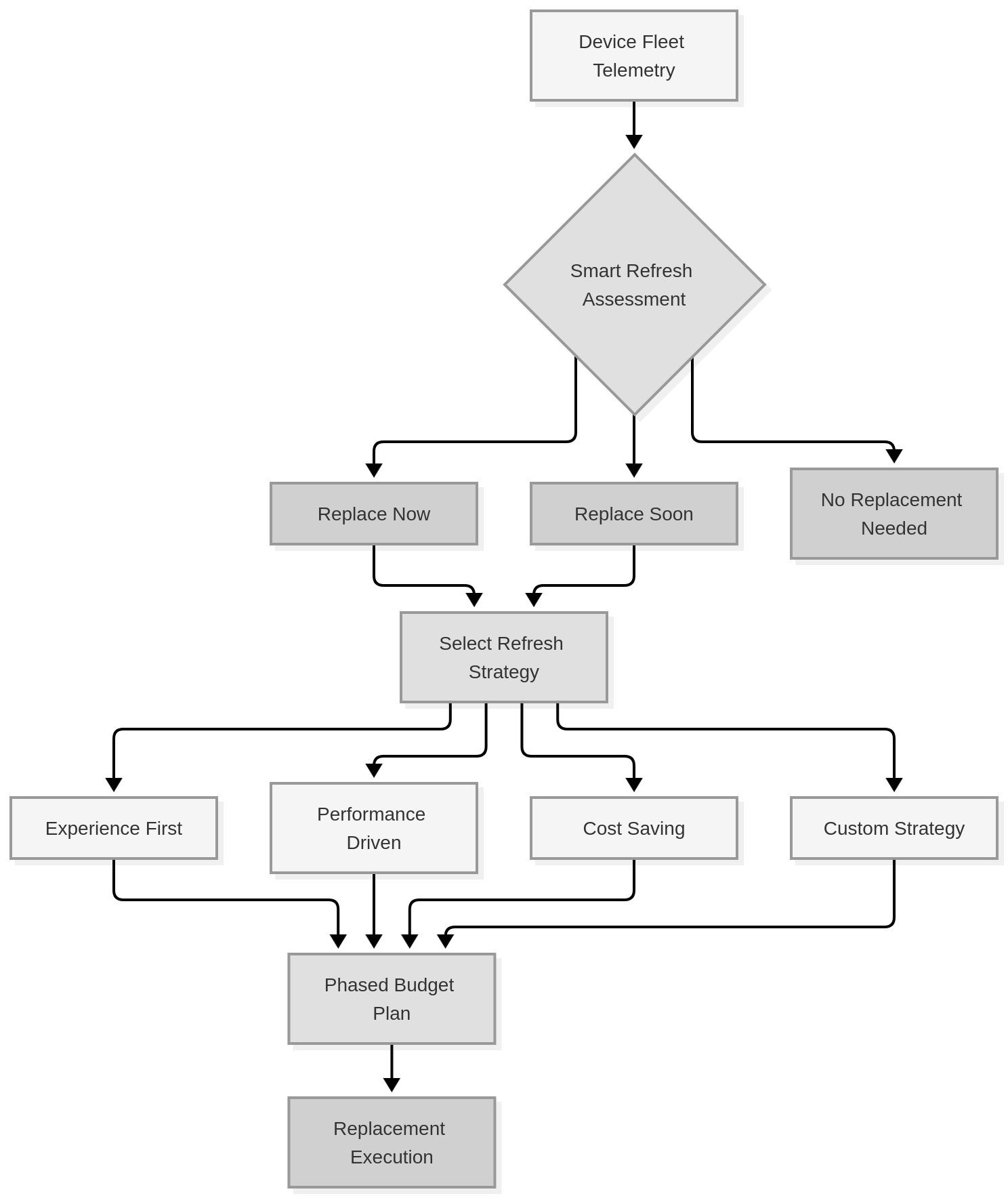
How WXP Smart Refresh uses device telemetry and refresh strategies to support phased hardware replacement planning
Reduce hidden IT support costs with automated remediation
Automated remediation reduces IT support costs by detecting device anomalies before they surface as helpdesk tickets, then resolving recurring incident classes through predefined workflows rather than manual technician intervention each time.
Unplanned helpdesk tickets are among the most consistently undercounted variables in IT budget forecasting. Last year’s ticket volume anchors the estimate, but that number doesn’t reflect a fleet that has aged another twelve months, added new device categories, or taken on new application workloads. Reactive support costs can be difficult to predict, particularly when device failures or unexpected incident volume increase during the year.
WXP addresses a predictable chain of escalating costs where a device degrades, the user experiences a problem, the user opens a ticket, and an IT technician investigates and responds. Each step can add operational effort, so identifying and resolving issues before they become user-facing incidents can reduce the manual support work required.
WXP’s real-time monitoring and severity-categorized alerts surface anomalies before they reach the user. Battery degradation, HDD predictive failure signals, and fan warnings all generate alerts at the hardware level before the device fails and before a ticket gets opened.
WXP’s AI remediation capability pairs each alert with an AI-generated, prioritized recovery path. WXP can use AI to prioritize relevant remediation options, while configured workflows can execute predefined actions such as scripts or driver updates. IT teams can codify recurring incidents as automated workflows in the Workflow Builder, freeing up unused memory, clearing disk pressure, and enforcing configuration baselines. The goal is to automate responses to recurring incident classes so the same remediation doesn’t require manual intervention every time.
For budget planning, predictive maintenance and automated remediation shift a meaningful portion of support spend from reactive (variable, hard to forecast) to proactive (predictable, decreasing over time as the workflow library matures). That shift makes support cost forecasting materially more accurate, which makes the overall IT budget more defensible going into the next planning cycle.
Activate cost attribution and waste identification before the next planning cycle
FinOps-style cost attribution helps IT teams understand what they’re spending and where that spend belongs by tagging every resource, allocating spend by team or business unit, and connecting that data to the financial reporting tools finance already uses.
Knowing what you spend is a prerequisite for knowing what you’re wasting. WXP’s integrations with Power BI, ServiceNow, and Microsoft Intune can reduce the need to build these connections entirely from scratch.
- The Power BI Connector extracts WXP fleet and operational data, cleanses it, and imports it into Power BI as datasets ready for visualization and analysis, segmented by department or other organizational attributes.
- The ServiceNow integration synchronizes device inventory and lifecycle data into the ServiceNow CMDB and automatically creates incident and alert data in the Event and Alert tables, giving IT operations a single view of device health alongside their existing ticketing workflow.
- The Intune integration gives IT administrators a unified view of Intune-managed devices within WXP, covering hardware, software, warranty status, and overall device health.
That combination means device data, support event data, and lifecycle data all flow into the financial and operational workflows your teams already work from, rather than sitting in a separate tool that nobody checks at budget time.
For a concrete action you can take before your next planning cycle, open WXP Fleet Explorer and run a natural language query such as “Which devices have had sustained high memory utilization over the past 30 days?” or “What devices have the highest support ticket frequency this quarter?”
Fleet Explorer is an AI-powered query interface (in the Labs section of WXP) that returns charts, tables, and device-level detail without requiring SQL or a custom report build. The devices it surfaces are your highest-priority candidates for either a remediation pass or a refresh nomination, and identifying them before the planning cycle means you’re allocating budget against actual risk rather than last year’s averages.
Frequently asked questions
What is IT cost optimization?
IT cost optimization is the ongoing practice of identifying and eliminating waste across hardware, software, cloud, and support spend. It differs from one-time cost-cutting in that it requires continuous monitoring, attribution, and adjustment rather than a periodic review that treats IT spend as a fixed variable.
What is the difference between IT budgeting and IT forecasting?
IT budgeting is a planned allocation for a defined period, typically annual, that sets spending guardrails across categories. IT forecasting is a continuous projection updated as actuals change throughout the year. Modern IT teams run both in parallel, with the budget setting the ceiling and rolling forecasts tracking whether you’re on course to hit it or need to adjust.
How often should IT teams refresh hardware?
Fixed-interval policies such as replacing hardware every three years are being replaced by data-driven approaches that assess device health, performance, and utilization before committing to replacement. HP Workforce Experience™ Platform (WXP) supports this model through Smart Refresh, which evaluates each device against real telemetry and places it into one of three categories: needing immediate replacement, near-term replacement, or no action, treating device age as one signal among many rather than the deciding factor.
How can AI help reduce IT support costs?
AI-powered predictive maintenance detects anomalies at the hardware and software level before they surface as helpdesk tickets. When WXP identifies a likely failure or degradation event, it pairs the alert with an AI-generated, prioritized remediation path. IT teams can also automate the resolution of recurring incident classes through the Workflow Builder, so the same issue doesn’t generate a manual intervention every time it appears. The net effect is a shift from reactive support volume, which is expensive and hard to forecast, toward proactive resolution that reduces both cost and variance in the support budget.
What is FinOps and how does it apply to IT cost management?
FinOps applies financial accountability and cost-management practices to technology consumption, historically with a strong focus on cloud and increasingly alongside practices covering SaaS and other technology costs. Originally developed for public cloud, FinOps practices now extend to endpoints, SaaS licenses, and device lifecycle costs, areas where most IT budgeting frameworks still leave significant savings unaddressed.
What causes IT budgets to run over mid-year?
Common contributors to mid-year IT budget overruns include unplanned helpdesk ticket volume from aging devices, emergency hardware replacements triggered by failures rather than planned refresh cycles, and SaaS or cloud spend that wasn’t captured in the original plan because purchasing happened outside the procurement process. Continuous fleet telemetry and rolling forecasts address all three by surfacing cost risk before it becomes a line-item surprise.
How does device telemetry improve IT cost forecasting?
Device telemetry (CPU load, memory pressure, battery health, and network behavior) feeds two forecasting inputs simultaneously. Devices with sustained high memory utilization predict higher helpdesk ticket volume, while devices showing thermal anomalies and declining performance scores predict earlier refresh needs. Feeding that data into your planning cycle replaces calendar-based assumptions with condition-based projections, giving IT teams more relevant inputs for budget estimates.
What is a rolling forecast in IT financial planning?
A rolling forecast is a continuous financial projection updated against actuals on a monthly or weekly cadence, running alongside the annual budget rather than replacing it. The annual budget sets overall spending guardrails, and the rolling forecast tracks whether actual spend is on course to meet those guardrails and flags adjustments needed before the next formal planning cycle. The FinOps Foundation’s State of FinOps research identifies rolling forecasts as a core practice for IT teams managing variable cloud, SaaS, and device costs.
How do IT teams identify underutilized or wasted spend?
The most direct method is cost attribution by team or business unit: tag every resource and connect that data to financial reporting tools. WXP Fleet Explorer accelerates this by letting IT administrators run natural language queries against fleet data, such as identifying devices with sustained high memory utilization or the highest support ticket frequency, without requiring SQL or custom report builds. The output surfaces specific devices and cost centers where spend is producing the least return.
Reduce IT costs with WXP
Better telemetry produces better refresh decisions, better refresh decisions reduce support load, and accurate cost attribution makes each planning cycle more precise than the last. Explore how HP Workforce Experience™ Platform (WXP) helps IT teams implement this practice, and browse the WXP developer documentation to see how the platform’s APIs connect to your existing financial and operations workflows.