
A failed checkout terminal is more than an IT issue. When checkout capacity drops during peak periods, retailers risk longer queues, abandoned purchases, reduced labor efficiency, and lower customer satisfaction. Even a single unavailable POS terminal can create ripple effects across store operations.
For retail IT teams managing hundreds or thousands of endpoints, maintaining availability therefore requires more than repairing devices after they fail. It requires detecting developing problems, controlling configuration drift, reducing mean time to repair (MTTR), and having a defined recovery path when a device does go offline.
Proactive POS maintenance is one layer of that strategy. This guide covers the failure modes that affect POS fleets, five practices for improving availability, and a practical starting workflow using HP Workforce Experience™ Platform (WXP).
POS fleet maintenance versus standard endpoint management
POS fleets combine several characteristics that make endpoint operations challenging. Devices are distributed across stores rather than concentrated in offices or data centers and they can operate for extended hours and process a continuous stream of transactions. A fleet may also contain traditional POS terminals, self-checkout kiosks, and mobile checkout devices spanning different hardware generations and configurations. HP Engage Express, for example, is a purpose-built self-service kiosk based on the HP Engage One Pro platform, with integrated options for components such as payment terminals, barcode scanners, printers, and bagging shelves.
That heterogeneity has operational consequences. Different hardware generations can require different firmware, drivers, peripherals, images, and support procedures. Self-service endpoints can introduce another complication because problems may not be reported to IT until an employee or customer encounters them. On-site support can also be limited in distributed retail environments. When a problem cannot be resolved locally, a centralized or regional IT team must determine whether it can remediate the endpoint remotely, swap the device, or dispatch a technician.
Conventional endpoint-management practices still have an important role here, but POS environments add availability requirements that endpoint management alone does not address. Retail IT teams need visibility into device health, controlled update processes, scalable remediation, and clearly defined recovery procedures.
Why reactive maintenance increases downtime exposure
In a purely reactive break/fix model, maintenance begins after an endpoint has already failed or degraded enough for someone to report a problem.
The sequence typically looks like this:
- The device becomes unavailable or develops a noticeable problem.
- An employee or monitoring system reports the issue.
- IT diagnoses the problem.
- The issue is resolved remotely or escalated for physical service.
- The endpoint returns to service.
The problem is not that break/fix is unnecessary. Some failures are abrupt and cannot be predicted. Rather, relying primarily on failure-driven intervention means that diagnosis and repair happen after service has already been affected.
Proactive maintenance moves some of that work earlier. Device telemetry can identify developing hardware and software conditions, while alerts, policies, scripts, and automated workflows can help IT respond before some conditions become outages.
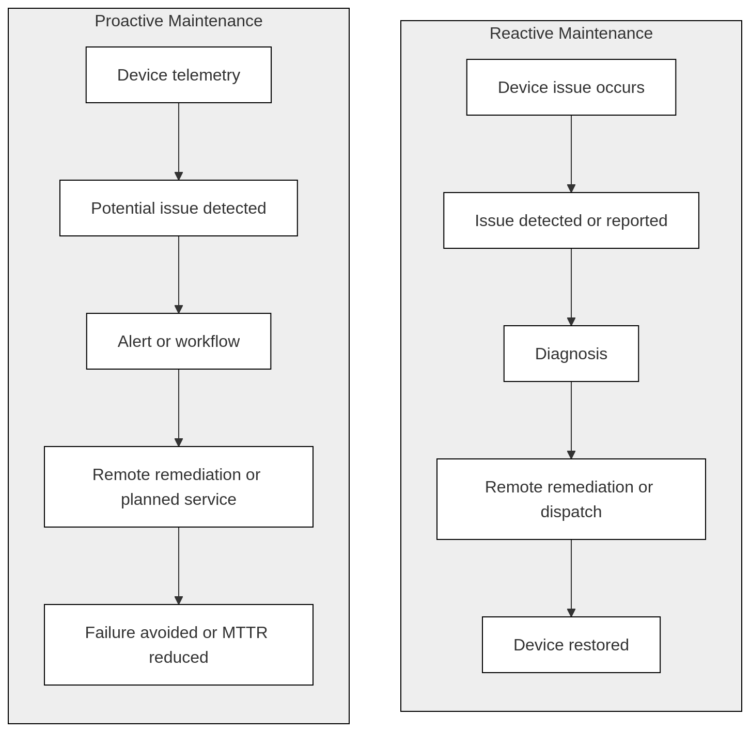
A comparison of proactive vs reactive maintenance in endpoint device management.
The distinction matters: proactive monitoring does not guarantee that every failure will be detected in advance. Instead, it expands the set of conditions IT can identify and address before they affect checkout operations.
Five best practices for POS high availability
Below is a list of five best practices that can help achieve POS high availability.
1. Start with hardware designed for retail environments and serviceability
Availability planning starts before deployment. When selecting POS hardware, consider not only performance but also component accessibility, peripheral integration, service documentation, warranty and support options, and the degree of standardization possible across the fleet. For example, a grocery retailer operating self-checkout lanes may prioritize hardware that allows fast scanner or printer replacement without taking multiple lanes offline.
Standardization can simplify POS maintenance as well. Reducing unnecessary variation in hardware models, firmware revisions, peripherals, and operating-system configurations gives IT fewer combinations to validate and support.
Hardware design, however, is only one component of availability. Retailers should also plan for what happens while a device is unavailable. Depending on the environment, that can mean maintaining spare checkout capacity, replacement devices or components, documented recovery procedures, and offline or degraded operating modes.
2. Maintain controlled firmware and software update cadences
Configuration and version drift can leave devices running different firmware, drivers, security fixes, and application versions. The result is a fleet that becomes harder to troubleshoot and support consistently. The answer is not necessarily to update every POS endpoint simultaneously. Rather, large-scale changes should use deployment rings or staged rollouts.
A practical model is to:
- Validate the update in a test environment.
- Deploy it to a small representative group of POS devices.
- Monitor that group for application, peripheral, and performance problems.
- Expand deployment gradually.
- Maintain a documented rollback procedure.
This limits the blast radius if an update introduces an unexpected compatibility problem.
For POS systems, testing should include more than whether the machine boots successfully. Payment peripherals, scanners, printers, customer displays, POS applications, network connectivity, and other components in the transaction path may all need validation. For retailers, testing should validate not only POS software but the complete transaction flow, including payment processing, loyalty programs, receipt printing, and barcode scanning.
3. Configure actionable alert thresholds and escalation paths
Collecting telemetry is useful only if the right conditions reach the right people at the right time. At fleet scale, poorly configured alerting can create two problems: important conditions get buried in noise, or teams become desensitized because too many alerts require no action.
Start by defining which device and application conditions warrant intervention and how urgently each should be handled. HP WXP supports configurable alert rules with severity levels, allowing IT teams to establish monitoring appropriate to their environment. See HP’s alert configuration documentation for the available configuration options.
The response path matters as much as the alert itself. A useful alerting strategy should define:
- key retail operational alerts such as “Self-checkout lane unavailable,” “Scanner repeatedly disconnecting,” and “Payment terminal communication failures”;
- which conditions should generate an alert;
- the appropriate severity for each condition;
- which team owns the response;
- when an unresolved condition should be escalated;
- which alerts can trigger automated remediation; and
- which conditions require a ticket or technician intervention.
For example, a recurring application-performance condition might initially generate a low-severity alert, while a condition that directly threatens checkout availability could warrant immediate escalation.
WXP also supports notification channels that can integrate alerts into existing operational workflows rather than requiring administrators to continually watch a dashboard. The objective is to turn telemetry into a manageable response process: detect the condition, assign the appropriate priority, route it to the right workflow, and track it until resolution.
4. Use groups, policies, and remediation to operate at fleet scale
Manual remediation becomes increasingly expensive as the POS fleet grows. WXP Groups provide a targeting layer for fleet operations. Groups can be static, dynamic, or synchronized from Microsoft Entra ID. Dynamic groups can use device properties such as manufacturer, model, device name, operating system, and serial number to maintain membership automatically.
Groups do not themselves perform remediation. Instead, they define the device population to which IT can apply policies, scripts, remediations, and other actions. A retailer might maintain separate groups for self-checkout devices, mobile checkout devices, and traditional lanes to support different update and remediation strategies. That enables useful operational patterns. For example, IT could maintain:
- a static pilot group for testing changes;
- dynamic groups for particular POS models or operating systems;
- Entra ID groups aligned with existing organizational structures.
WXP’s remediation capabilities can then apply appropriate actions to those target populations. HP also provides a Scripts Gallery and supports custom PowerShell scripts for managed Windows devices. The exact OS support and feature status should be checked against HP’s current Scripts documentation before designing a production workflow.
For appropriate software-layer problems, automation can reduce manual intervention. Examples include restarting a failed service, restoring a configuration, or cleaning up files consuming excessive disk space. Physical hardware replacement still requires an appropriate service workflow.
5. Add predictive hardware monitoring to identify developing failures
Alerting helps IT respond to known conditions, while predictive hardware monitoring addresses a different problem: identifying components that may be approaching failure before they actually become unavailable. For eligible devices with applicable HP support services, WXP’s Hardware Support capabilities provide predictive detection alerts for conditions including Predictive HDD Failure, Predictive Battery failure, Fan Warning, Fan Critical, etc. We describe these conditions and their associated support requirements in our Hardware Support alert documentation.
These alerts are different from administrator-configured thresholds. HP’s Predictive HDD Failure capability, for example, uses S.M.A.R.T. information together with other predictive models, and it can identify a supported drive that has failed or is predicted to fail within 30 days.
When a predictive condition appears, IT can investigate the affected endpoint and plan the appropriate response before a component failure affects checkout operations. Depending on the condition, that might mean replacing a component before a busy holiday weekend, promotional event, or seasonal sales period.
Predictive monitoring cannot identify every failure in advance. Its value is narrower but important: for hardware conditions that do provide detectable warning signals, it gives IT an opportunity to replace an unplanned outage with a planned POS maintenance action.
Treat proactive maintenance as one layer of POS high availability
Predictive endpoint maintenance is valuable, but it should not be confused with the entire high-availability architecture.
POS availability depends on several layers:
- Endpoint health: storage, memory, thermal performance, batteries, operating systems, drivers, and POS applications.
- Peripheral health: payment terminals, scanners, printers, customer displays, and other transaction-critical devices.
- Network resilience: reliable LAN/WAN connectivity and appropriate failover strategies.
- Application and backend availability: POS services, payment systems, inventory systems, and other dependencies.
- Operational resilience: spare capacity, replacement equipment, escalation procedures, and trained support personnel.
- Recovery capability: remote diagnostics, remediation, reimaging, component replacement, and documented recovery procedures.
- Checkout continuity: alternative lanes, assisted checkout fallback, mobile POS backup, and offline transaction capability.
A DEX platform such as WXP primarily strengthens the endpoint visibility, diagnosis, and remediation layers. It should complement rather than replace the retailer’s broader availability architecture. Teams can measure whether that strategy is working using operational metrics such as MTTR, technician dispatch rate, remote-resolution rate, patch and firmware compliance, incident rate by device cohort, and the percentage of relevant failures identified proactively.
How HP WXP operationalizes POS fleet maintenance
HP Workforce Experience™ Platform (WXP) is a cloud-based platform for monitoring, managing, and improving digital experiences across devices and applications. Its capabilities include device telemetry, alerts, analytics, remediation, grouping, and integrations. Several capabilities of WXP are particularly relevant to distributed POS operations.
Fleet Explorer
Fleet Explorer provides a natural-language interface for querying fleet telemetry. Instead of manually assembling reports or writing database queries, administrators can ask questions about their fleet and receive results based on telemetry associated with their WXP tenant. This can reduce the effort required to investigate trends across a large device population. Availability and usage limits depend on the applicable WXP subscription, so teams should check the current product documentation when planning deployment.
Out-of-Band Remote Connect
A difficult support case might occur when the operating system itself is unavailable. For supported Intel vPro Enterprise devices, WXP Out-of-Band Remote Connect provides below-OS remote access that can continue to operate when Windows is corrupted, frozen, or unable to boot.
Out-of-band access can reduce the need for some technician dispatches by allowing IT to diagnose problems that cannot be reached through conventional OS-level remote support. Retailers should nevertheless validate the current authentication, consent, entitlement, and network requirements when designing their POS support procedures.
Groups and remediation
WXP Groups provide the targeting layer for operating on device cohorts. Static groups work well for controlled pilot deployments, while dynamic groups can automatically update membership according to supported device attributes. WXP can also synchronize device groups from Microsoft Entra ID. Once the appropriate target population exists, IT can apply policies, remediations, scripts, and other supported actions to those devices.
Integrations and workflows
WXP supports integrations with other enterprise IT tools, including Microsoft Intune, Power BI, ServiceNow, Tableau, etc. This can help organizations integrate WXP into their workflows with ease. For example, organizations already using Microsoft Intune can incorporate WXP agent deployment into their endpoint-management process.
WXP also supports automated workflows. Its Workflow capabilities can use events such as alerts to initiate actions, including scripts, device actions, and webhooks. These integrations allow WXP to add endpoint telemetry and remediation capabilities while fitting into existing IT operations processes.
Rolling out proactive POS maintenance without disrupting operations
A successful rollout is less about enabling every available WXP feature and more about introducing automation gradually. The objective of the first deployment is to validate that your monitoring, alerting, and remediation workflows behave as expected before expanding them across the entire fleet.
Start with a pilot store or device cohort
Choose a representative subset of devices rather than the entire production fleet. A pilot should include enough hardware diversity to expose compatibility issues—for example, different POS models, peripherals, and operating-system versions—but remain small enough that unexpected behavior has limited operational impact.
Use WXP Groups to isolate these pilot devices so policies, alerts, and remediation scripts can be tested independently of the wider fleet.
Establish your operational baseline
Before automating anything, collect telemetry for several weeks to understand what “normal” looks like.
Questions worth answering include:
- Which alerts occur most frequently?
- Which devices consistently generate incidents?
- Which stores require the most technician dispatches?
- What is your current remote-resolution rate?
- Which hardware models account for most failures?
That baseline lets you measure whether proactive POS maintenance is actually improving operations rather than simply generating more alerts.
Introduce automation gradually
Not every alert should immediately trigger an automated response.
Begin with deterministic software fixes that are easy to validate, such as restarting a service or restoring a known configuration. Monitor the results before introducing more complex workflows.
For hardware-related conditions, use predictive alerts to improve planning rather than attempting to automate decisions. A Predictive HDD Failure alert, for example, is more useful as an opportunity to schedule a replacement before the device fails than as a trigger for an automated action.
Integrate with existing IT operations
Most organizations already use established incident-management and endpoint-management platforms. Instead of creating a parallel process, integrate WXP into those existing workflows.
For example, WXP can generate events that feed ServiceNow workflows, while Microsoft Intune can continue handling endpoint deployment and policy management. Keeping operators inside familiar tools reduces adoption friction and simplifies operational reporting.
Measure outcomes and expand
Once the pilot has been running long enough to produce meaningful data, compare the results against your baseline.
Useful operational metrics include:
- Mean time to repair (MTTR)
- Technician dispatch rate
- Remote-resolution rate
- Firmware and software compliance
- Repeat incidents by device
- Hardware failure rate by model
- Percentage of incidents detected proactively
- Checkout availability
- Self-checkout uptime
- Incidents affecting customer transactions
If those metrics improve, gradually expand the rollout to additional stores or regions, repeating the same validation process for each deployment wave.
Frequently asked questions
What is a DEX platform and how does it apply to POS maintenance?
Digital Employee Experience (DEX) platforms give IT teams visibility into how devices, applications, and other workplace technologies perform for users. Although POS terminals are not conventional employee endpoints in every deployment, many of those capabilities translate directly to retail fleet operations. Device telemetry and alerts can identify developing problems, while grouping and remediation capabilities help IT respond consistently across distributed endpoints.
What causes POS system downtime?
POS downtime can originate at several layers. Endpoint hardware can fail; operating systems, drivers, applications, or firmware can develop problems; peripherals can become unavailable; network connectivity can fail; or backend services required to complete transactions can become inaccessible.
Some of these conditions provide signals that monitoring systems can detect before a complete outage. Others occur abruptly, which is why predictive maintenance should be combined with redundancy and well-defined recovery procedures.
What is the difference between preventive and predictive maintenance for POS devices?
Preventive maintenance is performed according to a predefined schedule or lifecycle regardless of the current condition of an individual endpoint. Examples include scheduled cleaning, firmware maintenance, or component replacement.
Predictive maintenance uses device-health information to determine when intervention may be necessary. For example, Predictive HDD Failure capability uses S.M.A.R.T. information and other predictive models to identify supported drives that have failed or are predicted to fail within 30 days.
The two approaches are complementary. Predictive monitoring does not eliminate the need for scheduled maintenance.
How do you monitor a large fleet of POS devices remotely?
Start by enrolling endpoints in a fleet management or DEX platform so that hardware and software telemetry can be collected centrally.
In WXP, administrators can organize enrolled endpoints into static, dynamic, or Entra ID-synchronized Groups and target supported policies or remediations to selected device populations. You can read more in the Groups documentation.
HP’s Fleet Explorer can use its natural-language interface for analyzing available fleet telemetry, while Remote Connect provides below-OS remote access capabilities for supported Intel vPro Enterprise endpoints when the relevant prerequisites are met. These capabilities can help organizations monitor and manage large POS fleets more efficiently.
How does firmware drift affect POS stability?
Firmware drift means that devices intended to perform the same role are running different firmware revisions. That does not automatically make a device unstable. It does, however, increase configuration variation across the fleet. Devices may have different bug fixes, security patches, driver dependencies, or peripheral behavior, making incidents harder to reproduce and troubleshoot.
Staged deployment rings help control that variation while reducing the blast radius of a problematic update.
What hardware signals can predict a POS failure before it happens?
The available signals depend on the hardware and monitoring system.
For eligible HP devices, WXP Hardware Support can surface predictive detection alerts including Predictive HDD Failure, Predictive Battery Failure, Fan Warning, Fan Critical, etc.These alerts and the mechanisms behind supported predictive conditions can be found in the Hardware Support documentation.
Predictive alerts should be treated as one source of maintenance information rather than a guarantee that every hardware failure will be detected in advance.
When should you dispatch a technician versus resolving a POS issue remotely?
Issues that can be corrected entirely through software may be candidates for remote remediation. Examples include restarting a failed service or restoring a known configuration. Physical failures that require component replacement still require local intervention. Remote diagnostics can nevertheless improve that process by helping IT identify the likely problem before dispatch.
For supported Intel vPro Enterprise devices, WXP Out-of-Band Remote Connect can provide below-OS remote access when the necessary hardware, network, enrollment, and software requirements are satisfied.
What integrations does HP WXP support for POS fleet management?
HP WXP supports integrations with Microsoft Intune, Power BI, ServiceNow, Tableau, and other tools.The complete list of integrations can be found in the documentation.
Start monitoring your POS fleet proactively
High POS availability is not achieved by a single tool or POS maintenance technique. It comes from combining resilient architecture with consistent fleet management, controlled updates, useful telemetry, remote recovery capabilities, spare capacity, and well-defined incident procedures. Proactive endpoint maintenance strengthens one important part of that architecture.
The goal of proactive POS maintenance is not simply healthier devices. It’s keeping checkout operations available when customers are ready to buy. By reducing unexpected outages, improving remote resolution, and identifying developing issues earlier, retailers can protect both operational efficiency and customer experience.
Explore HP Workforce Experience™ Platform to learn how WXP can support proactive monitoring and remediation across your POS fleet.