HP on HP: WXP Collaboration Helps Improve the Meeting Experience

Discover how HP uses WXP Collaboration to proactively monitor meeting spaces, improve uptime, and enhance employee collaboration globally.
We’ve made no secret of the fact that when it comes to HP Workforce Experience Platform (WXP),1 HP serves as its own beta customer. As part of the HP-on-HP program, our IT team uses WXP to manage HP’s fleet of more than 80,000 devices around the world. HP acquired Vyopta in late 2024 and has integrated the technology into WXP as WXP Collaboration,2 adding the capability to manage HP’s meeting spaces and collaboration technologies all from a single platform. It’s no small task, with over 1,800 rooms across 119 globally distributed sites.
We sat down with the team that supports HP’s meeting spaces and related services to learn more about how the platform has enabled them to scale, identify issues in near real-time, and remediate them remotely to avoid costly downtime and meeting disruptions. Read on to learn more about how to proactively monitor, troubleshoot, and plan your meeting room spaces with actionable data that can save your teams valuable time and resources.
The Goal: A Better Collaboration Experience
Like many companies, HP used to support collaboration technologies and meeting rooms on a reactive basis by responding to users identifying issues. Managing meeting spaces and technologies reactively can be even more disruptive than doing so for individual devices like PCs, as issues often affect multiple employees at once and cause significant project delays if critical meetings must be rescheduled.
Before implementing WXP Collaboration, the team had already recognized the challenges of a reactive approach. To better manage meeting room technology, the team engaged a third-party vendor to physically inspect rooms weekly and ensure all devices were functioning properly.
“They’d go into the rooms and test all the devices and report back to us on the experience,” said Neil Ally, director of HP Future Ready Site Services, which oversees conference room delivery and uptime globally in conjunction with HP Managed Collaboration Services.3 “And similarly, if we needed to replace a device, we would rely on their hands and eyes in those locations to identify the problem and replace those devices.”
It was a solution that was costly to scale and still often fell short of the goal of preventing meeting room downtime before it affected employees.
Shifting to Fix Issues Before They’re Issues
To determine the feasibility of adopting a more proactive management protocol, HP established a pilot program with a team in Costa Rica to monitor room status using HP Poly Lens and Zoom Device Manager. If rooms went offline, the team received an alert, allowing them to mitigate issues before they affected meetings.
Kshitij Joshi (KJ), who manages command center operations and is responsible for execution of operations for both HP and external customers, explains, “We quickly realized we could do things proactively. We didn’t need someone else to tell us there was an issue—we were monitoring it, we were addressing it, we were tracking the alerts.”
Instead of waiting for the alerts, they're using the tools to find things that we can correct and remediate to deliver a better service to everyone.- JP Quesada, Director of Managed Services for the HP-on-HP Program
Around the same time, the team started another project, with the goal of standardizing on HP Poly products in all conference rooms across every company facility.
The team points out their situation was the same as many of our customers face: the Facilities team was responsible for meeting room oversight and technology, but the equipment in the rooms was the responsibility of the IT teams. When the team developed their plans to transition the company’s video and collaboration hardware, it became evident that collaboration experiences were more dependent on IT than on Facilities. The acquisition of Vyopta and the introduction of Managed Collaboration Services then provided the technology performance insights and remediation capabilities to enable the team to shift to a proactive management model.
“We moved from just getting up/down signals to implementing an intelligent platform that provides much more detailed information about what is actually going on in the room,” said JP Quesada, director of managed services for the HP-on-HP program. “We can see not just if the equipment is up or down, but if the latency and screen resolution are good enough. Or if there’s one device in the meeting that is affecting the overall performance of the room. We’re able to configure very detailed alerts so that we can monitor for specific use cases and not just rely on a generic performance alert. This intelligence made a big, big difference for us.”
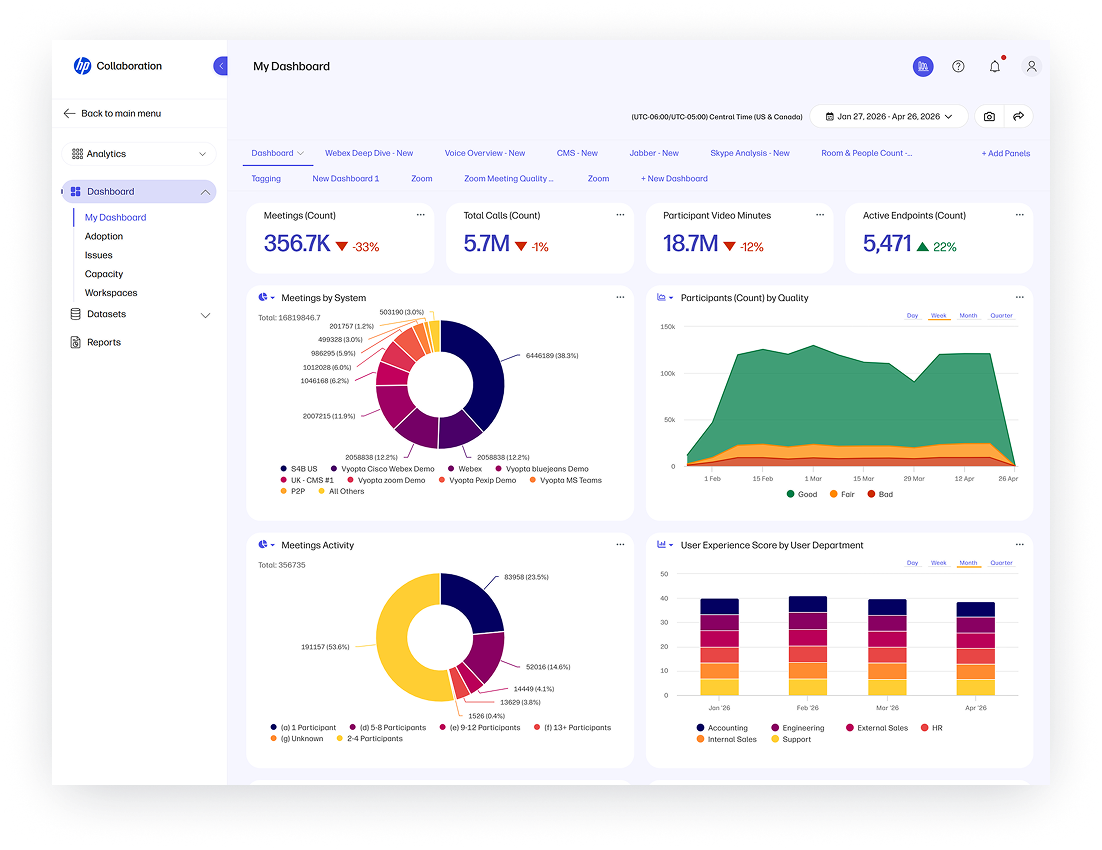
The Collaboration Experience dashboard in WXP Collaboration helps IT teams assess how collaboration technologies are performing and pinpoint issues for troubleshooting, to improve meeting efficiency.
Proactive Management Provides Nearly Perfect Uptime
As the project went on, the team was able to scale from managing 500 rooms to over 1,800, while reducing their dependence on third-party vendors for conference room management.
“We still do sweeps,” said KJ, “but there are certain things we don’t need to be on site to do. For example, if I need to reboot a device, I can do it remotely. I don’t need to go to that room to do it.”
With the range of insights and intelligence in WXP Collaboration, it’s easier to identify the root causes of meeting issues for faster troubleshooting. Network information for the room and the surrounding spaces—including devices connected by cable vs. devices connected over Wi-Fi, or the performance of other devices in the same meeting—all provide evidence that can help pinpoint whether a problem is specific to an employee, the room equipment, or the network.
“We see the people connected to the Wi-Fi and the Poly equipment in the rooms, and we can make correlations,” said JP. “Are all these things wrong? Maybe it’s a network layer above the Wi-Fi. Is it a performance issue related to a single user rather than the network or the room itself? If we can see that one PC is overloaded—and that happens often—it can lower the quality of the image and cause problems in a meeting. People blame the room, but we can now pinpoint when it’s an employee device and not the room equipment.”
We now identify around 98% of the issues proactively and remediate 95% of them proactively and remotely.- Kshitij Joshi (KJ), Manager of Command Center Operations, HP
Meeting room uptime is now averaging 95% across the fleet. The team is able to identify and remediate most collaboration space issues before they impact employees. KJ explained this in more detail, based on the metrics the team is tracking continuously.
“We are measuring proactive and reactive parameters,” he said. “We now identify around 98% of the issues proactively, and remediate 95% of them proactively and remotely, so we don’t even need to have someone call in and do anything.”
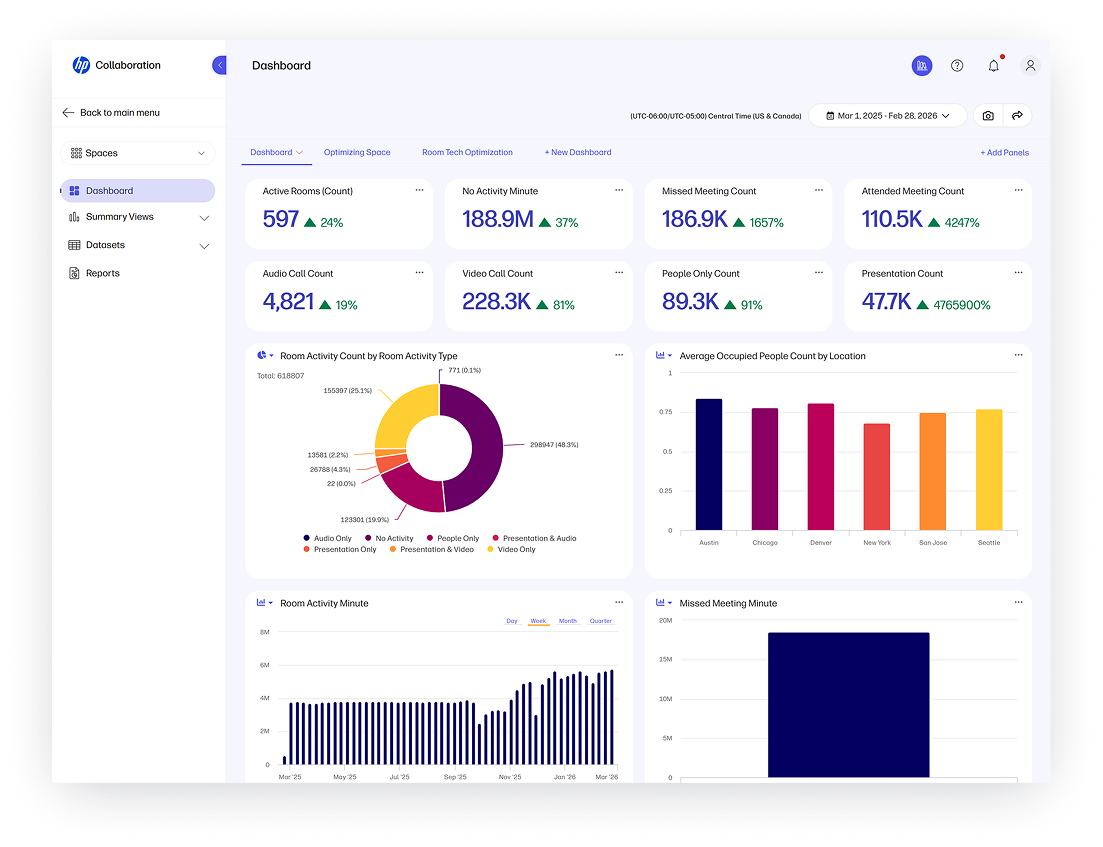
WXP Collaboration provides insight into how meeting spaces are actually being used, making it easier to prioritize budget and space allocation.
WXP Collaboration also enables the team to proactively address problems outside of local business hours. With command centers in multiple time zones, the team can sometimes fix issues that arise half a world away.
“At one of the locations in Europe, we saw multiple rooms going offline,” said KJ. “It was midnight over there and my Americas command center saw it happen—a network outage no one else had picked up. We worked with the network team; they worked overnight and got the rooms back up and running. By the time people arrived at the office the next day, things were all set. No one even realized there was an issue, because it was remediated proactively.”
Having that insight, to learn how things are being used and being able to build based on usage and optimizing space—which is the most expensive thing outside of salaries for the company—is a huge benefit to any organization.- Neil Ally, Director of HP Future Ready Site Services
Improve Your Collaboration Experience
A key benefit of the HP-on-HP program is to provide our customers with guidance and advice on best practices that they can implement in their own environments. Here are a few tips from our Managed Collaboration Services team:
1. Make a long-term plan, you don’t need to do everything at once—Whether it takes your company three, five, or even 10 years to standardize your collaboration technology, the commitment to consistency will pay off in both employee experience and the ease of maintenance for your IT team.
2. Take the time to establish and document the process up front—Look at where there are inefficiencies or redundancies, or where the employee experience is not good. Then determine the source of your issues and how they can be improved, with the aim to get it right the first time–using WXP to cross check device data with user reports.
3. Don’t assume you’re going to solve your collaboration problems with hardware—Hardware is only one component of a solution. You should also look at space utilization—assess the space and make sure the hardware is the right solution for how it is actually used. Start with the desired experience first. Then select the right collaboration hardware.
The team is quick to point out that even before the nuts and bolts of an upgrade project, WXP Collaboration data can be used to help both Facilities and IT prioritize meeting space upgrades and renovations.
Neil explains how helpful the platform can be in the space-planning stage. “One of the biggest things real estate organizations struggle with is building sites for the way people use them. Say we build a 10-person room. How often are there actually 10 people in there? How often is the room even booked, or how many people are coming in there on a regular basis? Having that insight into how things are being used and being able to build based on usage and optimizing space—which is the most expensive thing outside of salaries for the company—is a huge benefit to any organization.”
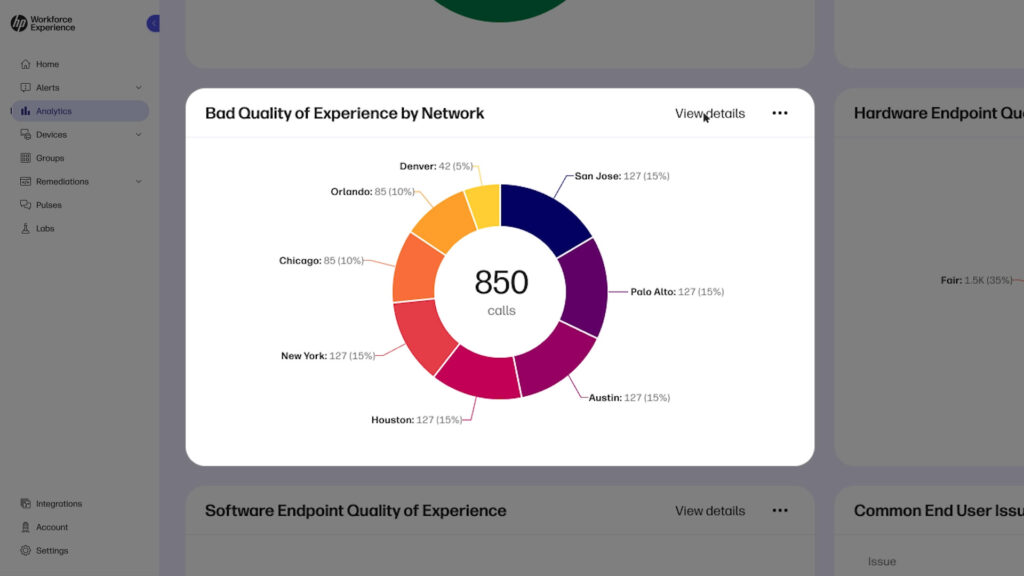
Learn more about how WXP Collaboration works in the demo video below.
Shift your Collaboration into Proactive Gear
Ready to shift to proactive monitoring of your collaboration spaces and improve the meeting experience for your organization? Contact your HP representative or fill out the form below to learn more about WXP Collaboration. If you’re looking for help with room design, implementation, or ongoing management, visit HP Managed Collaboration Services.
Additional Resources
WXP Collaboration – HP Workforce Experience Platform
HP Managed Collaboration Services
WXP Collaboration Makes Meetings Work Better
HP on HP: How We Used WXP to Accelerate the Windows 11 Migration – HP Workforce Experience Platform
Disclaimers
- The Workforce Experience Platform (WXP) is available in various tiers and for multiple term license durations, and some features require optional add-on solutions. WXP is for commercial customers and some features and capabilities may require additional purchase of HP services and/or commercial hardware capable of supporting the HP Insights agent for Windows, Mac, & Android. WXP is ISO27001, ISO27701, ISO27017 and SOC2 Type2 certified for Information Security. Activation and restrictions may apply. Select HP solutions require an HP Insights agent for Windows, Mac, & Android, available for download at https://workforceexperience.hp.com/software. For full system requirements and services that require the agent, please visit https://workforceexperience.hp.com/requirements. The agent collects telemetry and analytics around devices and applications that integrate into the Workforce Experience Platform. Internet access required. WXP Collaboration license required for audio and video collaboration technology monitoring. HP Anyware license or compatible third-party virtual machine license required for virtual machine monitoring.
- WXP Collaboration license required for audio and video collaboration technology monitoring. HP WXP Collaboration Space Insights and WXP Technology Insights support Windows®, Linux® and macOS® host environments and Windows, Linux, macOS, iPad®, Android®, and Chrome OS® end-user devices. For more on the system requirements for accessing HP WXP Collaboration, refer to the Admin Guides or data sheets: Technology Insights and Space Insights.
- HP Managed Collaboration Services includes hardware, repair services, and analytics components and may include financing. HP Managed Collaboration Services requirements may vary by region. Please contact your local HP Representative for specific details in your location. HP services are governed by the applicable HP terms and conditions of service provided or indicated to Customer at the time of purchase. Customer may have additional statutory rights according to applicable local laws, and such rights are not in any way affected by the HP terms and conditions of service or the HP Limited Warranty provided with your HP Product.
From the blog
The latest industry news, interviews, technologies, and resources.






Frequently asked questions
Here's everything you need to know about WXP.
- What is the HP Workforce Experience Platform (WXP)?
- How does WXP work?
- Can WXP be customized to fit specific business needs?
- How is WXP modular?
- Is WXP compatible with different vendors and operating systems?
- How does WXP integrate with other IT tools to provide a more comprehensive solution?
- What is a Workforce Experience score?
- How is AI used within WXP?
- How can I buy WXP and find out about new releases?
