
Software license management fails at the organizational level because procurement owns the contracts, finance tracks the spend, and the endpoint team provisions the software. That separation is where the waste hides, and Zylo’s 2026 SaaS Management Index quantifies it, showing that organizations waste a significant portion of their SaaS spend on licenses that go unused or underutilized every year.
The data needed to close that delta is already flowing through your endpoint tooling. Device agents collect installed application inventories, active usage hours, and last-sign-in timestamps on every enrolled machine. That telemetry answers the core license management question (is this software actually being used?) without a separate software asset management (SAM) platform or a spreadsheet audit. The workflow shift is treating license events as device events, because every provisioning run, offboarding ticket, and hardware refresh is also a license event.
Why software license management belongs in your device management workflow
Endpoint engineers are comfortable provisioning at scale. The same confidence rarely extends to license reclamation, because the two disciplines have historically lived in separate systems, with UEM (unified endpoint management) tooling on one side and license tracking in procurement spreadsheets or standalone SAM tools on the other.
That separation creates three concrete problems:
- Devices wiped and re-imaged for new hires often carry forward the original user’s licenses, duplicating cost without anyone noticing.
- Audits that catch more assigned licenses than contracted seats arrive as surprises precisely because no one reconciled the two lists after each device change.
- IT renews at last year’s seat count because no usage data informed the negotiation.
Many device lifecycle changes also affect licenses, so device telemetry already captures the data that license decisions require. Bringing both disciplines onto a shared data layer reduces manual reconciliation. The device inventory provides the usage and installation baseline that license-management decisions can be built on.
Start with what your devices already know
Before attaching any cost data to applications, you need a reliable ground-truth inventory. Procurement records alone don’t provide a complete picture of what’s installed across the fleet, particularly when users install software outside approved channels, and self-reported lists are even less reliable. Device telemetry collected by the endpoint agent reflects what’s actually installed and running, and it updates continuously.
The HP Workforce Experience™ Platform (WXP) surfaces this through the Application Inventory report which shows each application name, version number, publisher, and the count of devices where each application is installed, with filters by device model, OS version, manufacturer year, and location.
Here you can pull the full unfiltered list and sort by device count descending. Applications at the top are your highest-exposure items, with the widest install base and the highest compliance and cost impact if license counts are off. Applications with very small install counts that you don’t recognize are worth investigating to determine whether they are approved, licensed, or still required.
Telemetry-sourced inventory also catches version spread. If Adobe Acrobat Pro appears across 400 devices in four different versions, that may warrant investigation into application-version consistency and update practices. A clean inventory baseline is the prerequisite for every downstream license decision.
Set usage thresholds to surface reclaimable software licenses
Knowing an application is installed tells you half the story. Knowing it hasn’t been used in 90 days can help identify licenses for review before the next billing or renewal cycle.
License Lens, within the WXP Analytics module, connects installed application data to per-seat cost and usage thresholds. The workflow runs through Analytics > Modern Reports > License Lens.
To add an application for monitoring:
- On the License Lens page, click Add application.
- Search for and select the application name.
- Choose a Billing Cycle (Annual or Monthly).
- Enter the License Cost per seat and select the currency.
- Click Next, then set the Minimum Usage Threshold in hours, which is the floor below which a license is flagged as a reclamation candidate.
- Select a Usage Monitoring Method: “Time apps is in focus” captures active window time; “Total app runtime” captures time the process is open regardless of focus. Choose the usage-monitoring method that best reflects meaningful use for the application you’re evaluating.
- Click Add to finalize.
Once configured, the License Lens dashboard categorizes every enrolled device holding that application into three buckets: No Usage, Below Threshold, and Above Threshold. The All Apps view shows a bar chart of top potential savings across your monitored portfolio, and the per-app view breaks down Annual Estimated License Costs by Usage Level, giving you the dollar figure attached to each bucket rather than a headcount.
The CSV export is where reclamation decisions get made. The exported file includes serial number, device name, last signed-in user, usage hours, and usage level for every device. That device-level specificity gives IT a stronger evidence base when reviewing potential reclamation candidates.
A practical starting point is to set a fixed minimum usage per month for applications on an annual billing cycle, and have the dashboard categorize devices that don’t cross that floor in a given month as Below Threshold reclamation candidates at renewal. You can tighten or relax the threshold per application as you build confidence in the data.
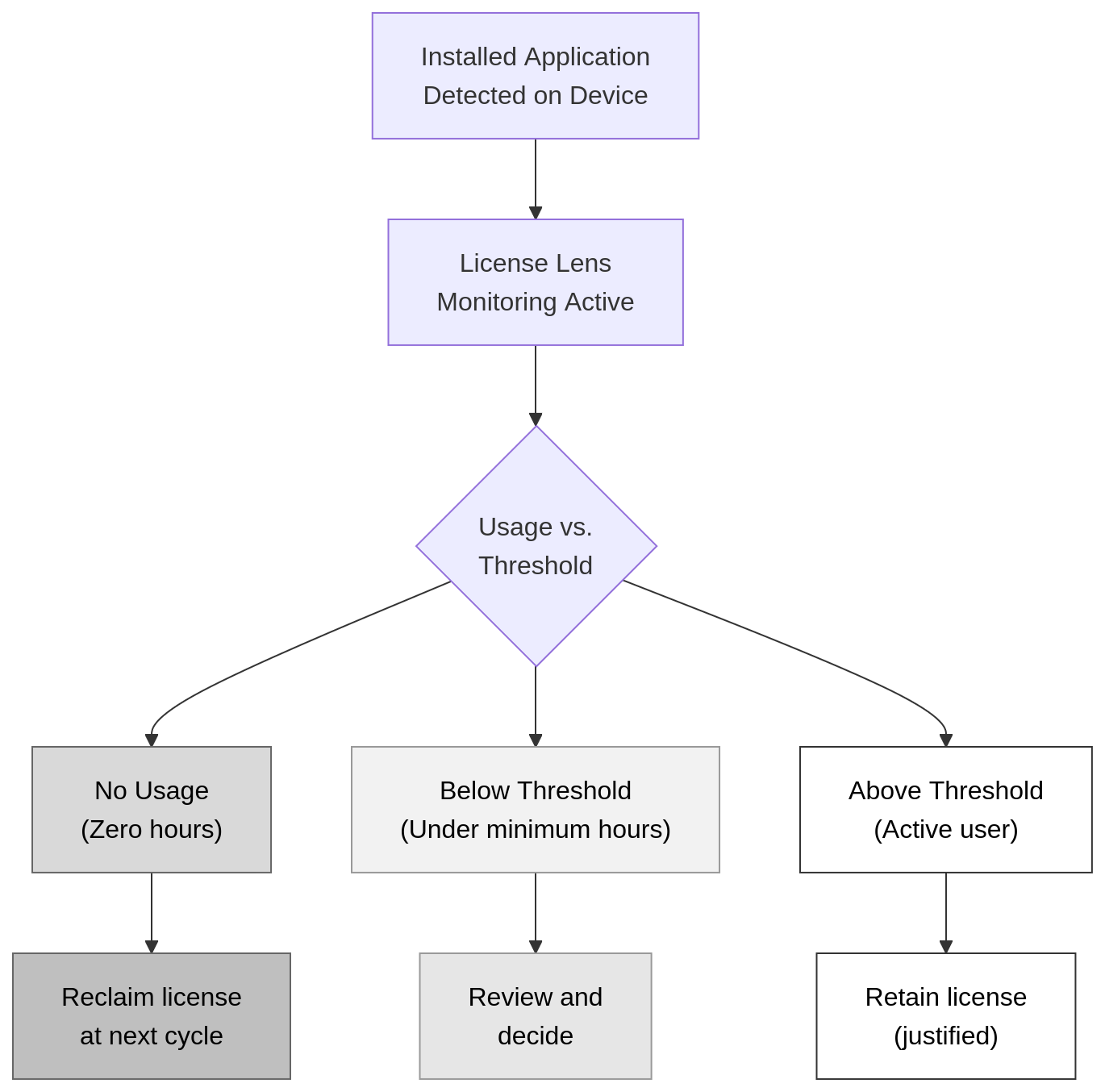
License Lens categorizes every enrolled device holding a specified application into three buckets: No Usage, Below Threshold, and Above Threshold.
Connect software license events to device lifecycle triggers
Usage monitoring catches underutilized licenses across your active fleet. The bigger opportunity is reclaiming licenses at the three device lifecycle moments where it costs nothing extra.
Provisioning is when you assign licenses. Before imaging a refreshed or new device, pull the application inventory from the previous device owner if the hardware was returned. Confirm whether the licenses assigned to that device have already been reclaimed or remain attached. Starting a provisioning run without this check means you’re likely buying a net-new license for software the previous user still holds.
Offboarding is one of the most important checkpoints. For applications whose licenses are assigned to the user or device, a device wipe without a corresponding reclaim step can leave those assignments in place, assigned to a departed user, consuming a seat that shows active in your vendor’s system, and invisible to procurement until the next audit or renewal. Adding license reclamation as a named step in the offboarding runbook, triggered at the same time as the device wipe, costs nothing extra. Running it as a follow-up task means it often doesn’t happen at all, and a deferred seat accumulates cost until the next renewal conversation forces the issue.
Hardware refresh is where shelfware concentrates. Devices queued for replacement are often running licensed applications that were relevant two years ago and aren’t needed on the replacement machine. Pulling a License Lens CSV export before initiating a refresh batch lets you identify applications with No Usage or Below Threshold status on those specific serial numbers, so you reclaim before migrating rather than carrying the shelfware forward alongside everything else.
The practical change is structural. Add a “Reclaim licenses in License Lens” line item to your offboarding checklist at the same stage as “Initiate device wipe.” Delaying reclamation can leave an unused assignment in place until the next opportunity to reduce or reassign seats, depending on the vendor’s licensing terms.
Make audit readiness an ongoing byproduct
Software audits are expensive not because the audit itself is complex but because the preparation is. Most IT teams spend a lot of time before an audit reconciling data that was never maintained continuously, pulling procurement records, chasing down installation logs, and arguing about what counts as an active user.
A monthly License Lens CSV export, cross-referenced against the procurement system of record, converts that scramble into a routine that takes an hour. The export gives you device-level usage data for every monitored application. Your procurement records give you contracted seat counts and renewal dates. The reconciliation is a straightforward comparison of seats provisioned against seats in use, flagging the delta for each application.
Monthly reconciliation provides a more current view of license usage and reduces the data you must reconstruct during an audit. When a vendor audit request arrives, you respond with a recent export rather than a reconstruction project. When a renewal negotiation opens, you enter with usage data showing exactly which seat counts to reduce and which to maintain.
For teams using WXP alongside existing enterprise tooling, the WXP Developer Portal at developers.workforceexperience.hp.com provides APIs that can pipe License Lens data directly into ServiceNow, Power BI, or Tableau, so the reconciliation lives inside the workflow your team already checks rather than as a standalone task.
Schedule a monthly calendar event for a License Lens CSV export on the first business day of each month and dedicate 30 minutes to cross-referencing it against your procurement system. That single recurring task replaces the pre-audit scramble.
Frequently asked questions
What is software license management?
Software license management is the practice of tracking, monitoring, and optimizing every software license an organization holds, from initial purchase through active use to expiration or renewal. It includes maintaining an accurate inventory of installed applications across the device fleet, monitoring usage to confirm licensed seats are justified, ensuring the organization stays within vendor contract terms to avoid compliance violations, and using usage data to reduce spend on underutilized licenses at renewal.
How do I find unused software licenses across my device fleet?
One of the most accurate methods is device telemetry. With a fleet management platform like WXP, the Application Inventory report gives you a fleet-wide inventory of what’s installed, and License Lens lets you configure a minimum usage threshold per application. Devices with zero usage hours appear in the No Usage bucket, and devices that don’t reach your defined threshold appear in Below Threshold. Export either list to CSV, identify the device and last signed-in user, and initiate reclamation before the next billing cycle rather than at the following year’s renewal.
What’s the difference between software asset management and endpoint management?
Endpoint management covers the full lifecycle of devices in your fleet, including enrollment, configuration, OS and application deployment, security policy enforcement, and decommissioning. Software asset management (SAM) covers the full lifecycle of software licenses, including procurement, assignment, usage monitoring, compliance tracking, and renewal optimization. Both disciplines rely on the same underlying data (device inventory and application usage), so unifying them under a single platform that surfaces telemetry alongside cost data reduces the reconciliation effort that otherwise happens between two disconnected systems.
How does device offboarding affect software license compliance?
A device wipe without a license reclaim step leaves provisioned licenses assigned to a departed user. Those assignments can consume available seats and increase costs. If your organization later reconciles assignments against its contractual entitlements, it may also need to address the discrepancy for compliance purposes. The cost compounds across every offboarding that skips reclamation. Integrating license reclaim into the offboarding checklist at the point of device wipe eliminates the delta entirely, because the step runs at zero additional cost when the device is already being processed.
When should I set a higher usage threshold for license reclamation?
Raise the minimum usage threshold for applications with occasional but critical use, such as compliance reporting tools or annual audit software. A two-hour-per-month floor works well for daily productivity applications, but a tool opened once per quarter for a mandatory process shouldn’t be flagged as reclaimable just because it sits idle most of the month. Review threshold settings per application after your first two monthly exports to calibrate against actual usage patterns in your organization.
Can License Lens data integrate with existing IT service management tools?
Yes. The WXP Developer Portal at developers.workforceexperience.hp.com provides APIs that pipe License Lens data directly into ServiceNow, Power BI, or Tableau. That means your license reconciliation can live inside the dashboards and ticketing workflows your team already checks daily, rather than requiring a separate manual export review each month.
How often should I run a license reconciliation against procurement records?
Monthly is the right cadence for most organizations. A monthly License Lens CSV export cross-referenced against your procurement system of record keeps your license position no more than 30 days stale, which is recent enough to respond to vendor audit requests without a reconstruction project and current enough to inform renewal negotiations with accurate seat-count data.
Final thoughts on software license management
The provisioning-to-offboarding device lifecycle is the natural scaffold for a software license management program. You already collect the data, and the shift is connecting it to cost decisions rather than treating license tracking as a parallel process that lives isolated in a spreadsheet.
Pull the Installed Applications inventory to get a reliable baseline. Configure License Lens to attach cost and usage thresholds to your highest-spend applications. Add license reclamation to your offboarding checklist at wipe time. Export and reconcile monthly. Each step runs on telemetry you’re already collecting.
See License Lens and the full WXP analytics module in action at workforceexperience.hp.com/demos.