
According to a 2026 HP survey, retail leaders identify increasing operational efficiency as a top priority, and many are investing in AI to achieve it, but AI is only as dependable as the data behind it. When transaction, inventory, and device information sit in separate systems with different formats and update cycles, it becomes much harder to generate insights that teams can confidently act on.
The answer is not necessarily a multi-year data transformation. Retailers can start by making priority data more accessible and consistent, collecting continuous telemetry from devices and peripherals, and giving IT teams a simpler way to turn those signals into operational decisions.
In this article, we’ll explore three practical steps for building that foundation.
Tip 1: Standardize data across retail devices and systems
AI-ready data does not have to mean a perfect enterprise data warehouse. It means that the operational data needed for a specific use case is accessible, consistently structured, and traceable to its source. For example, if a retailer wants to analyze device availability alongside store activity, its teams need a consistent way to identify stores, devices, and time periods across the relevant systems. For some use cases, a lightweight integration or ETL layer can be sufficient to establish consistent schemas, data lineage, and reliable access without first building a full enterprise data warehouse.
Bain & Company’s research on gen AI in retail finds that many retailers still use data in an unsystematic way, a pattern that limits AI gains before any model has run its first query.
The underlying problem is structural. POS systems expose transaction data through vendor-specific formats and interfaces. Inventory management runs on a separate database with its own schema. Loyalty and other customer data systems use different update schedules than operational systems. When an AI model draws from this collection of differently formatted, differently timed snapshots, it can’t distinguish signal from noise.
Data readiness for retail AI means your team can answer three questions about any dataset before it goes into a model.
- Where does this data live?
- Is the data consistently structured across locations and systems?
- Can you trace a record back to the source of the data?
These questions don’t demand perfect data, but they do require enough structure for a model to generate outputs worth acting on.
One common failure pattern is treating data readiness as an all-or-nothing transformation. Under pressure to show rapid AI progress, teams may instead feed inconsistent exports into a model, making the resulting outputs harder to trust and operationalize.
Getting ready means unifying access to your key systems (POS, inventory, and device data at minimum) behind a consistent schema, even if that’s a lightweight ETL pipeline rather than a full data warehouse. It means establishing a field naming convention so that store_id in your POS log matches store_id in your inventory system. It also means building an audit log so you can trace any AI-generated recommendation back to the data that produced it.
One concrete milestone is getting store-level POS data and device inventory into a single query layer, even if the underlying sources remain separate. An integration layer that normalizes field names, enforces consistent date formats, and logs data lineage is often enough to move from raw exports to AI-ready inputs.
Inventory data can be particularly difficult to reconcile when stores use different software versions, configurations, or inherited systems. Reconciling those schemas before prompting a model saves significant rework downstream. Device data is also easy to overlook, even though it can provide important signals about endpoint health, availability, and peripheral connectivity. Most retail IT teams know their POS terminal counts but have limited visibility into device-level health, uptime history, or peripheral connectivity patterns. Which leads us to another important point for AI-ready retail operations.
Tip 2: Turn device health into usable operational data
POS terminals and their connected peripherals produce operational signals that can help IT teams identify emerging issues. Intermittent scanner disconnects, printer errors, or other recurring events may indicate a problem before a device becomes unavailable. Without device-level telemetry, however, those signals can remain hidden until store employees report a disruption.
Device management platforms like HP Workforce Experience™ Platform (WXP) give you that visibility across your fleet of retail devices. The WXP Insights Agent, deployed as an .msi package via SCCM or Group Policy, enrolls each device into WXP and begins streaming continuous telemetry covering device performance, user experience signals, and security posture.
The Retail Peripheral Agent (RPOS Agent), installed on top of the WXP Insights Agent, extends that coverage to the full peripheral stack. The RPOS Agent covers all 36 UPOS device classes, including barcode scanners, receipt printers, and cash drawers. It continuously reports peripheral health, capturing signals such as USB cash drawer drops and scanner disconnections, so those events become data points in your telemetry stream rather than anecdotes from store staff.
After installation, you configure the RPOS Agent to set analytical thresholds for each peripheral class, defining what abnormal behavior looks like for your specific fleet. You don’t need to wait for enterprise-wide data readiness to start extracting value from device telemetry. WXP lets teams begin collecting and querying device and peripheral telemetry while broader POS, inventory, and other data foundations continue to mature.
The data flows from the device to the decision, as shown below.
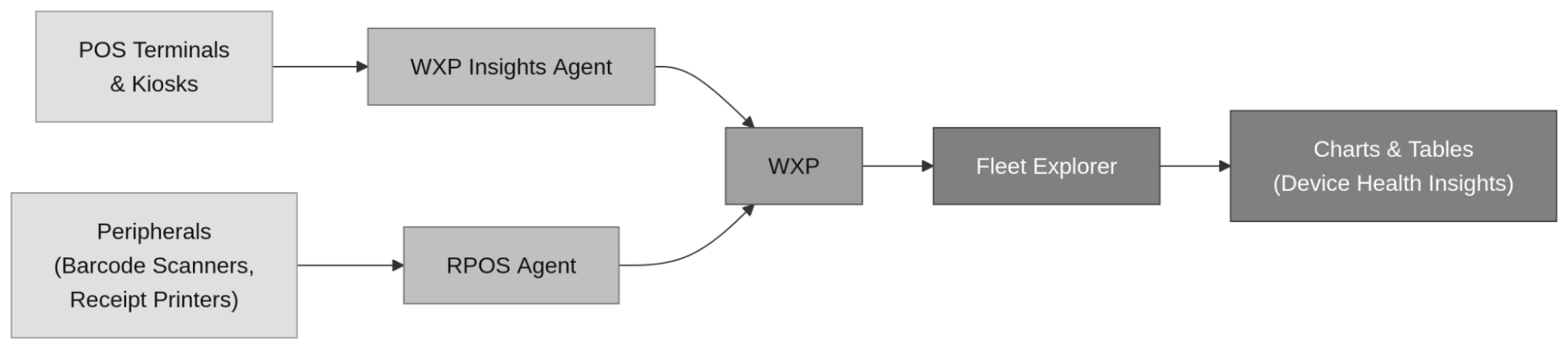
How to collect device data with WXP to gain AI-powered insights that support retail operations.
Tip 3: Use AI to turn device telemetry into action
Fleet Explorer, currently available in beta through WXP Labs, provides a generative AI interface for exploring available device and peripheral health data. IT teams can ask questions in natural language and receive results presented as charts or tables, helping them investigate fleet conditions without constructing database queries manually.
With the WXP Insights Agent and RPOS Agent running across your fleet, you have a live dataset of device and peripheral health from every enrolled location. Fleet Explorer handles the translation from natural language to a query entirely, returning results drawn directly from the telemetry your agents collect.
Depending on the telemetry available in your environment, teams could begin with questions such as:
- Which POS terminals have had the most peripheral disconnects in the last 30 days? This can help teams identify terminals with recurring disconnect activity and determine whether further investigation, maintenance, or peripheral replacement is appropriate.
- Which stores have devices showing abnormal peripheral error patterns this week? This can help IT teams compare abnormal peripheral activity across stores and prioritize where to investigate first.
The peripheral disconnect query is particularly useful for multi-store retail operations because disconnect activity may be concentrated around a particular peripheral model, configuration, or store environment. Comparing that activity across the fleet can help teams identify where further investigation is needed. Fleet Explorer makes that distribution visible without requiring someone to manually aggregate incident logs across locations.
Fleet Explorer’s output is designed for immediate use. Results come back as charts and tables your team can drop into a ticket, share in a weekly review, or export to a stakeholder report. This can reduce the manual effort required to aggregate and format telemetry data for investigation.
WXP combines telemetry collection and AI querying into a single platform workflow, so the same system collecting telemetry through the agents in Tip 2 powers the AI queries in Tip 3. Your deployment timeline shrinks to a single coordinated workflow, and you start seeing actionable device health insights from the moment your agents are enrolled.
Frequently asked questions
What does AI-ready retail data look like?
Data readiness means your key retail systems (POS, inventory, and device data) are accessible, consistently structured, and auditable enough for an AI model to produce reliable outputs. A perfect data warehouse isn’t required. What’s required is that a model can trust the data it’s querying, and that your team can trace any AI-generated recommendation back to the source data that produced it.
How can device telemetry improve retail operations?
Continuous telemetry from POS terminals and peripherals gives AI tools behavioral signals such as uptime patterns, error rates, and disconnect frequency as those events are collected, rather than relying solely on periodic reports. That signal can support preventive maintenance and proactive issue resolution before a device failure takes a register lane offline.
What is Fleet Explorer in HP Workforce Experience™ Platform (WXP)?**
Fleet Explorer is a generative AI feature inside WXP that lets IT teams query live device telemetry using natural language. Teams type questions in plain English and receive results as charts and tables, without writing SQL or accessing a database directly. Results are scoped to the organization’s own tenant data, so every answer reflects your fleet.
What types of devices can the Peripherals Agent monitor?
The Peripheral Agent covers all 36 UPOS device classes, including barcode scanners, receipt printers, and cash drawers. It continuously reports peripheral health, capturing signals such as USB cash drawer drops and scanner disconnections, turning those events into structured data points in your telemetry stream rather than anecdotes reported by store staff.
How long does it take to start collecting device telemetry with WXP?
Telemetry collection starts the moment the WXP Insights Agent is deployed and enrolled. The agent deploys as an .msi package via SCCM or Group Policy. There’s no separate data-readiness phase required before AI querying can begin.
Where does WXP fit into existing POS and inventory systems?**
WXP can collect device and peripheral telemetry data through its agents which can help make POS, inventory, loyalty, or other enterprise data AI-ready. For broader data readiness across POS and inventory systems, a lightweight ETL pipeline that normalizes field names, enforces consistent date formats, and logs data lineage is typically required to transform raw WXP exports into AI-ready inputs.
What is the WXP Insights Agent and what does it collect?**
The WXP Insights Agent is a software agent deployed as an .msi package that enrolls each device into WXP and begins streaming continuous telemetry covering device performance, user experience signals, and security posture. Every enrolled device sends health data from every store location into WXP, giving IT teams fleet-wide visibility without manual data collection at each endpoint.
Activate retail data with AI in WXP
Retailers do not need to solve every data challenge before beginning to improve device operations. They can strengthen access to priority operational data while also collecting device and peripheral telemetry from enrolled endpoints.
That combination creates a practical starting point: more consistent data, better visibility into fleet conditions, and a simpler way for IT teams to investigate the signals that matter.
To run data and AI in parallel, explore WXP for Retail.