
Omnichannel retail integration is the technical practice of connecting POS, e-commerce, inventory, and customer data systems through governed APIs, events, and shared data services so channels can access consistent, current information. When that layer is missing or fragmented, integration failures can contribute to lost sales: for example, when a loyalty promotion fails at the register because the POS and loyalty engine are working from stale data.
Historically, each new channel, such as mobile checkout, self-checkout, or digital signage, often introduced additional point-to-point integrations. Over time, those connections formed a tightly coupled architecture that became increasingly difficult to change safely.
This guide is for the engineers and IT leaders who own that architecture and have to fix it. It covers how to evaluate architectural patterns for different integration and operating requirements, and how to keep a unified commerce stack healthy once it’s in production.
Why retail systems resist integration
Retail integration failures are structural, not incidental. Many retail POS environments rely on established POS standards such as OPOS and UPOS, alongside vendor-specific integrations, designed primarily around device- and lane-level operations rather than modern cross-channel data sharing.
The data contracts between POS and back-office systems reflect the schema decisions of whoever built the original integration, often years apart, and those schemas drift every time either system is upgraded without coordinating with the other.
Three patterns often produce brittle integrations.
- Synchronous-only call patterns. A checkout lane that blocks while waiting for a loyalty system to confirm a points balance will eventually time out, and without proper error handling, that timeout becomes a failed transaction rather than a graceful degradation.
- Missing error handling at integration boundaries. A transient network failure between POS and inventory can become a data inconsistency instead of a logged, recoverable event.
- Schema mismatches across product catalogs. If the store and e-commerce platforms represent the same SKU differently, cross-channel queries may produce null results, false stockouts, or silent mismatches.
The compounding problem is that each new channel adds new point-to-point connections rather than feeding a shared data layer. As the number of channels and back-office systems grows, point-to-point integrations can grow rapidly, increasing the maintenance burden and making schema changes harder to manage.
Mapping the integration surface for omnichannel success
Before you can fix the architecture, you need a complete picture of what connects to what. The integration surface in a modern retail environment covers more nodes than most teams can hold in their heads at once, and each node corresponds to a data contract the integration layer must honor.
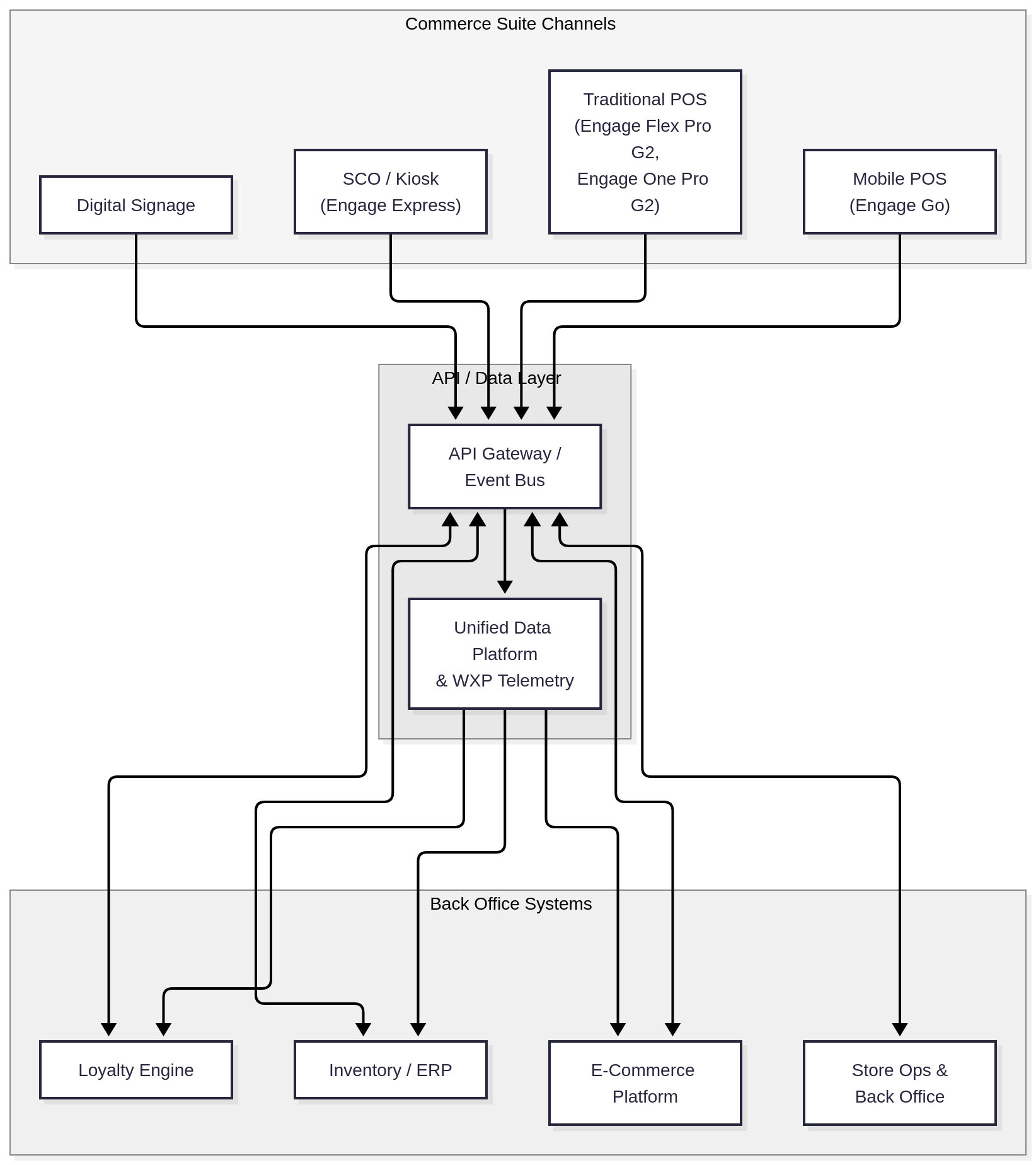
An example architecture of a retail system using HP Engage hardware and WXP, a fleet management platform.
The Commerce Suite channels (Traditional POS on Engage Flex Pro G2 and Engage One Pro G2, Mobile POS on Engage Go, SCO and Kiosk on Engage Express, and Digital Signage) are the channel endpoints. Each publishes transaction events, customer events, and device telemetry, and their data contracts define what fields arrive, in what format, and at what latency.
The API and data layer sits in the middle, with an API gateway or event bus accepting events from channel endpoints and a unified data platform aggregating telemetry for reporting and forecasting. The HP Workforce Experience™ Platform (WXP) feeds this layer with device and application health data from the full POS fleet.
The back office systems (Inventory/ERP, Loyalty Engine, E-Commerce, and Store Operations) are both consumers and producers. They publish the catalog and pricing data channel endpoints need, and they consume the transaction and customer events channels generate. Each of these nodes has a published schema that needs versioning and governance, not assumed stability.
Keep this map current. When you add a new touchpoint (a digital signage refresh, a new kiosk location), the integration surface map is the first document that changes.
API-led architecture for unified commerce
Moving from point-to-point integrations to an API-led or event-driven model is the structural change that makes unified commerce and omnichannel retail possible. A managed integration layer sits between your channel endpoints and your back-office systems, so adding a new channel or swapping a back-office system doesn’t require rewiring everything else.
HP’s Intelligent Retail Platform is built around this principle. The Commerce Suite runs on an open, modular ecosystem that supports Windows, Android, and Linux POS endpoints across ISV POS software partners. That multi-OS, multi-ISV reality makes a decoupled integration layer a practical necessity. When a Traditional POS running a Windows-based ISV application and a Kiosk running Android both need to publish inventory deductions to the same ERP, the integration layer abstracts the difference so neither the POS ISV nor the ERP needs to know about the other’s implementation.
For the integration layer itself, you have three broad patterns to evaluate.
- An API gateway works well when your channel-to-back-office interactions are primarily request-response, and your latency budget is moderate. You define a contract for each downstream system, expose it through the gateway, and channel endpoints call it. An API gateway can provide authentication enforcement, authorization integration, rate limiting, observability, and routing, depending on the selected implementation. The catch is that a gateway alone doesn’t handle event fan-out well, and in retail you’ll have events (a completed transaction, a loyalty earn) that need to reach multiple consumers.
- An event bus (a message broker with topic-based subscriptions) inverts the model. Channel endpoints publish events, and back office systems subscribe to the topics they care about. A completed checkout event can simultaneously update inventory, trigger a loyalty credit, and feed a real-time analytics stream without the POS knowing or caring who’s listening. An event bus can be well suited to environments where events need to reach multiple downstream consumers as channel and consumer counts grow.
- An iPaaS (integration platform as a service) combines both, adding workflow orchestration, connector libraries for common retail SaaS, and visual mapping tools. iPaaS platforms add a dependency and a recurring cost, but for teams without deep integration engineering capacity, the pre-built connectors for common ERP and loyalty systems can substantially reduce implementation time.
The choice is as much operational as it is architectural. Event-driven architectures require you to own event schema governance and consumer error handling. API gateways require you to own API versioning and backward compatibility. Whichever pattern you choose, the design goal is the same: adding a new channel endpoint should touch the integration-layer configuration, not the back-office systems.
Real-time data and the retail edge
Edge processing in retail POS addresses two concrete problems: latency and resilience. A checkout transaction that depends on a cloud round-trip for every pricing lookup, loyalty balance check, or inventory deduction accumulates latency at each step. At the register, those milliseconds compound into perceptible delays and, under peak load, into queues.
On-device inference, where the compute lives on or adjacent to the POS endpoint, removes the cloud round-trip for time-sensitive operations. Selected HP Engage systems can support optional edge AI acceleration, enabling compatible applications to run inference locally. Availability and compatibility vary by system and configuration.
Resilience follows the same logic. A POS that requires an active cloud connection to complete a transaction will fail when the WAN link drops. Retailers that have experienced connectivity outages during peak trading periods know that checkout downtime can increase abandoned transactions and disrupt store operations. Local processing can allow selected time-sensitive POS functions to continue during connectivity interruptions, provided the POS application and transaction workflows support offline operation.
WXP telemetry feeds real-time device and application health data from the edge layer into the unified data platform, enabling Retail Intelligence reporting and forecasting. WXP monitors device health, application performance, and peripheral status across the full POS fleet, and that data populates the operational dashboards that store operations teams and IT use to track fleet health in real time.
The longer-term direction for retail edge computing is vision AI, using on-device inference for loss prevention, shelf intelligence, checkout validation, and traffic and flow analysis. The HP Intelligent Retail Platform’s Physical AI layer is positioned to support these capabilities as they mature.
A completed checkout event traces a clear path from an in-store POS through the digital layer, with each downstream system receiving the same canonical event formatted to its own contract by the API layer.
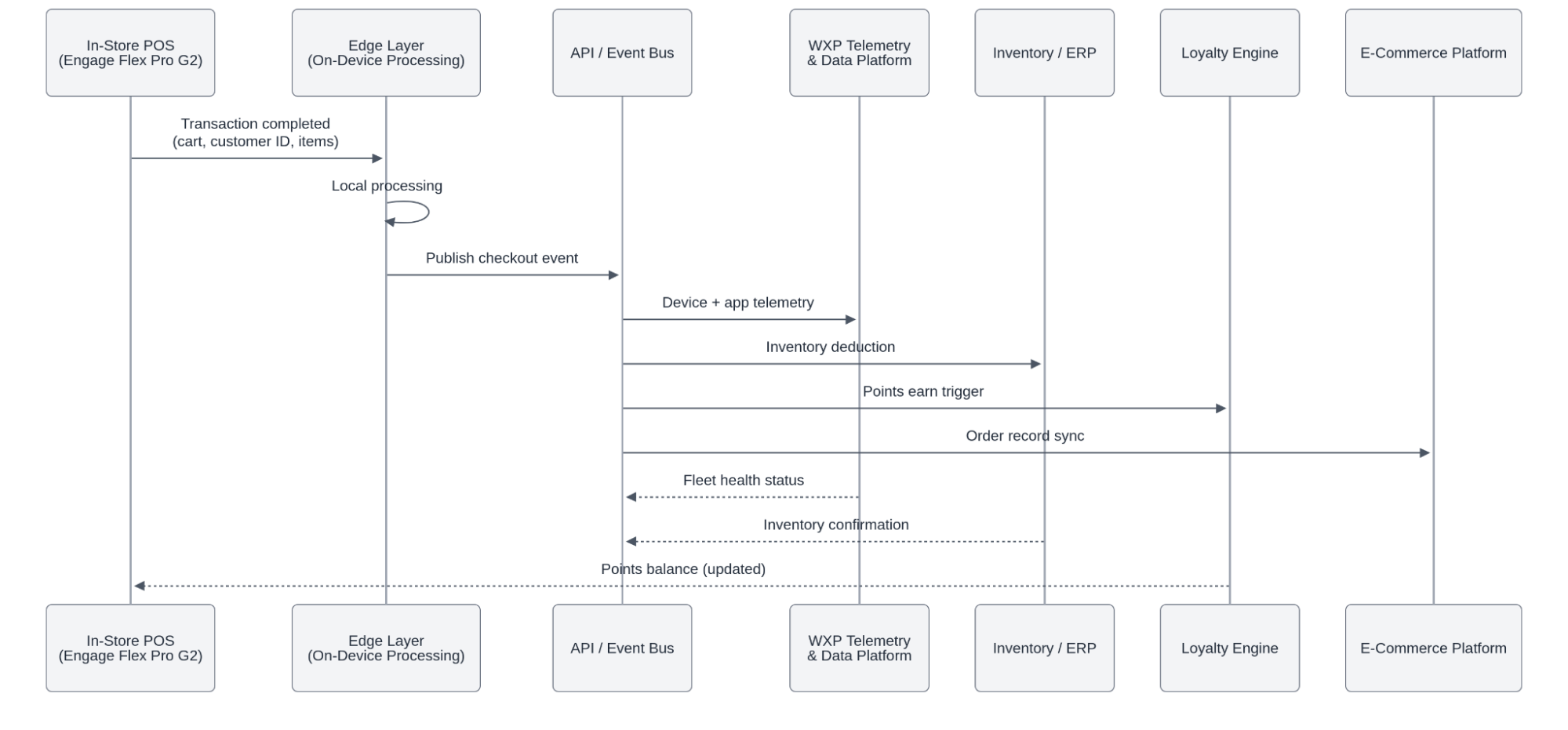
A completed checkout event trace showing how the data flows from in-store POS to the e-commerce platform
The POS publishes once, and the integration layer fans the event out, with no direct connection to the loyalty engine or the e-commerce platform required.
Production integration health
An integration architecture that works on deployment day can degrade over months. Peripheral devices accumulate wear. Memory creep affects application performance. A scanner that occasionally drops USB connections will cause intermittent transaction failures that are hard to reproduce and easy to misattribute. Production health requires active monitoring, not periodic audits.
The operational tooling for a WXP-enrolled POS fleet starts with the HP Retail Peripheral Agent. Installed alongside the WXP Insights Agent on HP POS hardware, this agent communicates with all 36 UPOS device classes (barcode scanners, receipt printers, cash drawers, customer displays) and reports peripheral health data to the WXP dashboard. The agent also lets you set analytical thresholds for each peripheral category, so a scanner that disconnects more than N times per shift triggers an alert before a customer-facing failure occurs.
To deploy the HP Retail Peripheral Agent across a fleet, download the Softpaq installer from the enrolled device’s HP Software and Drivers support page and run it on each endpoint (or use the /s silent switch for remote deployment via scripts or HP Image Assistant). Prerequisites are Windows 10 Pro or Windows 10 IoT, Microsoft .NET Framework v4.6, and the appropriate UPOS drivers (CCO v1.14 plus the OPOS driver stack for your peripherals). After installation, use the HP Retail Peripheral Agent Configuration Utility (RPOSAgentUtility.exe) to assign Logical Device Names to each peripheral and configure the threshold values that trigger alerts.
For fleet-scale device telemetry beyond peripheral health, deploy the WXP Insights Agent via MSI using SCCM or Group Policy. The silent install command is setup.exe /silent CPIN=########, where the Company PIN comes from your WXP platform settings. This gets every enrolled device reporting device health, application performance scores, and anomaly alerts to the centralized WXP dashboard.
With both agents deployed, your WXP dashboard gives you a unified view of hardware inventory (model, serial number, warranty status), device health scores, peripheral status, and predictive maintenance alerts. WXP’s predictive maintenance capability identifies degradation patterns (a device memory trend heading toward a failure threshold, or a peripheral showing early signs of wear) and surfaces them as actionable alerts before they produce transaction failures.
Run a fleet health review ahead of peak trading periods so you can remediate identified issues before they affect store operations. Capabilities vary by WXP tier, device, peripheral, agent deployment, and purchased services.
HP Wolf Security and HP BIOS Security cover endpoint security at each integration node, operating at the firmware and OS layer across the Engage hardware portfolio. An integration layer that accepts events from a compromised POS endpoint propagates that compromise across every downstream system the event touches, making security at integration nodes as consequential as security at the perimeter.
Frequently asked questions
What is omnichannel retail integration?
Omnichannel retail integration connects POS, e-commerce, inventory, and customer data systems through governed APIs, events, and shared data services so channels can access consistent, current information. The key distinction from multichannel is shared state: multichannel runs each channel with its own data stores in parallel, so a loyalty balance updated online isn’t visible at the register until a sync runs, while an omnichannel architecture ensures consistent state regardless of where the customer interacts.
What are the most common retail system integration failures?
Several recurring failure patterns drive most failures in production retail environments. Point-to-point coupling means each system pair has a bespoke connection, so a schema change in one system requires updates across every direct consumer. Synchronous-only call patterns create availability dependencies, and if the loyalty engine is slow, the checkout lane waits. Missing error handling at integration boundaries lets transient network failures propagate as data inconsistencies rather than logged, recoverable events. Schema drift between POS product catalogs and e-commerce catalogs is the subtlest problem: a product ID format difference can cause silent null results in cross-channel inventory queries, and those nulls often masquerade as stockouts.
What is API-led omnichannel architecture?
API-led omnichannel architecture places a managed API or event layer between channel endpoints and back office systems. Channel endpoints (POS, Mobile POS, kiosk, digital signage) publish events or make API calls to the integration layer rather than calling back-office systems directly. The integration layer routes, transforms, and fans out those events to the appropriate downstream consumers. Adding a new channel touchpoint means onboarding it to the integration layer, and existing back office integrations don’t require changes because they already consume from the integration layer rather than from individual channels.
How does edge computing affect retail POS integration?
Edge processing can reduce cloud round trips for selected latency-sensitive functions and can support continued operation during connectivity interruptions when the POS application, payment workflow, and local data model are designed for offline use. A POS that processes pricing lookups, receipt generation, and basic fraud checks locally can complete transactions when the WAN link is degraded or down, then sync the resulting events to the central data platform when connectivity is restored. For high-volume retailers where checkout downtime during peak periods means directly measurable lost revenue, that resilience is a production requirement.
How do IT teams monitor POS integration health at scale?
Fleet-scale POS monitoring runs on agent-based telemetry. The HP Workforce Experience™ Platform (WXP) Insights Agent reports device health, application performance, and anomaly data from every enrolled endpoint to the WXP dashboard. The HP Retail Peripheral Agent adds peripheral-level monitoring, tracking all 36 UPOS device classes (scanners, printers, cash drawers), letting you configure per-device alert thresholds, and flagging devices showing degradation patterns before they cause transaction failures. Centralized dashboards give IT teams a single view of hardware inventory, device health scores, and predictive maintenance alerts across the full fleet. A practical approach is to run a dashboard review before every peak trading period to catch pending issues while there’s still time for scheduled remediation.
What schema governance practices prevent integration drift?
Schema drift accumulates when either side of an integration upgrades without coordinating with the other. A useful control is treating every data contract as a versioned artifact, stored in source control alongside the systems that produce and consume it. When a POS ISV ships a catalog schema update, the integration layer should validate incoming events against the published schema version and reject or quarantine nonconforming events, rather than silently passing malformed data downstream where it surfaces as a stockout or a null loyalty lookup.
When should a retailer choose an event bus over an API gateway?
An event bus can be the appropriate choice when a single channel event (a completed checkout, a loyalty earn) needs to reach multiple downstream consumers simultaneously. An API gateway suits request-response interactions, though complex workflows may still require orchestration or event-driven components behind the gateway. An event bus becomes increasingly valuable as event fan-out, asynchronous processing, and the number of independent consumers increase.
Integration health as an ongoing discipline
Unified commerce architecture doesn’t reach a finished state. Channels get added, ISV software gets updated, back office systems get replaced, and each change introduces new schema versions and integration touchpoints that need validation.
A strong omnichannel integration strategy gives every channel access to consistent inventory, loyalty, and order information. Achieving that consistency requires three ongoing disciplines: maintaining an accurate integration map, decoupling channels from back-office systems through governed interfaces, and monitoring production health across applications, endpoints, and peripherals. The architecture is never truly finished. It must evolve as channels, schemas, and operating requirements change.
Ready to close the delta between your in-store and digital systems? Explore how HP approaches unified commerce.