
Collaboration’s 1% Problem

Only a tiny fraction of meetings (1%) take place in conference rooms or executive settings. The other 99%, where most collaboration happens, is not getting the support it needs.
This article was first published on LinkedIn.
In most enterprises, collaboration is the primary engine of value creation. Meetings bring people together to share ideas, make decisions, solve problems, drive innovation, and accelerate execution, helping transform teamwork into measurable business outcomes.
Yet organizations have a collaboration problem. While they continue to invest heavily in monitoring and management for physical conference room technology and spaces, HP research finds that these environments host just 1% of digital meetings.
Meanwhile, 99% of digital meetings are attended on personal systems such as laptops, PCs, and smartphones. Even with return-to-office mandates, employees often join meetings from their devices at their desks.
Despite this shift, organizations allocate fewer resources and devote less attention to these meeting environments, thereby increasing operational risk. That widening gap is having grave consequences, where:
- 1 in 5 meetings include at least one participant with a quality-of-experience issue
- 73% of employees feel they lack the right equipment to do their jobs
- 55% of employees report only about half of their technology issues to IT, resulting in “silent” productivity losses
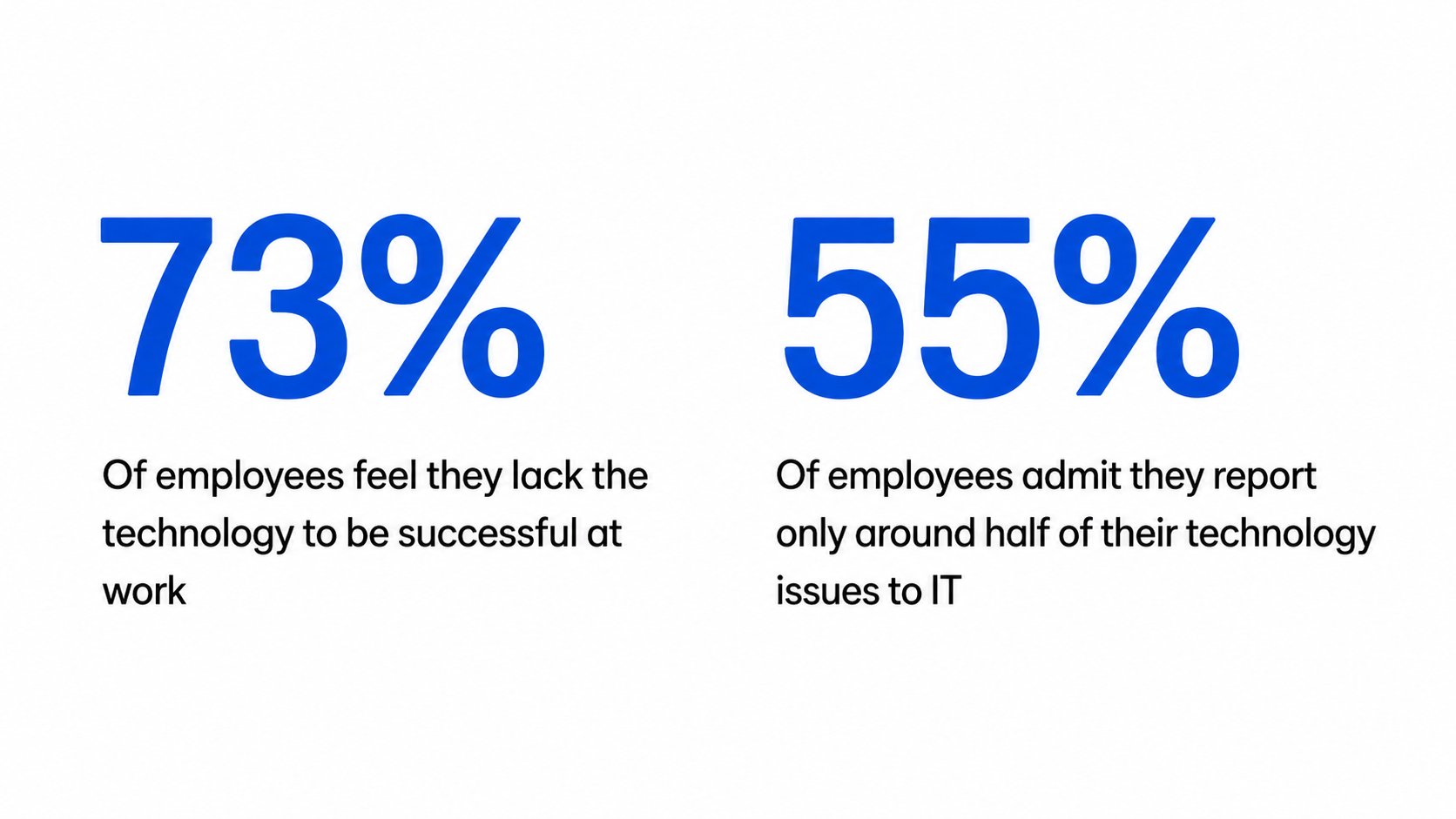
Source: HP
Ultimately, this gap strains customer interactions, drags down business performance, and erodes the employee experience. Today, just 20% of knowledge workers report having a healthy relationship with work.
The 1% Problem
1% of all meetings is a small figure, but monitoring and managing conference rooms and executive settings still matter because they host high-stakes interactions. The last thing you want is to have a critical customer negotiation go south because of a dropped call or a room scheduling conflict.
However, organizations simply can’t afford to neglect the other 99%. When IT doesn’t actively monitor these virtual environments, many issues go unnoticed and unresolved, which directly impacts:
- Productivity: Time lost to audio issues, lag, and dropped calls
- Employee experience: Friction from unreliable tools reduces engagement
- Customer interactions: Technical issues disrupt calls and weaken trust
- Decision velocity: Interruptions slow meetings and delay decisions
- Business performance: Issues at scale reduce output and delay execution
Addressing the 99% is not only about adding software to solve the problem. Organizations need to collect high-quality telemetry from UC&C (unified communications and collaboration) platforms, devices, and meetings, turn that data into actionable insights, and take targeted steps to improve the collaboration experience.
Optimizing the 99% of Collaboration
Organizations can address—even reverse—some of the challenges by improving how they monitor and manage the 99%.
The first step is observability. Software tools provide visibility into user experience, device performance, and meeting quality, enabling IT to identify issues across the full collaboration stack.
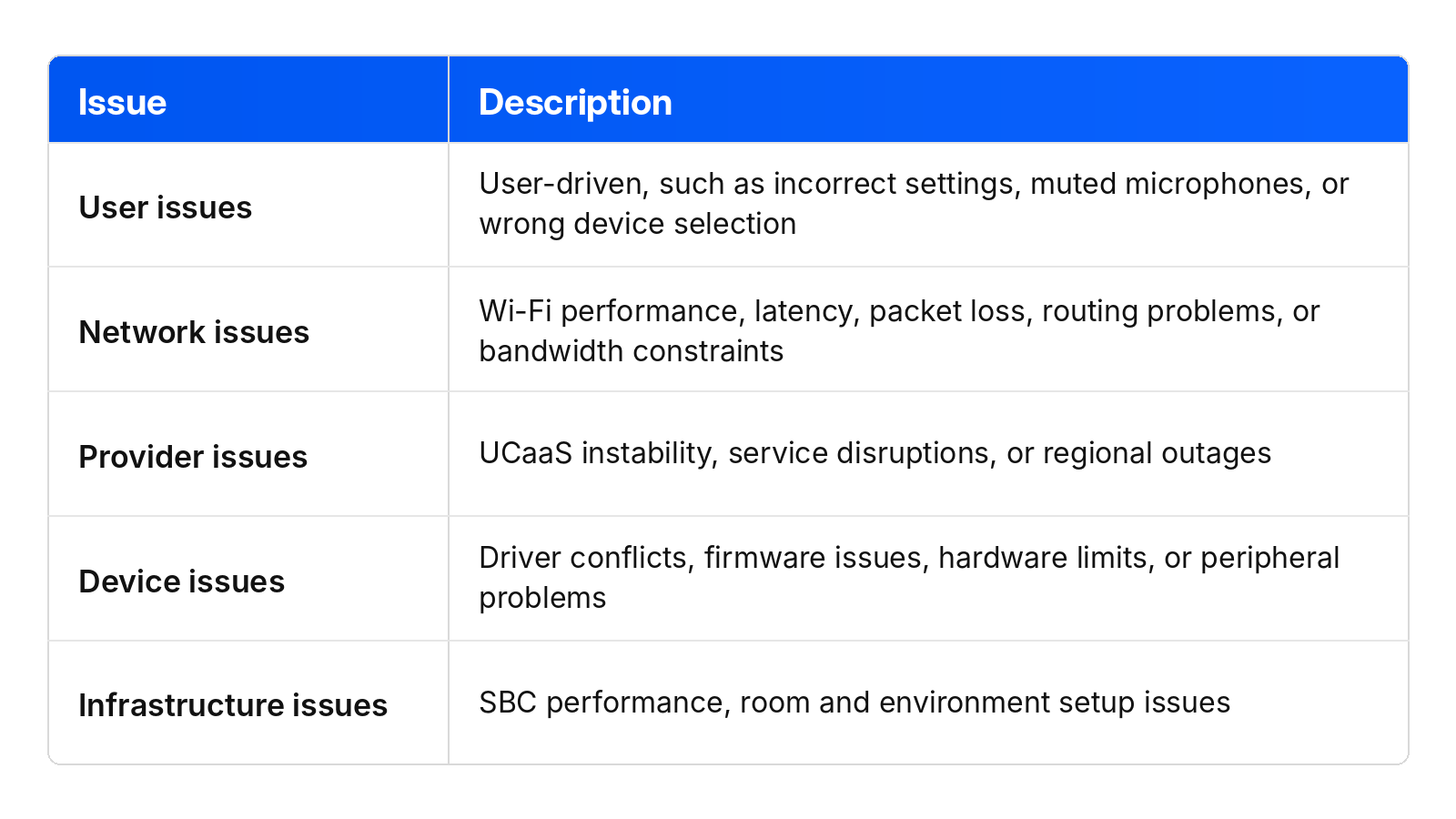
Once organizations have visibility into collaboration environments, they can prioritize issues based on impact. These include:
- Systemic issues that affect large groups of users at once. These deliver the fastest, highest return because one action improves the experience for many people.
- Pervasive issues that are repeat problems tied to specific users or groups. These often go unreported, so IT needs to identify them and intervene proactively.
- Reactive issues that are traditional support tickets. These issues often require deep root cause analysis across devices, applications, networks, and infrastructure.
With the right tools, IT can manage collaboration as a business-critical system. By putting end-user needs first, IT can resolve issues proactively and deliver consistent experiences, positioning IT as a contributor to business performance.
Rethinking Collaboration for the Modern Workforce
The 1% Problem exposes the mismatch between where organizations focus and where meetings actually happen. By allocating more resources and attention to the 99%, they can remove the obstacles that disrupt collaboration and create an environment for sustained value creation.
Beyond meeting quality, optimizing collaboration strengthens employee experience, enhances customer interactions, accelerates decision-making, and boosts productivity.
Ultimately, it enables IT to turn collaboration from a source of friction into a stronger foundation for how work gets done.
HP Workforce Experience Platform is a comprehensive digital employee experience solution that enables organizations to optimize IT for every employee’s needs.
Discover how it can transform your IT operations from a cost center to a business accelerator. Simply fill out the form below, and our team will be in touch soon.
From the blog
The latest industry news, interviews, technologies, and resources.






Frequently asked questions
Here's everything you need to know about WXP.
- What is the HP Workforce Experience Platform (WXP)?
- How does WXP work?
- Can WXP be customized to fit specific business needs?
- How is WXP modular?
- Is WXP compatible with different vendors and operating systems?
- How does WXP integrate with other IT tools to provide a more comprehensive solution?
- What is a Workforce Experience score?
- How is AI used within WXP?
- How can I buy WXP and find out about new releases?