Today’s retailers depend on technology at every customer touchpoint, from assisted selling and self-checkout to curbside pickup and inventory visibility. Yet many store environments still operate with fragmented device management, limited visibility, and reactive support models. The result is increased downtime, rising support costs, and inconsistent customer experiences.
Retail modernization requires more than replacing aging hardware. It requires a strategy that combines intelligent telemetry, connected devices, and proactive operations to keep stores running at peak performance.
This guide covers three concrete IT solutions for the retail industry that help in instrumenting your device estate for real-time telemetry insights, modernizing the physical hardware fleet, and shifting to proactive remote IT operations. All three are implementable today.
Solution #1: Turn device telemetry into actionable insights
Retail IT teams often lack a simple way to understand which stores are experiencing technology-related friction. By aggregating device and peripheral health data into a single experience indicator, teams can quickly identify stores that require attention before issues affect customers or associates. A fleet management platform ingests that telemetry into a single view, surfaces failure patterns automatically, and enables threshold-based alerting so IT receives a signal before a cashier escalates.
Many retail devices are capable of generating operational telemetry (processor load, USB connectivity events, print queue failures, scanner disconnects), but this data usually lives in silos, gets exported to spreadsheets, or disappears entirely. HP Workforce Experience Platform (WXP) changes that by ingesting telemetry across the entire fleet and surfacing it in a unified view. It does this across two agent types.
The HP Insights Agent runs on retail PCs and workstations, collecting endpoint telemetry (processor utilization, memory pressure, crash events, application performance) and feeding it into the WXP dashboard in near-real time. The HP Retail Peripheral Agent extends that coverage to the peripherals that drive checkout, including barcode scanners, receipt printers, and cash drawers. It supports all 36 UnifiedPOS (UPOS) device classes, giving comprehensive coverage across the peripheral stack rather than coverage limited to the devices a vendor chooses to prioritize.
The architecture sequences from device to insight, with POS terminals, barcode scanners, receipt printers, and kiosks feeding into the HP Insights Agent and HP Retail Peripheral Agent, which pipe telemetry into WXP. WXP then surfaces a DEX Score, Fleet Explorer AI-assisted troubleshooting, and custom dashboards with threshold alerts. All three outputs feed fleet prioritization, which drives proactive IT actions including remote remediation and hardware refresh decisions.
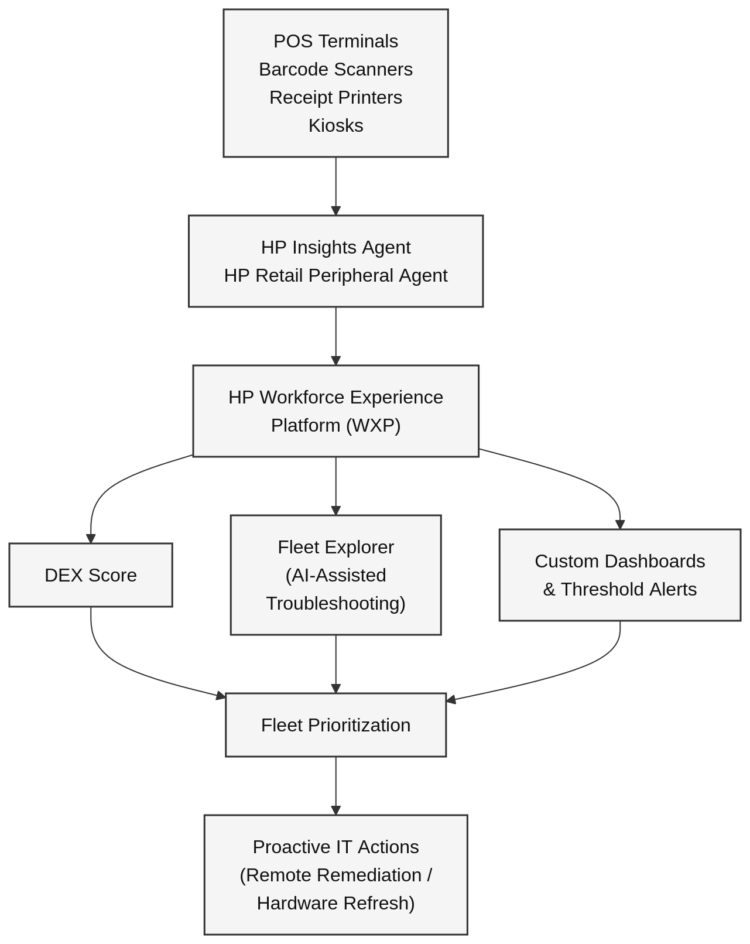
An example of a modern retail IT solution leveraging the latest fleet management technology and proactive IT.
Once both agents are deployed, WXP surfaces three capabilities with direct operational value for retail IT:
- DEX Score: A composite health metric that rolls device and application health into a single index across the fleet. Instead of checking 12 different dashboards to assess store readiness, IT gets one number per site and can drill into the detail when something looks off.
- Fleet Explorer: An AI-assisted troubleshooting interface that surfaces failure patterns across the fleet. When barcode scanners in three locations start showing elevated disconnect rates, Fleet Explorer surfaces that as a pattern rather than three separate tickets.
- Custom dashboards: WXP lets teams build custom views per device group, store, or peripheral type, so a regional IT manager can monitor a subset of locations without wading through fleet-wide data.
The most operationally significant feature for retail IT is threshold-based alerting on peripherals. The HP Retail Peripheral Agent lets you manually set analytical thresholds per device (flagging a scanner when its error rate crosses a defined level, for example) so IT receives a signal before the device fails and a cashier escalates. That shift from ticket-driven response to threshold-based alerting is what separates reactive IT from proactive IT.
Solution #2: Modernize the POS and peripheral fleet
Aging retail hardware creates blind spots in your telemetry layer. Devices that can’t run the HP Insights Agent generate no signal, and no software layer can fully compensate for hardware that can’t be instrumented. A POS terminal that can’t support the HP Insights Agent drops out of your monitoring coverage entirely, leaving you managing a fleet you can only partially see. Modern hardware is the prerequisite for the telemetry and remote management capabilities covered in the other two solutions.
Modernizing retail technology requires more than improved visibility. Retailers also need flexible, reliable hardware capable of supporting evolving customer journeys, including assisted checkout, self-service, store fulfillment, and mobile selling experiences.
HP’s Engage hardware portfolio is purpose-built for retail environments, with each form factor covering a distinct operational scenario:
- HP Engage Go:The HP Engage Go portfolio provides the flexibility to move between mobile and fixed operations, helping businesses improve service, efficiency, and customer experiences.
- HP Engage Flex G2 / Engage Flex Mini: The HP Engage Flex portfolio combines enterprise-grade performance, flexible deployment options, and extensive connectivity in three modular form factors built to power a wide range of workflows.
- HP Engage One Pro: The HP Engage One portfolio blends elegant design, enterprise-class performance, and configurable flexibility to power a wide range of business and customer engagement scenarios.
Modern retail operations depend on a technology foundation that delivers consistent visibility across stores, devices, and peripherals. As retailers expand self-service, mobile checkout, and omnichannel fulfillment services, current-generation retail technology becomes increasingly important. Modern devices support the telemetry, analytics, and remote management capabilities needed to proactively identify issues, streamline operations, and maintain a more consistent experience across locations.
Solution #3: Adopt proactive remote IT operations
Many retail organizations still operate in a reactive mode, resolving issues only after store operations have been affected. Predictive maintenance helps shift support models from incident response to issue prevention, allowing teams to address risks before they result in downtime.
The reactive IT failure mode in retail is well understood. A device fails, a cashier notices, a ticket opens, and IT dispatches someone or remotes in if the device is reachable, while the store stays down in the meantime. WXP AI predictive alert flips that sequence by analyzing device health data (battery degradation, hardware error patterns, thermal behavior) and flagging devices likely to fail before they do, giving IT time to schedule intervention during off-hours rather than reacting during a peak shift.
When intervention is needed, the WXP Remote Connect handles remote remediation without a site visit. It gives IT out-of-band access to enrolled devices, meaning it can reach a device even when the OS isn’t responding, to run diagnostics, apply fixes, or stage a controlled restart. For a retailer managing 50 or 150 locations, eliminating even a fraction of on-site dispatches adds up quickly in labor cost and MTTR.
IT lifecycle management and hardware refresh planning fit naturally into this model. WXP fleet visibility data identifies devices approaching end-of-life based on actual usage rather than arbitrary age cutoffs, which means refresh budgets go to the devices that actually need replacement. That’s a more defensible capital justification for leadership, and it keeps the proactive operations model from being undermined by hardware too degraded to manage remotely.
Frequently asked questions
What is a fleet management platform in retail IT?
A fleet management platform monitors device health, application performance, and telemetry across a fleet. In retail, this extends beyond endpoints to POS terminals, kiosks, and peripherals (barcode scanners, receipt printers, cash drawers), giving IT teams unified visibility and enabling proactive management. The platform surfaces degradation signals and alerts IT before a device fails, so tickets become a last resort rather than the starting point.
How does telemetry data improve retail store operations?
Near-real-time telemetry from retail devices surfaces performance degradation, hardware risk, and connectivity issues before they cause checkout downtime or associate disruption. The HP Retail Peripheral Agent monitors each peripheral against configurable thresholds, so when a barcode scanner’s error rate trends upward, IT receives an alert rather than a help desk call. That shift from ticket-driven response to threshold-based alerting is what separates proactive retail IT from the traditional break-fix model.
Which retail devices can be monitored with a DEX platform?
HP WXP covers PCs and workstations via the HP Insights Agent, and POS peripherals (including barcode scanners, receipt printers, and cash drawers) via the HP Retail Peripheral Agent, which supports all 36 UnifiedPOS (UPOS) device classes. The platform also extends to collaboration tools and mobile devices, giving IT a single view across the full retail device estate.
What hardware prerequisites does the HP Retail Peripheral Agent require?
The HP Retail Peripheral Agent requires Windows 10 Pro or IoT, .NET Framework v4.6, UPOS drivers (CCO v1.14), and the HP Insights Agent installed first. It must be deployed on HP-manufactured POS terminals using the Softpaq installer, and supports silent deployment across multiple terminals by running sp****.exe /s with the actual Softpaq number substituted.
How does WXP predictive maintenance reduce on-site dispatches?
WXP AI predictive maintenance analyzes battery degradation, hardware error patterns, and thermal behavior to flag devices likely to fail before they do. IT can then schedule intervention during off-hours rather than reacting mid-shift. Combined with the Remote System Controller’s out-of-band access, many issues are resolved remotely without rolling a van, which reduces both labor cost and mean time to resolution across large multi-location estates.
How does WXP handle security and data privacy for retail telemetry?
WXP is ISO 27001, ISO 27017, ISO 27701, and SOC 2 Type II certified, and its AI models operate on de-identified telemetry data, which means the telemetry data used for predictive maintenance and fleet health scoring doesn’t expose individual employee or customer information.
What is the difference between the HP Insights Agent and the HP Retail Peripheral Agent?
The HP Insights Agent runs on retail PCs and workstations, collecting endpoint telemetry including processor utilization, memory pressure, crash events, and application performance. The HP Retail Peripheral Agent extends monitoring to checkout peripherals. Both agents feed into the WXP dashboard and are required to monitor both endpoints and supported peripherals.
How WXP customers can modernize retail IT today
For WXP customers, the fastest path to validating all three solutions is instrumenting what you already have, in this sequence.
- Download the HP Insights Agent from the HP Workforce Experience Platform website at
workforceexperience.hp.com/software. Select the installer that matches your device architecture (x86 or Arm64). - Enroll your retail PCs: Log in to the WXP dashboard, go to Settings > Preferences, and copy your Company PIN. Then navigate to Devices > PCs > Add new devices to start enrollment.
- Deploy the HP Retail Peripheral Agent on each HP-manufactured POS terminal using the Softpaq installer. For a silent deployment across multiple terminals, run:
sp****.exe /s(replacesp****with the actual Softpaq number, available from the enrolled device’s support page under Support > System Management).
Hardware prerequisites for the Retail Peripheral Agent are Windows 10 Pro or IoT, .NET Framework v4.6, UPOS drivers (CCO v1.14), and the HP Insights Agent installed first.
The telemetry dataset from this initial rollout becomes the baseline that drives fleet prioritization for the hardware refresh and remote operations work, giving you evidence-based data for refresh decisions and the foundation for predictive maintenance.
Retail modernization is no longer limited to replacing aging hardware. As retailers expand omnichannel services and customer-facing technology, visibility and proactive management have become essential capabilities. By combining connected devices, operational intelligence, and predictive insights, retailers can reduce downtime, improve associate experiences, and build a more resilient store environment.
If you’re not already a customer, see how WXP turns retail device telemetry into actionable insights.