
Automate Remediations and Workflows to Scale Support

How AI-driven remediations and low-code workflows reduce operational drag and speed resolution
You’ve invested years building your IT expertise, and your team has, too. But if you step back and look at how that expertise is used day-to-day, the picture is often frustratingly familiar. Many experienced IT professionals report spending a significant portion of their time on repetitive, reactive tasks—responding to alerts, resolving routine issues, and manually executing the same maintenance processes again and again. That constant churn slows resolution times, fills ticket queues, and leaves less room for the work that actually moves your organization forward.
Reducing this operational drag requires more than better alerts or faster responses. It requires shifting routine work out of manual workflows altogether. HP Workforce Experience Platform (WXP)1 has introduced AI-driven remediations and a new no-code workflow automation tool to help you do exactly that: move beyond constant firefighting, resolve issues faster, prevent problems before they impact employees, and standardize recurring processes so skilled IT talent can focus on the more complex challenges where they’ll deliver the most value.
Use AI to Find Problems, Then Help Solve Them
Alerts have long been available to help address issues quickly, but most IT teams today aren’t short on alerts, they’re overwhelmed by them. When every issue demands human interpretation and manual follow-up, the usefulness of alerts is limited by the time and capacity of the team responding to them.
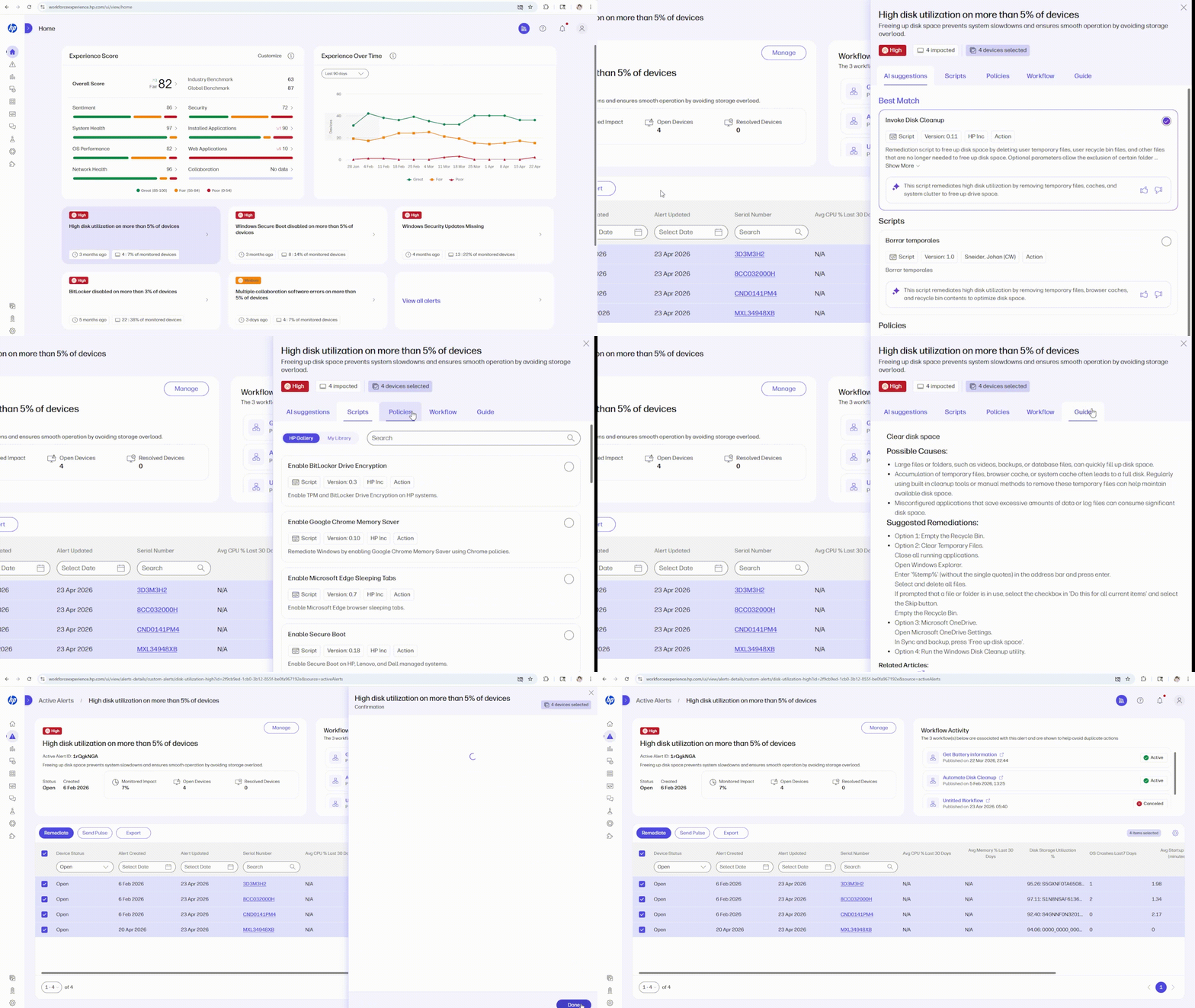
This is where AI can meaningfully change how work gets done. Instead of stopping at detection, WXP uses AI to help you understand what’s happening across your device fleet and what to do about it. AI-driven remediations move you beyond alert noise to actionable guidance by identifying likely root causes and recommending appropriate fixes, not just flagging another problem to investigate.
Stay in the Loop, but Out of the Fray
From there, you stay in control. WXP helps you review recommended remediations,3 select the scripts you trust, and decide how and when they should run—whether as a one-time action or on a recurring schedule, across the device groups you choose. Over time, this shortens resolution cycles, reduces repeat issues, and eases the constant pressure on your team to react.
You already have plenty of systems telling you when something is wrong. What’s harder to scale is consistently turning that signal into fast, effective action. By pairing AI-driven insight with guided remediation, WXP helps you resolve issues more quickly and in many cases, address them before employees are impacted at all.
Run Routines Routinely, Then Focus on the Exceptional
AI-driven remediations help you identify and resolve issues faster, but not all repetitive work starts with a problem. Many of the tasks that consume IT time are simply processes that need to happen consistently. Examples include routine maintenance, configuration checks, onboarding steps, or recurring compliance actions. These activities are easy to overlook until they are missed, and when that happens, they often turn into the tickets and disruptions you were trying to avoid in the first place.
Workflow Builder is designed to take this kind of repeatable work out of your team’s day-to-day queue. Using a low-code, visual designer, you can define workflows that run on a schedule or are triggered by specific events. Chain actions together using simple if-then logic, run scripts automatically, and apply them across the selected audience that makes sense for your environment. The result is a straightforward way to turn best practices into repeatable operations.
Out of Mind, but Within Sight
Just as importantly, automation does not mean losing visibility or control. If an automated action cannot resolve an issue (or if you simply need to keep records of all actions whether they’re automated or not), WXP can trigger a helpdesk ticket automatically, using webhooks to integrate with other platforms like ServiceNow or Jira. That keeps noise out of the queue while still maintaining the record you need for accountability and reporting. You can also use workflows to run configuration checks and proactively remediate drift, helping maintain compliance without relying on manual follow-up.
By standardizing workflows and shifting routine execution from people to the platform, you create more consistent outcomes, shorten resolution times, and free your team to focus on the work that actually requires their judgment and experience.

Stop the Ticket Treadmill, Start Automating Proactive Fixes
Routine work is part of IT. The problem arises when that work depends on constant human attention. Repetitive tasks compete with higher-value priorities and quietly limit how much progress your team can make. AI-driven remediations help issues get resolved faster, while workflow automation ensures recurring processes run consistently and predictably.
By shifting routine execution from your IT staff to WXP, you can keep essential work moving without keeping your team stuck in reactive mode. As Faisal Masud, President of HP Services and Workforce Experience, discussed in a recent podcast with Product Voices, our goal for WXP is not simply to automate tasks—it’s to deliver tangible outcomes to our customers. Our data indicates that a typical enterprise-scale organization (50K or more devices) using WXP can achieve a 30%-35% reduction in service desk tickets, leading to up to a 40% improvement in downtime reduction and a 45% improvement in overall Mean Time to Resolution (MTTR).4
If you are ready to reduce ticket noise while ensuring your best practices and policies still get consistently applied, contact your HP representative or fill out the form below to learn more about how WXP can help.
Additional Resources
https://learn.workforceexperience.hp.com/docs/using-ai-assisted-remediation-for-alerts
https://learn.workforceexperience.hp.com/docs/overview-of-workflows-in-wxp
https://learn.workforceexperience.hp.com/docs/automating-workflows-in-wxp
3. AI Remediations and Workflow Builder are available with WXP Pro and Elite plans and require PowerShell scripts.
4. Based on HP’s internal analysis of data collected between January 1, 2026, and July 31, 2026 across 4,447 customers and partners; over 5.4 million licensed active devices/seats; over 10.5 million telemetry events (including issues, alerts, and remediations) and 140 feature usage and clickstream metrics.
From the blog
The latest industry news, interviews, technologies, and resources.







Frequently asked questions
Here's everything you need to know about WXP.
- What is the HP Workforce Experience Platform (WXP)?
- How does WXP work?
- Can WXP be customized to fit specific business needs?
- How is WXP modular?
- Is WXP compatible with different vendors and operating systems?
- How does WXP integrate with other IT tools to provide a more comprehensive solution?
- What is a Workforce Experience score?
- How is AI used within WXP?
- How can I buy WXP and find out about new releases?