
DEX-Backed Onboarding: How Employees Can Hit the Ground Running on Day One
Setting new hires up for success should be a primary focus for any HR department.
This article was first published on LinkedIn.
Digital friction across employee onboarding may just be one of the worst productivity killers
for enterprise HR teams. When tech-related issues bog down new hires, HR often gets dragged into extra administrative work, follow-ups, and coordination across teams, consuming a disproportionate amount of time that could be spent on higher-value work.
Today, distributed teams, fragmented systems, and rising employee expectations make onboarding even more challenging. Poor experiences are common, leaving many new hires feeling overwhelmed and unprepared. Research shows that:
- 42% of employees fail to receive their laptops, desks, and phones on day one.
- 39% encounter problems when starting a new job.
- Only 12% believe their company does a good job of onboarding.
- 1 in 3 new hires today will leave a job within the first 90 days.
For HR leaders, the priority is to create a smoother onboarding experience that reduces friction and shortens the time it takes for new employees to become productive, aka time-to-productivity.
Fortunately, digital employee experience (DEX) management software may be the solution they’ve been waiting for. Traditionally used by IT to monitor and optimize workplace technology, it’s increasingly becoming indispensable for reducing onboarding friction.
Why Onboarding Is Broken
First impressions are everything. According to the Brandon Hall Group, organizations with a strong onboarding process improve new hire retention by 82% and productivity by over 70%. That’s why a well-structured experience—starting even before offer acceptance—can set the tone for a new hire’s entire career. A robust program should transform a new employee into an engaged, confident, and contributing member of the organization.
However, preventable technology issues often slow employees down before they can even get started. For example, up to 30% of help desk calls stem from simple password resets and MFA issues. Without the right hardware, software, and access, new hires spend their first days troubleshooting instead of contributing.
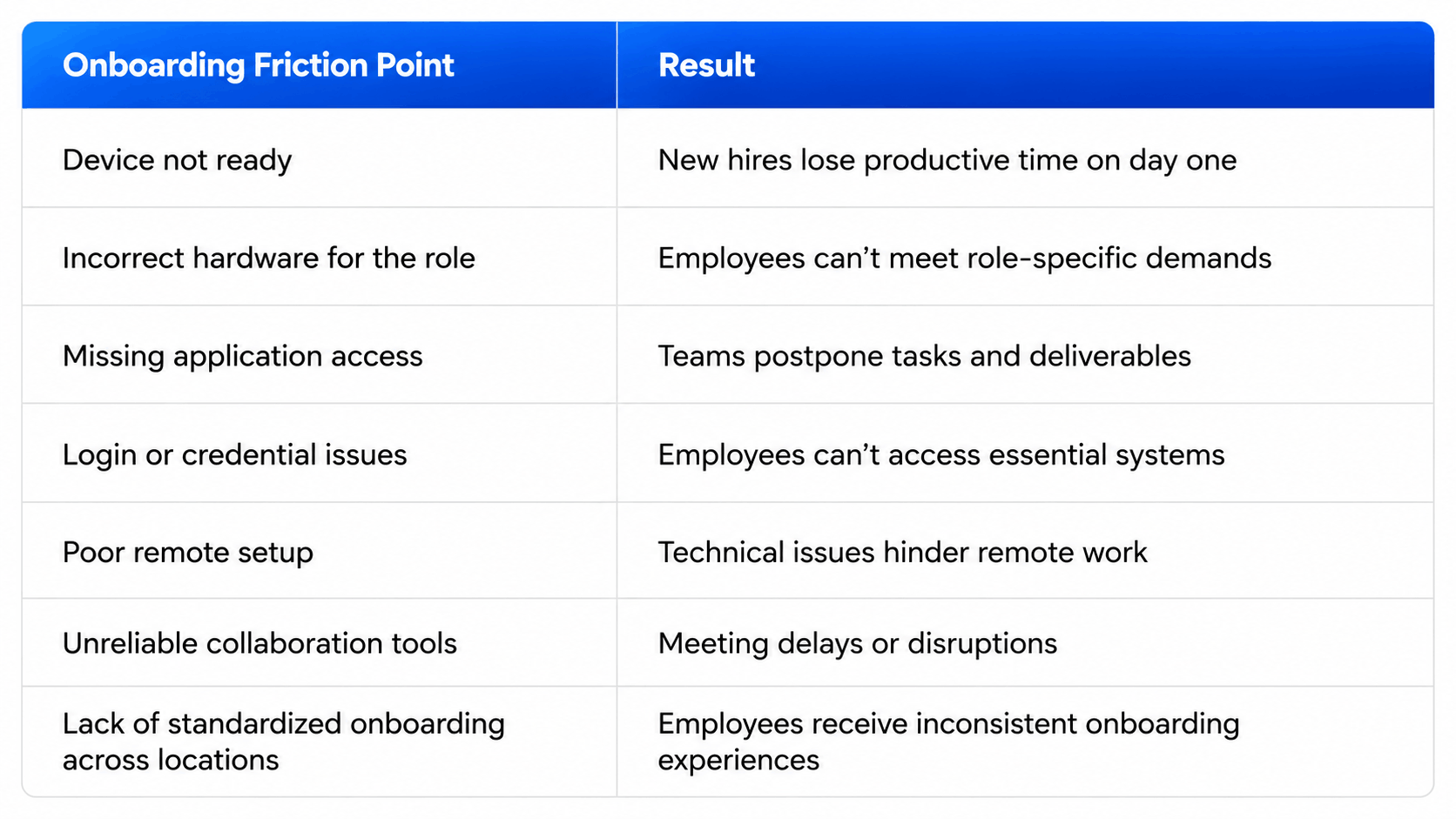
These issues increase IT workload, reduce employee productivity, and can raise retention risk. They can cost employees up to 22 minutes a day of lost time, and when they interrupt focused work, it can take another 23 minutes to regain momentum.
Over time, poor experiences erode the employer brand and weaken the employee value proposition, making it more difficult to attract and retain top talent.
DEX Management Is the Tech HR’s Been Missing
What does a great onboarding process look like? According to APQC, faster organizations achieve time-to-productivity in 25 days or less, while slower organizations take 50 days or more.
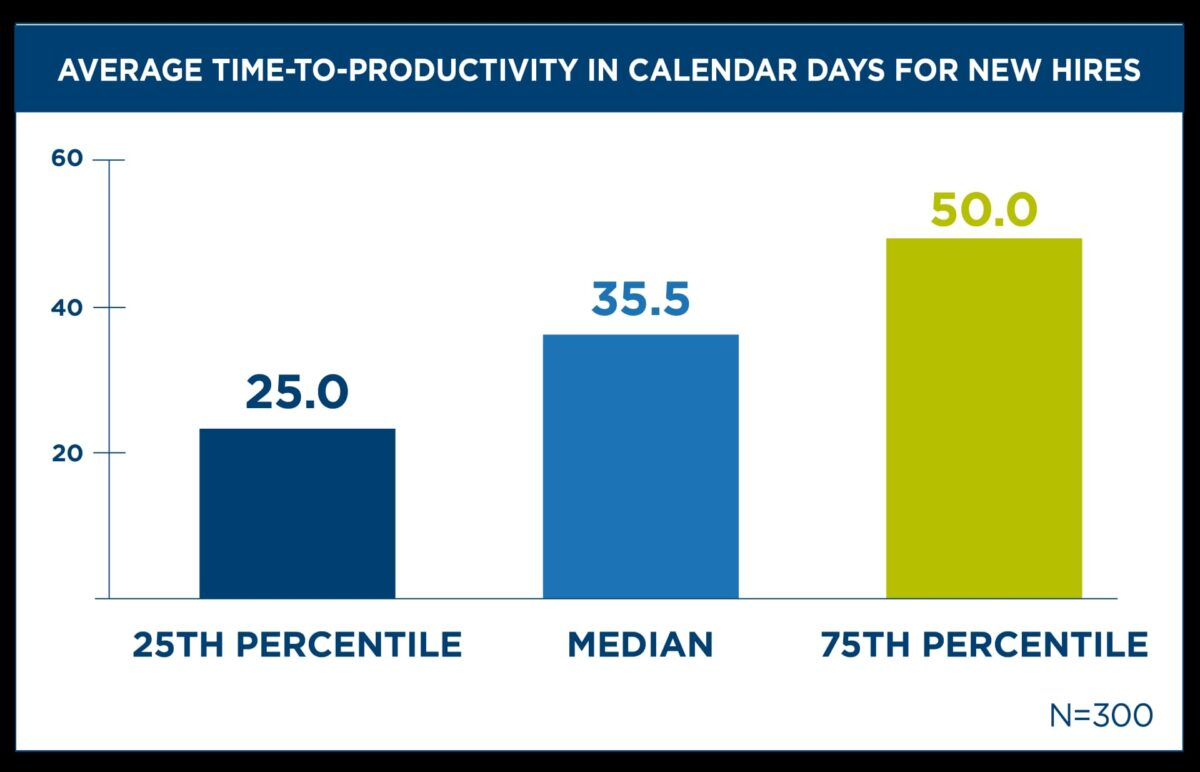
Source: APQC
DEX management software helps close that gap by simplifying and automating many complex tasks. To ensure employees hit the ground running on Day One, organizations can proactively remove friction at the source by:
- Configuring devices for specific roles with the right hardware, applications, and access.
- Testing systems to prevent login, connectivity, security, and collaboration issues.
- Standardizing setups across locations, including remote environments.
- Monitoring employee sentiment to identify and resolve issues early.
When teams are set up for success, time-to-productivity falls, new-hire engagement and satisfaction rise, and employee retention improves.
According to Gallup, 70% of employees who have exceptional onboarding experiences say they have “the best possible job.” These employees are also 2.6 times as likely to be extremely satisfied with their workplace.
DEX Is Becoming Essential for HR
The purpose of onboarding is to integrate new hires into an organization by providing all the resources they need to succeed. A great experience depends on workplace technology that just works, and DEX management software is the tool that can reduce the friction that disrupts productivity and frustrates employees.
In that sense, DEX management is quietly moving beyond IT and becoming critical to HR. By shortening time-to-value and ensuring new hires are “ready-to-work” from the get-go, it’s a win-win that enhances the employee experience and helps organizations perform at their best.
HP Workforce Experience Platform is a comprehensive digital employee experience solution that enables organizations to optimize IT for every employee’s needs.
Discover how it can transform your IT operations from a cost center to a business accelerator. Simply fill out the form below, and our team will be in touch soon.
From the blog
The latest industry news, interviews, technologies, and resources.





Frequently asked questions
Here's everything you need to know about WXP.
- What is the HP Workforce Experience Platform (WXP)?
- How does WXP work?
- Can WXP be customized to fit specific business needs?
- How is WXP modular?
- Is WXP compatible with different vendors and operating systems?
- How does WXP integrate with other IT tools to provide a more comprehensive solution?
- What is a Workforce Experience score?
- How is AI used within WXP?
- How can I buy WXP and find out about new releases?