
Stop Paying for Underused Software
WXP offers new software license optimization features to reveal potential savings
According to research by the Boston Consulting Group, between 2019 and 2024, software costs increased by 50% as a share of the total tech budget, from 13% in 2019 to 21% in 2024. Fifteen years after Marc Andreesson famously declared software was eating the world, it may feel like the main course is your budget.
No one disputes the importance of software to daily operations, but if it’s going to form such a significant portion of costs at a time when IT budgets are being drained in multiple directions, let’s be sure you’re getting value for your spending. Software license optimization employs usage data to identify underused software licenses so you can stop paying for applications you’re not using.
Now it’s available right inside the HP Workforce Experience Platform (WXP),1 alongside the rest of your IT ecosystem analytics and management tools.
One Platform, One Big Picture
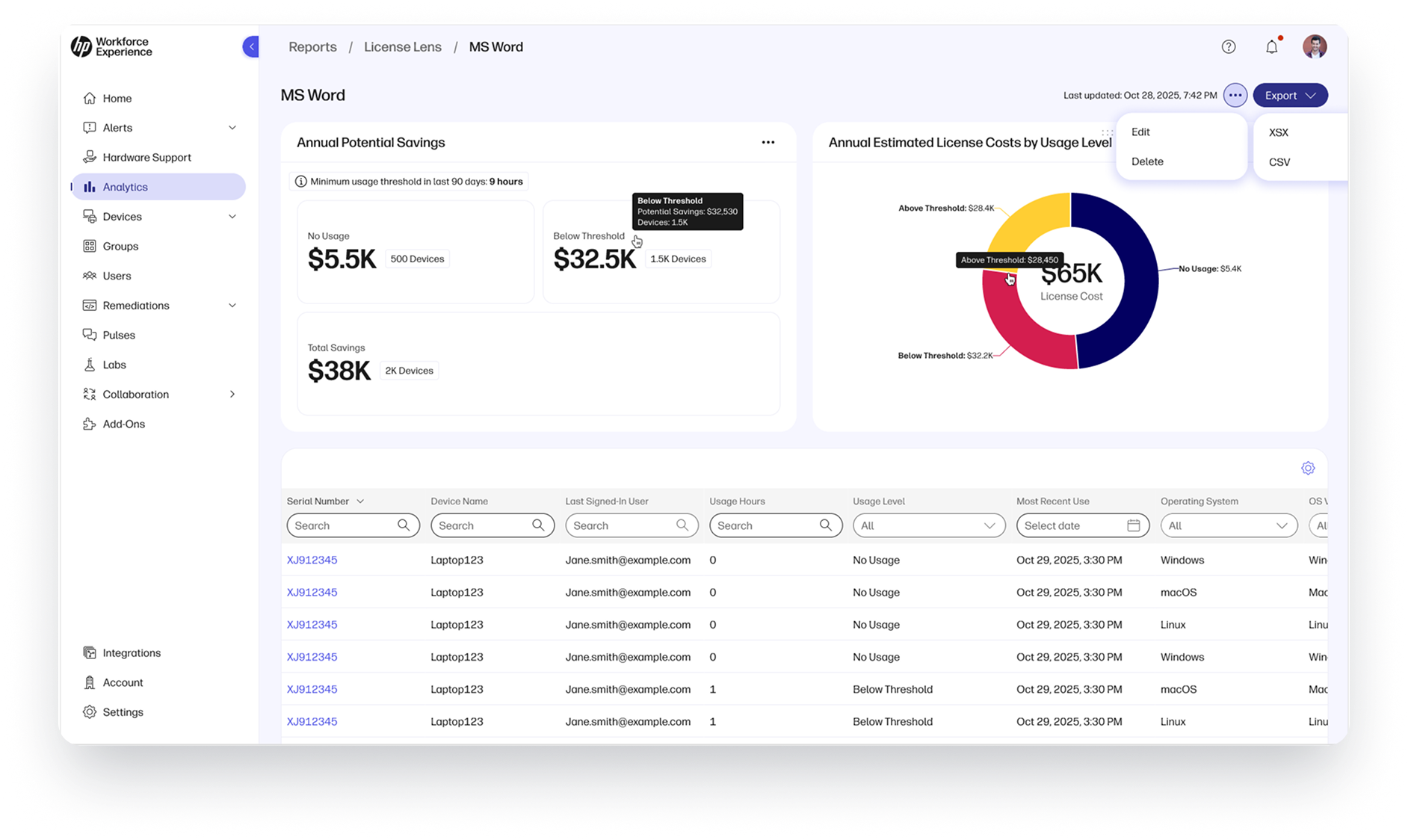
License Lens3 is a software tracking and analytics tool that helps organizations identify and reclaim underutilized software licenses and manage spending more effectively. Integrated within WXP Pro and Elite plans, it offers IT teams an ongoing, detailed usage analysis for installed Windows applications.
Inclusion in WXP also spares customers the additional cost of standalone software license management tools, because adding another new software platform to manage your software licenses and costs seems counterproductive.
Customize License Usage Policies to Find Savings
License Lens is customizable to fit your organization’s needs. IT teams can monitor software usage and quantify potential cost savings associated with reclaiming licenses that are underused.
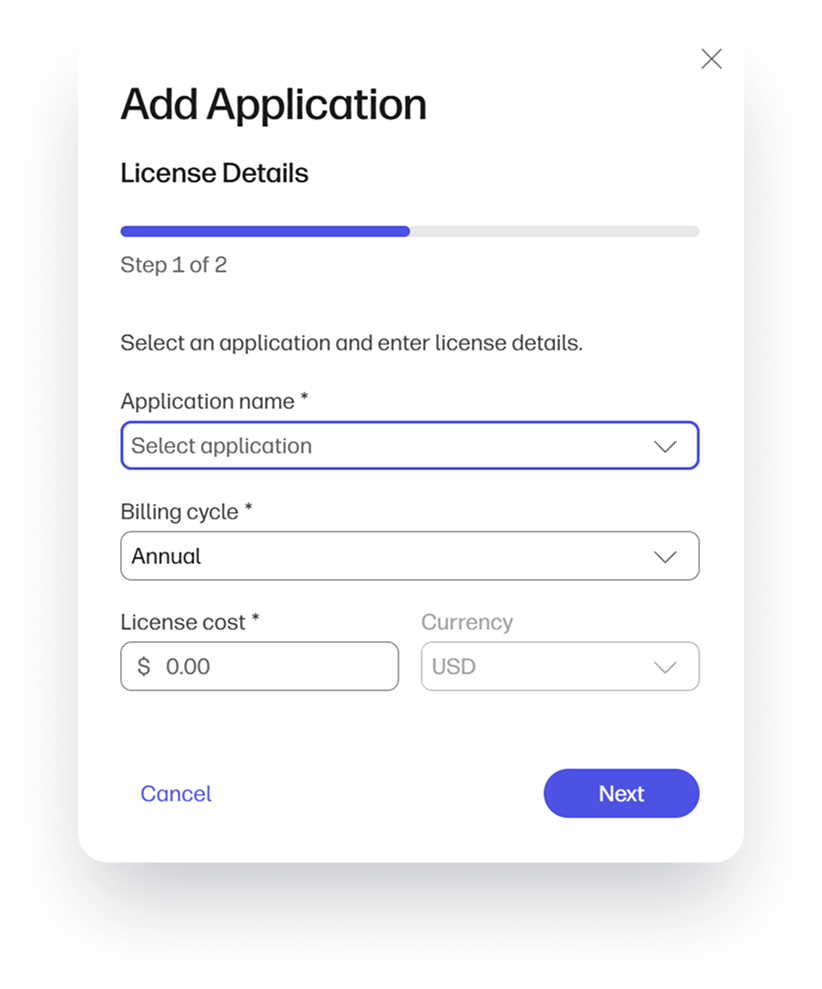
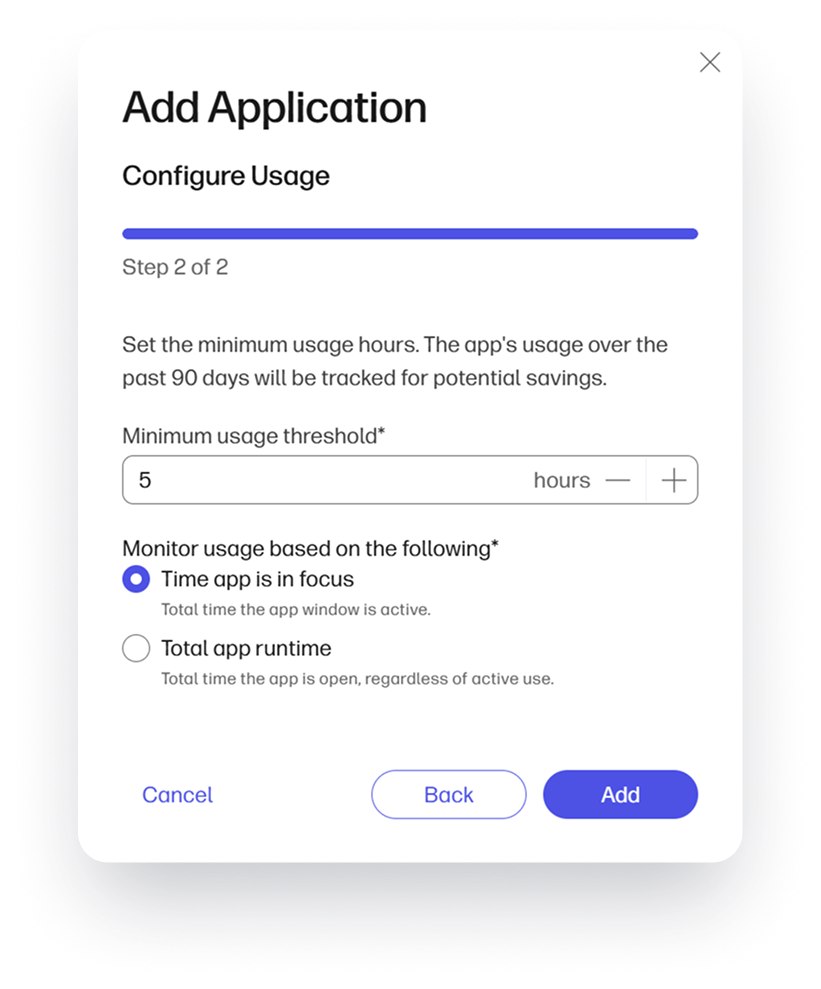
Administrators can choose an application in the system catalog, enter the license cost and billing frequency, and set a threshold for use over a particular time period, such as monthly or weekly. You can choose to measure app usage based on the time an app is running or the time it is in focus, to ensure you’re capturing real usage, not just open windows.
If the application usage does not meet the threshold, the license is identified as a candidate for reclamation. From there, you can assess whether to reclaim the license from the device.
Set Spending Priorities with a Clear View of Impact
Where License Lens really starts to shine is on a wider scale, when you need to optimize spending, forecast budgets, or negotiate with vendors on renewal agreements. The software usage analytics dashboard shows where underutilization has the largest impact, cross-referencing subscription costs with the number of licenses not meeting minimum usage thresholds and providing a quantified potential savings number, graphed and ranked for easy visibility.
Find Balance in Your Licensing Budget
Whether the result of shadow IT, abandoned pilot programs, changes in job duties, or simply too little time to complete manual software audits, application sprawl is an ongoing challenge with direct impact on the bottom line. Not only does it lead to unnecessary spending, it adds complexity to internal information systems, interferes with employee productivity, and introduces extra security and compliance risk.
The easiest way to start reducing both application sprawl and your IT budget without impacting employee experience is to stop paying for what they’re not using. WXP provides the visibility you need on both the individual and organizational scale to ensure your investments in software applications are providing real value. For more details on how License Lens works within WXP, check out the demo below.
This is just scratching the surface of what WXP can do. To learn more about how the Workforce Experience Platform can help you manage everything from PCs to printers to meeting spaces to security and compliance, contact your HP representative or request a follow-up discussion using the form below.
Additional Resources
Overview of License Lens | WXP Knowledge Base
3. License Lens is available in WXP Pro and Elite plans.
From the blog
The latest industry news, interviews, technologies, and resources.





Frequently asked questions
Here's everything you need to know about WXP.
- What is the HP Workforce Experience Platform (WXP)?
- How does WXP work?
- Can WXP be customized to fit specific business needs?
- How is WXP modular?
- Is WXP compatible with different vendors and operating systems?
- How does WXP integrate with other IT tools to provide a more comprehensive solution?
- What is a Workforce Experience score?
- How is AI used within WXP?
- How can I buy WXP and find out about new releases?